> For the complete documentation index, see [llms.txt](https://docs.akinon.com/llms.txt). Markdown versions of documentation pages are available by appending `.md` to page URLs; this page is available as [Markdown](https://docs.akinon.com/release-notes/2025/june/akinon-release-notes-06.23.2025.md).
# Akinon Release Notes (06.23.2025)
## Omnitron
{% hint style="warning" %}
The following changes are available in **Omnitron FE versions later than** `rad2323`, **Omnitron BE versions later than** `r3185` and **Whippy Ware versions later than** `ware154`.
{% endhint %}
#### Resolved Issues
**Outdated Reservations Displayed on Reserved Stock List**
* In the path *Products and Catalogs > Stock Lists > Stock List Detail*, when clicking the icon in the **Reserved Stock** column, users could previously see both active and outdated (passive) reservations. This issue has been resolved — now, only active reservations are displayed to Omnitron users.

**Fixed Bulk Increase & Bulk Decrease Stock Action Issue in Whippy Ware**
* There was a problem with the **Reserved Stock Bulk Increase and Bulk Decrease** services where, if a request payload included multiple reservation actions for the same product, the reserved stock was only increased or decreased once. This issue has now been resolved.
#### New Features
**"Price History" Modal Added to Price List Detail Page**
* Users can now view the price changes of products by navigating to *Products and Catalogs > Price Lists > Price List Detail* and clicking the label icon next to the products’ Sales Prices.\
Please note that only price changes from the last 3 months are displayed in the history list.


#### Enhancements
**Bulk Secondary Condition Template Added to Marketing Forms**
* Bulk Secondary Condition Templates have been added to the condition tabs of all marketing detail forms, including Campaigns, Coupons, Discount Codes, and Bulk Discount Codes. Users can now download templates for email and/or phone numbers.

**"Make Selected Active / Passive" Action Added to Settings > Users List**
* A new bulk action, **“Make Selected Active / Make Selected Passive,”** has been added in the *Settings > Users* page. This feature allows superusers in Omnitron to efficiently change the status of multiple users at once, activating or deactivating their accounts as needed. Access to this action is restricted exclusively to superusers to ensure proper user management and security.

**Name Change for "Bulk Coupons"**
* In *Sales Channels > Marketing*, the menu previously labeled **“Bulk Coupons”** has been renamed to **“Bulk Discount Codes”**. This change better reflects the page’s purpose and functionality, providing clearer guidance for users.

**"Expand All" Performance Enhancement on Category Tree Pages**
* Performance improvements have been made to the **“Expand All”** action available on category tree pages. This enhancement applies to both *Products and Catalogs > Catalogs > Category Tree* (for **web** sales channels) and *Sales Channels > Category Management* (for **marketplaces**), resulting in faster and more efficient tree expansion.

**"Currency" Filter Added to Orders > Cancellation / Return Requests Page**
* Users can now filter cancellation and return requests by **Currency** on the *Orders > Cancellation / Return Requests* page, making it easier to manage and review requests across different currencies.

**"Supplier" Filter & Unified Column are Shown Together**
* For every page in which the *Supplier* filter is available, the Unified icon is only shown if the *Supplier* filter is selected as available filters.
**Discount Amount Information Now Sent to Commerce**
* Omnitron now sends discount amount details for order items to Commerce. This enhancement ensures more accurate pricing data synchronization between the two systems.
**Error Message Improvements**
* To improve clarity and user understanding, the following error messages have been updated:
* **Order Cancellation:** The message *"Unreported order of ERP can not be canceled"* has been updated to: *"This order cannot be canceled because it has not been sent to the ERP yet. If you're not expecting to see this message, please check your cancellation flow or strategy."*
* **Bulk Update - Attribute Value:** The message *“Attribute Value: {attribute\_value.pk}, exception: Attribute Value not found”* has been updated to: *“Attribute Value not found exception: Attribute Value not found for {attribute\_value.value}, {attribute.name}”*
## Commerce
{% hint style="warning" %}
The following changes are available in Commerce versions as of **June 23, 2025**.
{% endhint %}
#### Enhancements
**One-Time Token Support for Checkout URL Generation**
* A one-time token is now appended to the checkout URL in both `SendCheckoutUrlEmailView` and `SendCheckoutUrlSmsPage` when the dynamic setting `CHECKOUT_WITH_TOKEN_ALLOW_ANONYMOUS` is set to `True`. This enhancement enables secure, tokenized access to the checkout process for anonymous users, ensuring that only recipients with the unique URL can proceed to checkout.
**Introduction of `ENABLE_LOCMEM_CACHE` Environment Variable**
* The previously used `DISABLE_LOCMEM_CACHE` environment variable has been deprecated and replaced with `ENABLE_LOCMEM_CACHE`. When `ENABLE_LOCMEM_CACHE` is set to `True`, the application activates the local memory cache configuration. This simplifies cache management and improves clarity by using a positive flag convention.
**Installment Filtering Based on Email Domain**
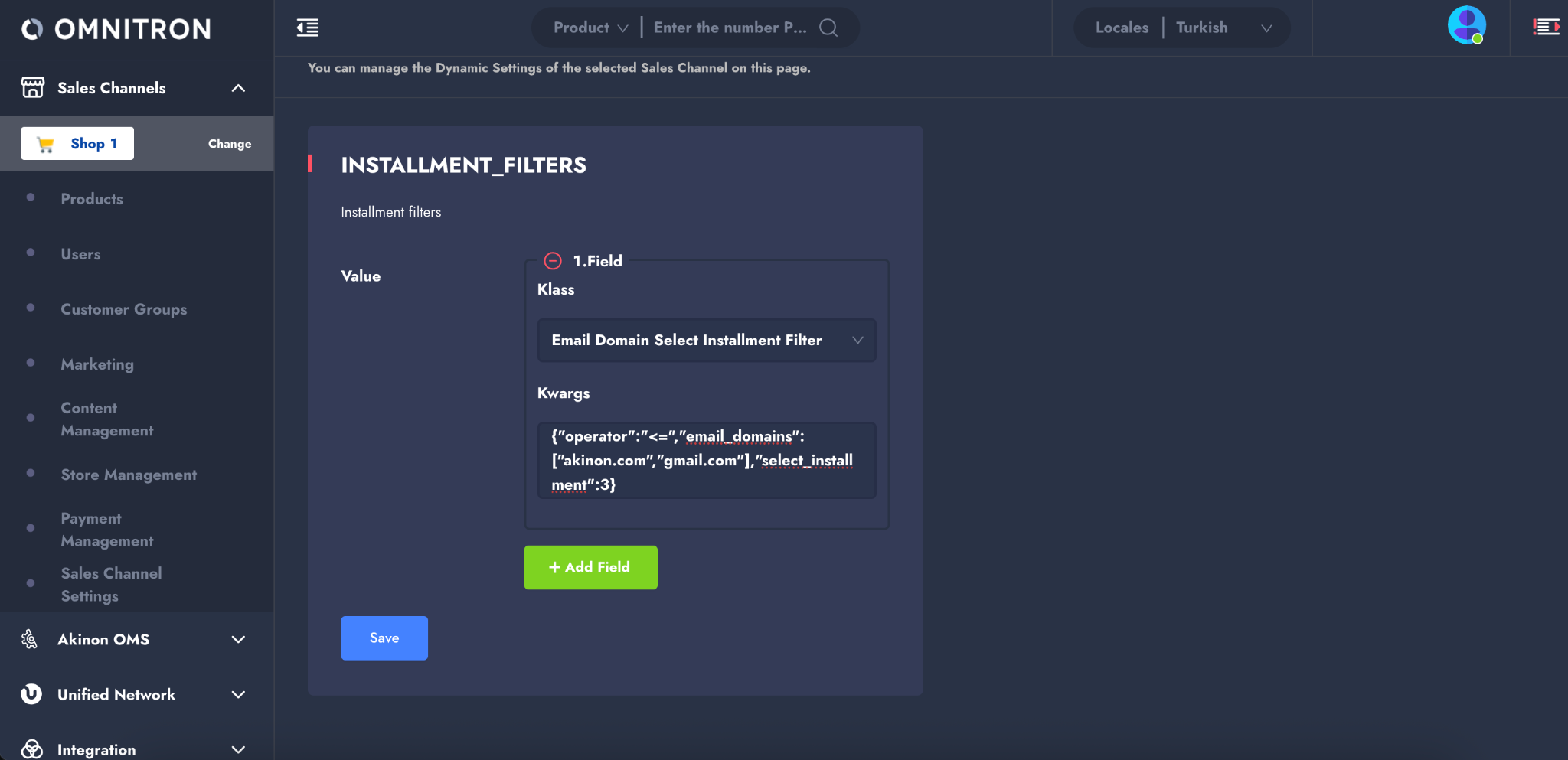
* A new installment filtering capability has been introduced, allowing restrictions to be applied based on the user's email domain, controlling the number of available installment options during checkout for users associated with specific email domains.
* The `INSTALLMENT_FILTERS` configuration now supports a new filter class:\
`EmailSelectInstallmentFilter`. This filter enables installment limitations using the following parameters:
* `email_domains`: List of email domains to filter by
* `select_installment`: Maximum allowed installment count
* `operator`: Comparison operator (`<=`, `<`, `=`, `>`)
* **Example:** If the configuration is set with:
```json
{
"klass": "omnishop.payments.filters.EmailSelectInstallmentFilter",
"kwargs": {
"operator": "<=",
"email_domains": ["akinon.com"],
"select_installment": 3
}
}
```
* Then users with an email ending in `@akinon.com` will be limited to 3 or fewer installment options during checkout.
* **Optional Parameter – `email_verification_required`:**
* If `false`: The filter applies regardless of email verification status.
* If `true`: The filter applies **only if** the user's email is verified.
* **Sample Configuration API:**
```bash
curl --location --request PUT 'https://{omnitron_url}/api/v1/remote/{channel_id}/dynamic_settings/1520/' \
--header 'Authorization: Token {token}' \
--header 'Content-Type: application/json' \
--data '{
"key": "INSTALLMENT_FILTERS",
"value": [
{
"klass": "omnishop.payments.filters.EmailSelectInstallmentFilter",
"kwargs": {
"operator": "<=",
"email_domains": ["akinon.com"],
"select_installment": 3
}
}
]
}'
```
**Proportional Discount Calculation for BIN-Based Campaigns in Split Payments**
* In checkout scenarios where split payments were used (e.g., part loyalty points, part credit card), BIN-based campaigns incorrectly applied the discount based on the **entire cart total**, even though only a portion was paid by credit card.
* **Example (Incorrect Calculation):**
* Cart Total: 100 AED
* Payment Split: 50 AED via Loyalty Points, 50 AED via Credit Card
* Campaign: 10% BIN-based discount
* Discount Applied: 10 AED (10% of 100 AED) — *incorrectly applied fully to card portion*
* Discounts are now calculated **proportionally**, based solely on the credit card portion of the payment.
* **Correct Calculation:**
* Card Portion: 50 AED
* Discount: 10% of 50 AED = **5 AED**
## OMS
{% hint style="warning" %}
The following changes are available in **OMS versions later than** `oms706`.
{% endhint %}
#### Enhancements
**Aras Cargo Integration Optimized**
* Aras Cargo integration is now more robust, featuring dynamic weight data submission and full cargo label generation. This ensures our shipping processes are more accurate and efficient.
**Detailed Omnitron Error Messages**
* Error messages from Omnitron services now include more comprehensive details, especially within package detail information during packaging processes. This speeds up troubleshooting and makes it more effective.
## Instore
{% hint style="warning" %}
The following changes are available in I**nstore FE versions later than** `acc-708` and **Instore BE versions later than** `s142`.
{% endhint %}
#### New Features
**Customizable Basket Messages**
* A new customizable **Basket Messages** area has been introduced in Instore, now available for use by all brands. These messages are managed as widgets, allowing flexible and brand-specific content customization.
* Configuration and management can be done via: **Omnitron > Sales Channels > Content Management > Widget Management > Add/Edit Widgets.** To set up the Basket Messages widget in Omnitron, fill in the following fields:
* Widget Name: Basket Messages
* Widget Slug: basket-messages
* Widget Type: Basket Messages
* Template: *Null*
* Description: The designated basket message text will be routed through this widget.
* Make sure the **“Show basket messages widget”** setting is enabled under: **Instore Settings > Configurations.**

**Customer Name on Account Page**
* The customer's first and last name has been added to the Account Page. Users can access this enhancement by navigating to **Account Page > Orders > Order Detail**.

**Persistent Delivery Location Selection**
* For brands that opt to enable this feature, the estimated delivery location (city and district) selected by the user will now persist across page transitions. This enhancement provides a smoother and more consistent browsing experience by preventing the need to reselect the delivery location on each page.

## Marketplace Dashboard
#### New Features
**Turkish Language Option**
* Turkish language support has been added to improve user experience. To activate it, simply set the language to TR in Omnitron.
#### Enhancements
**Order Address Mapping**
* Previously, if address data was missing in Omnitron during the order retrieval step from marketplaces, it caused errors. With this enhancement, when address data is unavailable, a passive address is automatically created, allowing the order to be retrieved without interruption.
**Seller Center**
* In the GetUpdatedOrders flow, orders in the ReadyToShip status are now retrieved, and tracking URLs are automatically assigned.
**Hespiburada**
* The stock\_location (ERP code) data sent via the OMS during package creation is now properly updated on the Hepsiburada side.
**Amazon**
* Slot selection for Easy Ship orders is now automated using the slot information assigned by Amazon, eliminating the need for manual input.
* To comply with Amazon’s new Feed API requirements, XML-based Feed operations used in GetOrders and SendUpdateOrders flows have been migrated to JSON format.
## Seller Center
{% hint style="warning" %}
The following changes are available in Seller Center **FE versions later than** `v0.8.113f0`. and **Seller Center BE versions later than** `v1.1.160f2`.
{% endhint %}
#### Resolved Issues
**Seller Performance Metrics Issue**
* Resolved an issue where users were unable to add metrics as a **Seller Performance Metric** in the **Finance > Seller Management > Seller Performance Metrics** form. Now MPOs can add any metric from the selection that Seller Center supports.

#### New Features
**Multiple Seller Selection for Filters**
* Users can now select multiple sellers when applying filters, enabling more flexible and efficient data filtering for the **Orders** page. Filters can be removed individually within the Seller filter area, or all seller filters can be cleared using the filters area.

**MPO Delivery Rule Override**
* Marketplace Owners (MPOs) are now able to override delivery rules set by sellers, allowing greater control over order logistics. MPOs can overrule delivery rules set by the Sellers by using **Settings > Delivery Settings** page or **Seller Management > Seller Detail > Delivery Settings page**.
**Order Item Export Enhancements**
* Further improvements have been made to the order item export functionality to better align with operational requirements. The "discount" parameter is now visible to users, enabling them to view the discount amount for each order item through the **Orders > OrderItem Export file**.
#### Enhancements
**Dashboard Date Handling Improvement**
* The date handling UI on the dashboard has been clarified for better usability. Additionally, the related request has been optimized for improved performance.

**Offers Pages Remastering**
* All frontend remastering tasks for Offers-related pages have been completed. These updates enhance visual consistency and user experience.
**Order Detail Page Remastering**
* The Order Detail page has been visually refreshed and aligned with the new frontend standards, improving readability and interaction flow.
## App Maker
### Platform
#### New Features
**Webhook Triggering Based on Deployment Events**
* A new **Webhooks** tab has been added to the **Projects > Project Detail > Settings** page, allowing users to automatically trigger predefined URLs based on deployment status events (e.g., success, failure). With this addition, App Maker now supports event-driven hooks that can be configured to respond to specific deployment lifecycle stages, improving operational efficiency and system integration capabilities. This enhancement enables developers and project managers to automate their workflows.


**Build-Time Environment Variables Support**
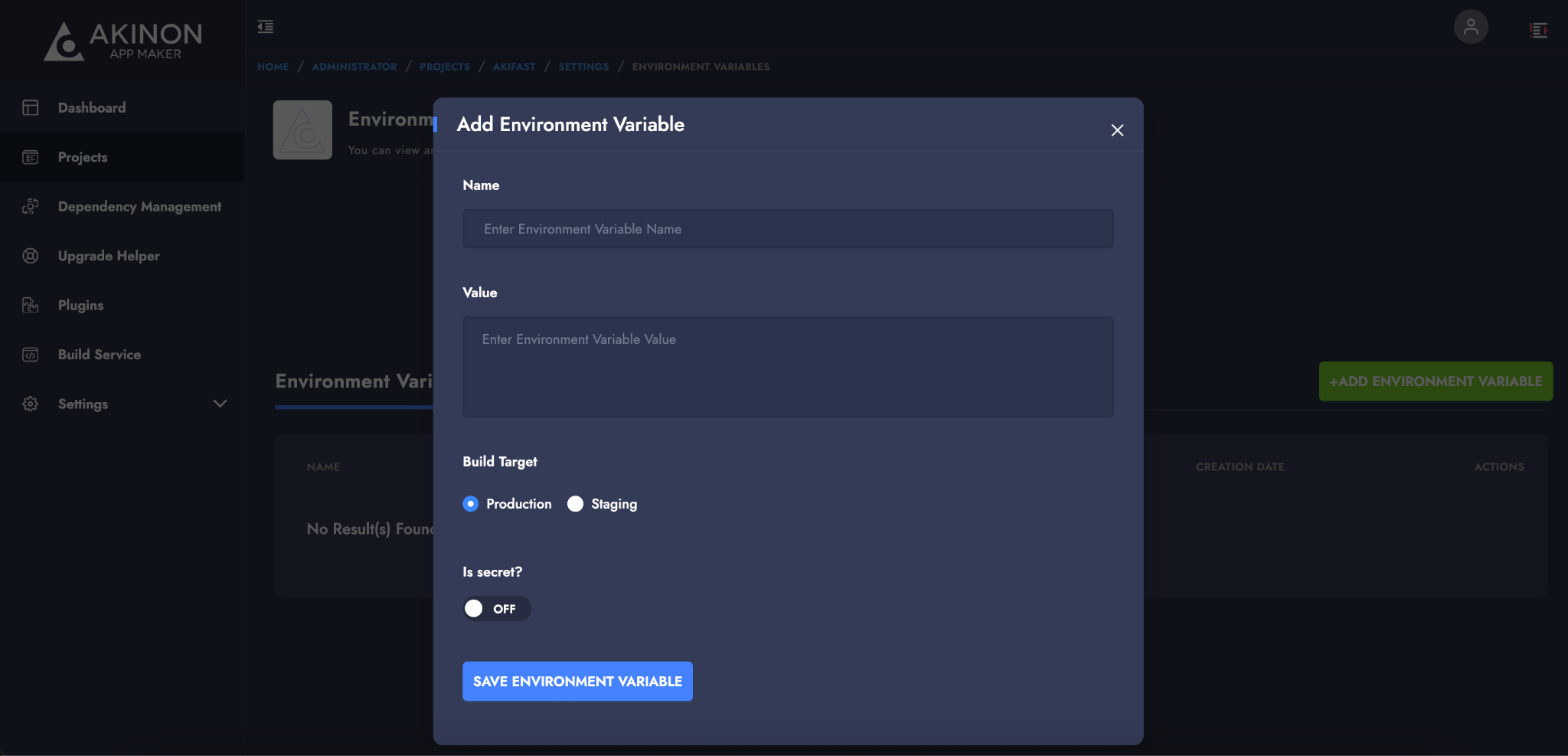
* A new **Environment Variables** tab has been added in the **Projects > Project Detail > Settings** page, allowing users to define custom variables for use during **Build Time**. This feature enables secure and centralized management of environment-specific values such as database credentials, API keys, and feature flags. It simplifies configuration across different environments, reduces manual intervention, and improves flexibility, security, and deployment consistency—ultimately optimizing the development and deployment process.

#### Enhancements
**App Icons Now Displayed as Project Logos**
* App icons are now used as project logos across relevant views in the platform. This enhancement improves visual clarity and provides quick project identification while reinforcing brand consistency, professionalism, and corporate identity throughout the user interface.

### Mobile
#### New Features
**Native Font Load**
{% hint style="warning" %}
The following change is available in **App Maker Environment versions later than** `env5.5.0`.
{% endhint %}
* Previously, each app launch required waiting for fonts and icons to load. With this new feature, fonts are now defined and loaded directly in the native layer, improving performance and reliability. Key benefits:
* Fonts and icons are instantly available when the app launches.
* No additional runtime process is required to load fonts/icons into the project.
* Consistent font/icon usage across all devices, since they are bundled within the app.
* To use this feature, define your font and icon files path in the `fonts` array key inside `akinon.json` as follows:
```json
"fonts": [
"./src/assets/fonts/icomoon/icomoon.ttf"
]
```
**New Plugin: `akinon-expo-video`**
{% hint style="info" %}
The following change is available in **App Maker Environment versions later than** env5.\
**Plugin Adapter Version:** `v1.0.0`
{% endhint %}
* A more advanced video playback plugin is now available for all projects, offering enhanced functionality compared to libraries like expo-av or react-native-video.
* This plugin is currently **experimental**.
* Documentation for usage can be found in the [Plugins](https://abp.akinon.net/plugins/685960f3eda8bf5da5d60e60) page of the App Maker platform.
#### System Improvements
**Updated Main Component Naming**
{% hint style="warning" %}
The following change is available in **App Maker Environment versions later than** `env5.5.0`.
{% endhint %}
* The expected name for the main component in the native layer has been changed from "`akinon`" to "`main`" for better standardization and compatibility.
---
# Agent Instructions
This documentation is published with GitBook. GitBook is the documentation platform designed so that both humans and AI agents can read, navigate, and reason over technical content effectively. Learn more at gitbook.com.
## Querying This Documentation
If you need additional information that is not directly available in this page, you can query the documentation by asking a question.
Perform an HTTP GET request on the following URL with the `ask` and `goal` query parameters:
```
GET https://docs.akinon.com/release-notes/2025/june/akinon-release-notes-06.23.2025.md?ask=&goal=
```
`ask` is the immediate question: it should be specific, self-contained, and written in natural language.
`goal` is what the user is ultimately trying to achieve, the reason they need the answer. Sharing it helps GitBook give you a better, more relevant answer. A goal is most helpful when it describes the outcome the user wants rather than restating the question. For example, with `ask=how do I create an API token`, a goal like `automate deployments from our CI pipeline` lets GitBook tailor the answer to that use case.
The response will contain a direct answer to the question and relevant excerpts and sources from the documentation.
Use this mechanism when the answer is not explicitly present in the current page, you need clarification or additional context, or you want to retrieve related documentation sections.