> For the complete documentation index, see [llms.txt](https://docs.akinon.com/llms.txt). Markdown versions of documentation pages are available by appending `.md` to page URLs; this page is available as [Markdown](https://docs.akinon.com/technical-guides/commerce/grouped-products-and-combinations.md).

# Grouped Products & Combinations

A **combination** (also called a *set* or *kombin*) is not a separate entity in Akinon Commerce — it is a **Grouped Product**. A grouped product is a product record whose `product_type` is `grouped` and which points to a list of simple products through a dedicated relation. Everything a merchant thinks of as "a combination" — the look, the set, the package — is stored, priced, indexed, and rendered as a grouped product.

This guide explains how a combination is defined, which fields feed it, how one is set up, how it is priced, how it behaves in listing and search, and how it reaches the storefront.

{% hint style="info" %}
This guide describes **Commerce** behavior — how a combination is stored, priced, indexed and served. [Setting up a combination](#setting-up-a-combination) gives the order of operations; for the Omnitron admin screens behind those steps (Product Pool > + New Product > Add Grouped Product), see [Product Types > Grouped Product](/technical-guides/omnitron/product-types.md#id-3-grouped-product). The API paths below are Commerce endpoints, not the Omnitron ones behind those screens.
{% endhint %}

{% hint style="info" %}
Not to be confused with [Group Attribute Sets](/technical-guides/commerce/group-attribute-sets.md), which groups the **attributes** of an attribute set for display on the product detail page. That feature shares the word "group" and nothing else.
{% endhint %}

## <mark style="color:red;">1. How a Combination Is Defined</mark>

A combination is made of two parts:

1. The **grouped product** itself — a product whose `product_type` is `grouped` (enum value `3`). It carries the name, SKU, base code, attribute set, images, categories and the combination's own price.
2. The **group product items** — one record per member, each linking the combination to one simple product and carrying that member's display order and default quantity.

```
Grouped product   "Suit Package"   SKU: SP01
  │
  ├── item (order=0, initial_quantity=1) ──► Simple product  "Jacket"  JKT01
  ├── item (order=1, initial_quantity=1) ──► Simple product  "Pants"   PNT02
  ├── item (order=2, initial_quantity=1) ──► Simple product  "Shirt"   SRT03
  └── item (order=3, initial_quantity=2) ──► Simple product  "Tie"     TIE04
```

### Fields that feed the combination

The group product item is the only place combination-specific data lives. It has exactly four meaningful fields:

| Field              | Type              | Description                                                                                                                                                                               |
| ------------------ | ----------------- | ----------------------------------------------------------------------------------------------------------------------------------------------------------------------------------------- |
| `from_product`     | product reference | The grouped product (the combination). Its `product_type` **must** be `grouped`.                                                                                                          |
| `to_product`       | product reference | A member of the combination. Its `product_type` **must** be `simple`.                                                                                                                     |
| `order`            | positive integer  | Display order of the member inside the combination. `0` is the highest priority and is shown first. This is the **Sorting** column on the Omnitron product page.                          |
| `initial_quantity` | positive integer  | Default quantity of that member shown before it is added to the basket, and the multiplier used in total-price calculation. This is the **Quantity** column on the Omnitron product page. |

The pair `(from_product, to_product)` is unique — the same simple product cannot be added to the same combination twice.

Omnitron and Commerce hold these same four fields, and the integration carries them across unchanged, so the Sorting and Quantity values a merchant enters in Omnitron are the `order` and `initial_quantity` Commerce sorts and prices with.

<figure><img src="https://2911598027-files.gitbook.io/~/files/v0/b/gitbook-x-prod.appspot.com/o/spaces%2FlQinVPnOffBiOp126ldR%2Fuploads%2Fgit-blob-a36ad99b168e3a0febd4f12e44bb07aa4590494e%2Fgrouped-product-omnitron-sorting-quantity.png?alt=media" alt=""><figcaption><p>The Grouped Products table on the Omnitron product page. Sorting is the member's <code>order</code> and Quantity its <code>initial_quantity</code> — here the shirt is second in the set and comes two to a set.</p></figcaption></figure>

### Validation rules

Three rules are enforced when a member is added or changed:

| Rule                                              | Message                                                                         |
| ------------------------------------------------- | ------------------------------------------------------------------------------- |
| The combination must be a grouped product         | Group Product Item: product\_type of relation 'from\_product' must be 'grouped' |
| The member must be a simple product               | Group Product Item: product\_type of relation 'to\_product' must be 'simple'    |
| The member must not already be in the combination | Group Product Item already exists                                               |

A violation returns HTTP `406` with an error code identifying the rule. The codes and full error payloads are in the OpenAPI specification referenced below.

{% hint style="warning" %}
Only **simple** products can be members of a combination. Meta products, bundles, other grouped products and miscellaneous products are rejected. If you want a combination to offer a variant choice (e.g. the shirt in several sizes), add the simple variants themselves — see [Deduplicating variants](#deduplicating-variants-on-the-detail-page) below for how the storefront collapses them.
{% endhint %}

### Setting up a combination

The order matters. A combination can only be assembled out of products that are already sellable on their own, and membership is always added after the combination itself exists.

1. **Prepare the members.** Every simple product that will go into the set has to be sellable in that channel on its own — category, catalog, price and stock. A member missing any one of these is left out of the set on the storefront with no warning, which is why this step comes first; [Where combinations are authored](#where-combinations-are-authored) covers what to check when a piece of a set goes missing.
2. **Create the grouped product.** A product whose `product_type` is `grouped`, with its own name, SKU and attribute set. It needs a category and a place in the channel's catalog, but no price and no stock of its own — both are derived from its members. For the Omnitron admin screens, see [Product Types > Grouped Product](/technical-guides/omnitron/product-types.md#id-3-grouped-product).
3. **Give it a full-look image.** The combination's own image, showing the whole set worn together. This is a prerequisite rather than a finishing touch: a combination with no image of its own is not indexed as a selectable entry. See [Imagery](#imagery).
4. **Add the members one at a time.** One record per member, each carrying its `order` and `initial_quantity`. Members cannot be supplied in the same call that creates the grouped product — see [Managing combination items via API](#managing-combination-items-via-api).
5. **Leave the price alone.** The combination's price is derived from its members, so a price entered by hand on the grouped product is overwritten the next time it is recalculated. See [Pricing](#id-2.-pricing) for which derivation is used and what triggers a recalculation.

{% hint style="info" %}
On Omnitron-fronted catalogs none of these steps reaches the storefront the moment it is saved. The products, the memberships and the resulting price each sync to Commerce on their own schedule, so a combination and its members can arrive at different times — see [Where combinations are authored](#where-combinations-are-authored).
{% endhint %}

### Managing combination items via API

Combination items are exposed as a standard admin REST resource.

**Path**: `/api/v1/group_product_items/` **Permission**: admin user only (this is not a storefront endpoint)

| Method          | Purpose                                                                       |
| --------------- | ----------------------------------------------------------------------------- |
| `GET`           | List items. Filterable by `from_product` and `to_product` (both product IDs). |
| `POST`          | Add a simple product to a combination.                                        |
| `PUT` / `PATCH` | Change the member, its `order` or `initial_quantity`.                         |
| `DELETE`        | Remove a member from the combination.                                         |

{% hint style="warning" %}
Membership is managed **only** through this resource. Creating the grouped product and adding its members are two separate steps: create the combination first, then post one item per member. The `group_products` field on the product resource does not establish membership, so a combination is empty until its items are posted here.
{% endhint %}

#### Adding a member to a combination

`POST /group_product_items/` takes the grouped product, the member, and the two display fields:

```json
{"from_product": 700, "to_product": 341, "order": 0, "initial_quantity": 2}
```

The created row comes back with its identifier:

```json
{"pk": 5, "from_product": 700, "to_product": 341, "order": 0, "initial_quantity": 2}
```

A request that breaks one of the rules above returns HTTP `406`.

#### Which combinations contain a given product?

The relation is navigable in both directions. To find every combination a simple product belongs to — the data a "Complete the look" / "Shop this combination" module on a simple product's detail page needs — filter the list by the member: `GET /group_product_items/?to_product=341`.

```json
{
    "count": 2,
    "next": null,
    "previous": null,
    "results": [
        {"pk": 5, "from_product": 700, "to_product": 341, "order": 0, "initial_quantity": 2},
        {"pk": 18, "from_product": 912, "to_product": 341, "order": 3, "initial_quantity": 1}
    ]
}
```

The `from_product` values are the combinations the member appears in; resolve each one to build the suggestion module.

{% hint style="info" %}
For the complete request and response contract — every field type, the filter and pagination parameters, and the error payloads — see **Group Product Items** in the Admin specification, under *API Reference → Commerce OpenAPIs → Admin*.
{% endhint %}

### Where combinations are authored

Combinations exist in **both** Omnitron and Commerce, with the same four fields on either side. Which one you write to depends on how the catalog is run:

* **Omnitron-fronted catalogs** (the usual case) — the merchant builds the combination on the Omnitron product page and the channel integration syncs it to Commerce. Product references are remapped to the channel's Commerce product IDs on the way, so the two systems never share identifiers.
* **Commerce-direct catalogs** — the combination is posted straight to the Commerce endpoint above.

Two conditions gate what actually reaches Commerce:

* A combination item is only sent once **both** of its products are already integrated to that channel. A membership pointing at a product that has not synced yet is skipped and picked up on a later run.
* The grouped product itself only enters the channel's product set when it is **active** and assigned to the **channel's catalog**.

{% hint style="warning" %}
Membership syncs separately from the products themselves, so a change made in Omnitron — adding a member, reordering, changing a quantity — does not reach the storefront immediately, and a newly created combination and its members can arrive at different times.
{% endhint %}

{% hint style="warning" %}
A member has to be sellable in the channel **in its own right** before it can appear inside the combination: assigned to a category, included in the channel's catalog, and carrying a price and stock in the lists that channel uses. A member missing any one of these never reaches the storefront, and the combination simply shows up without it — Omnitron still lists it as a member, which makes this an easy gap to miss. When a piece of a set is missing on the storefront, check the member's own setup first.

The combination itself is less demanding: it needs a category and a place in the channel's catalog, but no price or stock of its own, since both are derived from its members.
{% endhint %}

{% hint style="info" %}
Pricing is a **Commerce** concern. Omnitron stores the membership and nothing else; `GROUPED_PRODUCT_PRICE_SELECTOR` and the recalculation described in the next section exist only on the Commerce side.
{% endhint %}

{% hint style="info" %}
There is **no separate recommendation engine** behind combinations. A combination is an explicitly curated list maintained by the merchant; the platform does not infer or score it. The reverse lookup above is the only "product suggestion" signal grouped products provide, and because the endpoint is admin-only it is consumed by an integration or a plugin, not directly by the browser.
{% endhint %}

## <mark style="color:red;">2. Pricing</mark>

A grouped product has **its own price**, derived from the prices of its members. Which derivation is used is controlled by a dynamic setting.

### GROUPED\_PRODUCT\_PRICE\_SELECTOR

| Property | Value                                                         |
| -------- | ------------------------------------------------------------- |
| Key      | `GROUPED_PRODUCT_PRICE_SELECTOR`                              |
| Type     | string (dotted path)                                          |
| Default  | `omnishop.catalogs.selector.group_product_min_price_selector` |

| Selector                                                      | Resulting price                                                            |
| ------------------------------------------------------------- | -------------------------------------------------------------------------- |
| `omnishop.catalogs.selector.group_product_min_price_selector` | The cheapest member's price ("starting from" pricing).                     |
| `omnishop.catalogs.selector.group_product_max_price_selector` | The most expensive member's price.                                         |
| `omnishop.catalogs.selector.group_product_sum_price_selector` | The sum of all members' prices, each multiplied by its `initial_quantity`. |

See [Dynamic Settings #60](https://docs.akinon.com/technical-guides/commerce/pages/3387ea9a6e3866e9094eab23ca4e74508d76c296#id-60.-groupedproductpriceselector) for the registry entry.

{% hint style="warning" %}
Whichever selector is used, only the price itself carries over to the combination, along with the tax rate and currency. **The combination's own `retail_price` is never set**, so a combination has no strike-through price of its own even when its members do — show member discounts on the member cards, not on the combination.

The combination's price is also flagged as a range price (`price_type: range_` in the detail response). That flag is the signal to render it as a "from" price rather than an exact one, which matters most with the default `min` selector.
{% endhint %}

### When the price is recalculated

The grouped product's price is recomputed whenever the inputs change:

* A member is **added to or changed in** a combination — that combination is repriced immediately.
* A member's **price changes** — every combination containing that member is repriced.
* The **selector setting is changed** — existing combinations are repriced in the background, so on large catalogs the new prices appear gradually rather than all at once.

### Price lists

Everything above applies per price list. When a request resolves to a specific price list, member prices and the combination total are read from that list instead of the default one.

## <mark style="color:red;">3. Listing & Listability</mark>

Grouped products are **always listable**. Unlike simple and meta products — whose listability depends on variant-listable attributes and stock — a combination is listable from the moment it is created and stays that way.

Consequences:

* A combination appears in category listings and collections like any other listed product, provided it is assigned to them.
* It gets a pretty URL of its own, which is its canonical address. The numeric route `/group-product/{product_id}/` stays valid and redirects to it.

{% hint style="info" %}
Listability is independent of the members' stock. A grouped product stays listable even when its members are out of stock; what changes is the `in_stock` flag returned by the detail endpoint and the aggregated stock written to the search index.
{% endhint %}

## <mark style="color:red;">4. Search Behavior</mark>

### How a combination is indexed

A combination is indexed as a single searchable product, with its members attached to it:

* A member is only indexed under the combination if it has at least one image, and only if it has stock (or [`PRODUCT_STOCK_OUT_VISIBILITY_ENABLED`](https://docs.akinon.com/technical-guides/commerce/pages/3387ea9a6e3866e9094eab23ca4e74508d76c296#id-17.-product-stock-out-visibility-enabled) is on).
* A member does not carry its own categories, collections or sorting into the combination. This is deliberate: it stops a member from pulling the combination into a category it does not belong to, and stops member sorting values from competing with ordinary listed products.
* The combination's stock is the **sum** of its members' stock, and it counts as in stock when any member is.

{% hint style="warning" %}
Give every combination at least one image. A combination with no image of its own is not indexed as a selectable entry, so it will not appear the way you expect on listing pages.
{% endhint %}

### HIDE\_GROUPED\_PRODUCTS\_ON\_SEARCH

| Property | Value                             |
| -------- | --------------------------------- |
| Key      | `HIDE_GROUPED_PRODUCTS_ON_SEARCH` |
| Type     | boolean                           |
| Default  | `false`                           |

When set to `true`, combinations are indexed without any searchable text. They remain listable and still reachable by URL and from category pages, but a search query can no longer match them.

Use it when combinations should be reachable only from curated entry points (a category, a landing page, a link from a member's detail page) and should not compete with individual products in the search box.

{% hint style="info" %}
Changing this setting re-indexes **every** combination in the catalog, so the effect is not instant — it appears as the indexing queue catches up.
{% endhint %}

See [Dynamic Settings #84](https://docs.akinon.com/technical-guides/commerce/pages/3387ea9a6e3866e9094eab23ca4e74508d76c296#id-84.-hidegroupedproductsonsearch) and [Search Structure](/technical-guides/commerce/search-structure.md) for the registry entries.

## <mark style="color:red;">5. Storefront Display</mark>

### Detail endpoint

**Path**: `GET /group-product/{product_id}/` **Permission**: public

The combination's canonical address is its pretty URL; this numeric route redirects there, so follow redirects when calling it.

The endpoint serves grouped products only; any other product ID returns `404`. It also honours the end-of-life attribute: if [`PRODUCT_END_OF_LIFE_ATTRIBUTE`](https://docs.akinon.com/technical-guides/commerce/pages/3387ea9a6e3866e9094eab23ca4e74508d76c296#id-14.-product-end-of-life-attribute) is set and the grouped product carries a truthy value for it, the endpoint returns `404` **regardless of stock** (for single products the same check additionally requires the product to be out of stock).

#### Response contract

| Field                               | Type    | Description                                                                                       |
| ----------------------------------- | ------- | ------------------------------------------------------------------------------------------------- |
| `product`                           | object  | The grouped product itself, serialized like any product detail (name, images, attributes, price). |
| `group_products`                    | list    | The members, in display order. Each member is a full product payload plus `initial_quantity`.     |
| `in_stock`                          | boolean | Whether any member is in stock.                                                                   |
| `group_products_total_price`        | string  | Sum of member prices × `initial_quantity`.                                                        |
| `group_products_total_retail_price` | string  | Sum of member retail prices × `initial_quantity`.                                                 |

#### Example response

The member objects use the same product schema as any product detail response, so only the combination-specific fields are shown below.

```json
{
    "in_stock": true,
    "product": {
        "pk": 700,
        "name": "Suit Package",
        "sku": "SP01",
        "price": "49.99",
        "retail_price": null,
        "price_type": "range_"
    },
    "group_products": [
        {
            "pk": 341,
            "name": "Jacket",
            "sku": "JKT01",
            "price": "199.99",
            "retail_price": "249.99",
            "initial_quantity": 1
        },
        {
            "pk": 342,
            "name": "Tie",
            "sku": "TIE04",
            "price": "49.99",
            "retail_price": "59.99",
            "initial_quantity": 2
        }
    ],
    "group_products_total_price": "299.97",
    "group_products_total_retail_price": "369.97"
}
```

{% hint style="warning" %}
The two prices in this response mean different things, and they are expected to differ. `product.price` is the price stored on the grouped product by `GROUPED_PRODUCT_PRICE_SELECTOR` — with the default `min` selector that is the cheapest member's price (`49.99`, the tie), and it is what listing pages and search results show. `group_products_total_price` is **always the sum** of the members, independent of the selector: `199.99 × 1 + 49.99 × 2 = 299.97`. A combination showing a "from" price in a category listing and a higher total on its own page is therefore behaving correctly, not inconsistently.
{% endhint %}

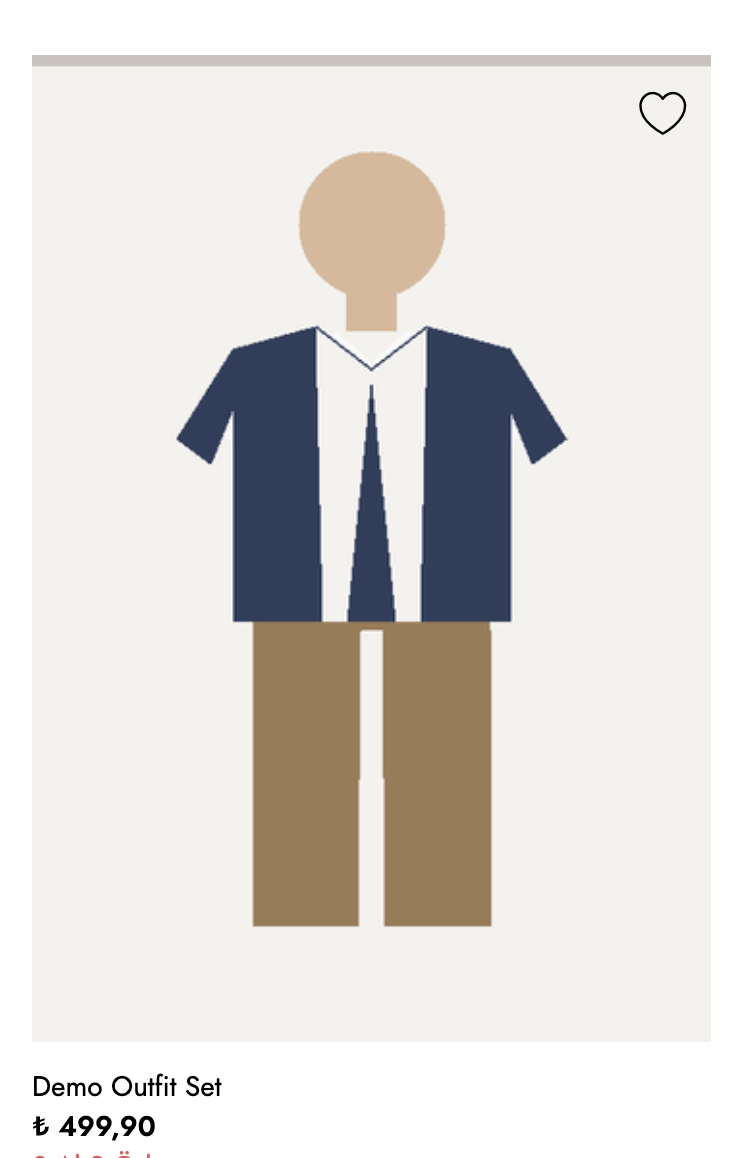
<figure><img src="https://2911598027-files.gitbook.io/~/files/v0/b/gitbook-x-prod.appspot.com/o/spaces%2FlQinVPnOffBiOp126ldR%2Fuploads%2Fgit-blob-f7d76896ebc4eeb130b15e7ae370b99f8b52512e%2Fgrouped-product-listing-card.png?alt=media" alt=""><figcaption><p>The same combination on a listing page. The card carries the combination's own full-look image and the price the selector stored — ₺499,90, the cheapest member — not the ₺3.399,60 the whole set costs.</p></figcaption></figure>

{% hint style="info" %}
For the full member product schema and every field the endpoint returns, see **Grouped Product** in the Products specification, under *API Reference → Commerce OpenAPIs → Products*.
{% endhint %}

### Deduplicating variants on the detail page

The member list returned by the endpoint is not simply every member you added. When several members are variants of the same model, **only one of them is returned** — the one most suitable to show, preferring a listable and in-stock variant. Members that are not variants of anything are all returned. The result is ordered by `order`, and ties by the order the members were added.

Note that `in_stock` is evaluated over **every** active member, not just the returned ones, so a combination can report `in_stock: true` on the strength of a variant that was not selected for display.

This means a combination can safely contain several size or colour variants of the same model; the detail page shows one representative card per model rather than repeating it. Stock is evaluated for the requesting channel, so the representative can differ by price list or channel.

### Imagery

A combination has an **image set of its own**, returned alongside the members' images and independent of them. The two play different roles, and both are worth getting right:

* **The combination's own image** is the full look — the model wearing every piece together. It is what makes a set recognisable as a set.
* **Each member's image** is that single garment's product shot, shown on the member's card so the customer can tell the pieces apart before adding them.

{% hint style="warning" %}
Storefronts differ in how they build the gallery on a combination's page: some lead with the combination's own image and list the members underneath, others build the whole gallery from the members' images. Treat the hero image as a storefront decision rather than a fixed platform behaviour, and supply **both** — a full-look image on the combination and a product shot on every member — so the page reads correctly either way. A combination whose own image is missing also loses its preview image in search results and social shares.
{% endhint %}

### Rendering

Storefronts consume the endpoint above and render the combination on its own page.

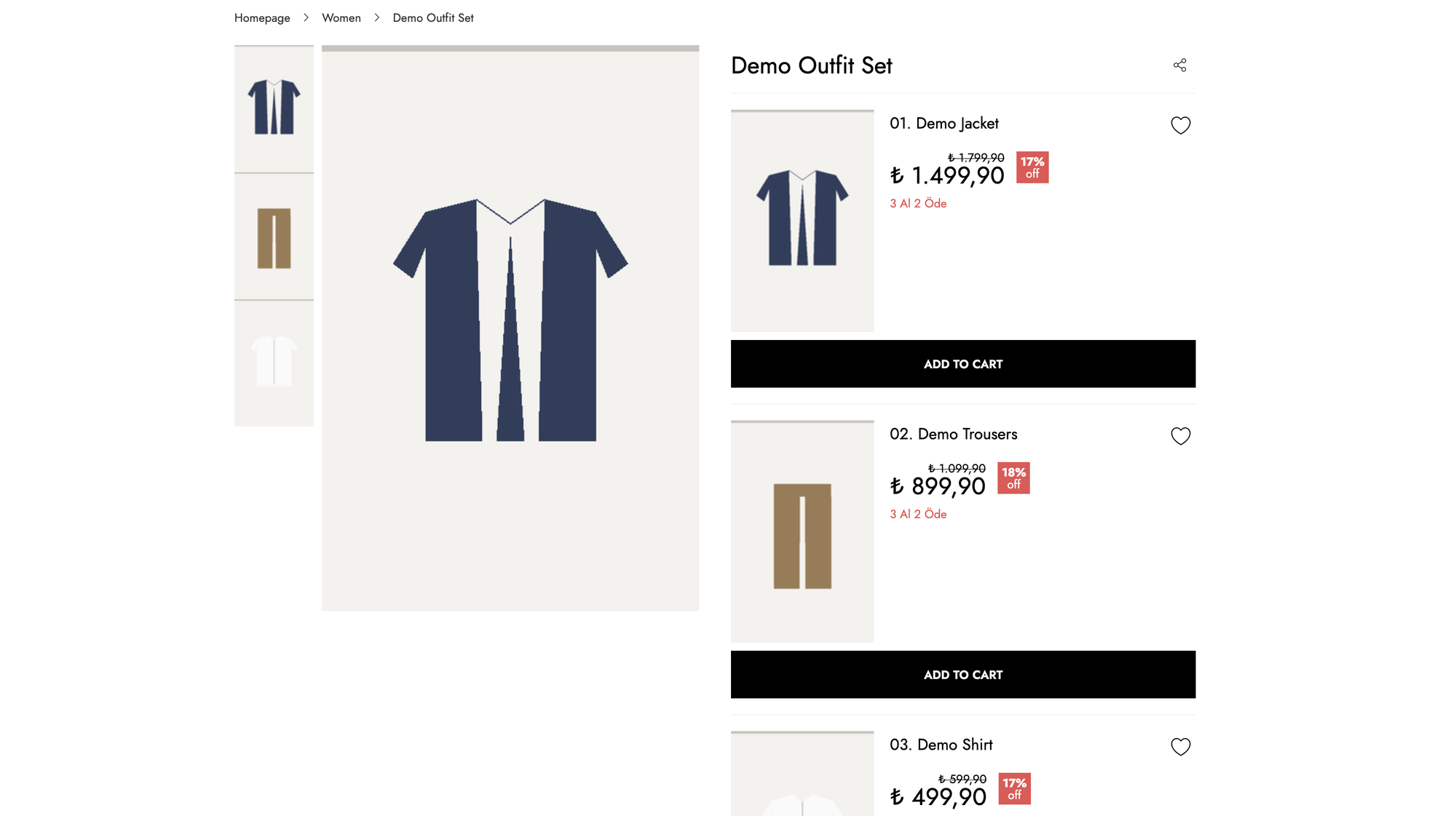
<figure><img src="https://2911598027-files.gitbook.io/~/files/v0/b/gitbook-x-prod.appspot.com/o/spaces%2FlQinVPnOffBiOp126ldR%2Fuploads%2Fgit-blob-c677b17b684465346e591c01e0b53fa76afedb9e%2Fgrouped-product-storefront-detail.png?alt=media" alt=""><figcaption><p>A combination page on the storefront. Each member is listed with its own price and add-to-basket action. This storefront builds the gallery from the members' images; others lead with the combination's own image instead.</p></figcaption></figure>

For what the resulting page looks like to a customer — the per-member cards, variant selection on each card, the "Add the full set" path versus adding members one by one, and how out-of-stock members change the display — see the **Group Product (Set Product) Experience** tutorial, under *Tutorials → Instore*. That page documents the Instore implementation, but the flows and the pricing/stock scenarios it walks through are the ones this endpoint drives.

## <mark style="color:red;">6. Basket Behavior</mark>

A grouped product **cannot itself be added to the basket**. An attempt to add one is rejected as though the product did not exist — the same rule applies to meta products — so do not expose an add-to-basket action on the combination itself.

What the customer buys are the **members**:

* Each member is added to the basket as an ordinary simple product line.
* `initial_quantity` is the *default* quantity presented in the UI, not a constraint — the customer can raise or lower it before adding.
* Members are added independently, so a customer may take part of the combination. Any "Add the whole set" action on the storefront is a client-side convenience that issues one basket call per member.

Because the basket holds simple products only, everything downstream — promotions, stock reservation, order lines, cancellation, returns — treats a purchased combination as separate items, not as a single sellable unit. If you need the set to behave as one indivisible sellable unit, use a [Bundle Product](/technical-guides/omnitron/product-types.md#id-4-bundle-product) instead.

## <mark style="color:red;">7. Related Settings & Pages</mark>

| Setting / page                                                                                                                                                                         | Relevance                                                               |
| -------------------------------------------------------------------------------------------------------------------------------------------------------------------------------------- | ----------------------------------------------------------------------- |
| [`GROUPED_PRODUCT_PRICE_SELECTOR`](https://docs.akinon.com/technical-guides/commerce/pages/3387ea9a6e3866e9094eab23ca4e74508d76c296#id-60.-groupedproductpriceselector) (#60)          | Which price is stored on the combination (min / max / sum).             |
| [`HIDE_GROUPED_PRODUCTS_ON_SEARCH`](https://docs.akinon.com/technical-guides/commerce/pages/3387ea9a6e3866e9094eab23ca4e74508d76c296#id-84.-hidegroupedproductsonsearch) (#84)         | Hides combinations from search by blanking their indexed text.          |
| [`PRODUCT_STOCK_OUT_VISIBILITY_ENABLED`](https://docs.akinon.com/technical-guides/commerce/pages/3387ea9a6e3866e9094eab23ca4e74508d76c296#id-17.-product-stock-out-visibility-enabled) | Whether out-of-stock members are still indexed under the combination.   |
| [`PRODUCT_END_OF_LIFE_ATTRIBUTE`](https://docs.akinon.com/technical-guides/commerce/pages/3387ea9a6e3866e9094eab23ca4e74508d76c296#id-14.-product-end-of-life-attribute)               | Returns `404` for the combination's detail page when set.               |
| [Product Types](/technical-guides/omnitron/product-types.md)                                                                                                                           | Omnitron admin steps for creating grouped products and all other types. |
| [Search Structure](/technical-guides/commerce/search-structure.md)                                                                                                                     | How the search index and its dynamic settings work end to end.          |
| **Group Product (Set Product) Experience** (*Tutorials → Instore*)                                                                                                                     | What the combination page looks like to a customer, end to end.         |
| **Admin → Group Product Items** (*API Reference → Commerce OpenAPIs → Admin*)                                                                                                          | Full contract for managing combination members.                         |
| **Products → Grouped Product** (*API Reference → Commerce OpenAPIs → Products*)                                                                                                        | Full contract for the combination detail endpoint.                      |


---

# Agent Instructions
This documentation is published with GitBook. GitBook is the documentation platform designed so that both humans and AI agents can read, navigate, and reason over technical content effectively. Learn more at gitbook.com.

## Querying This Documentation
If you need additional information that is not directly available in this page, you can query the documentation by asking a question.

Perform an HTTP GET request on the following URL with the `ask` and `goal` query parameters:

```
GET https://docs.akinon.com/technical-guides/commerce/grouped-products-and-combinations.md?ask=<question>&goal=<user_goal>
```

`ask` is the immediate question: it should be specific, self-contained, and written in natural language.
`goal` is what the user is ultimately trying to achieve, the reason they need the answer. Sharing it helps GitBook give you a better, more relevant answer. A goal is most helpful when it describes the outcome the user wants rather than restating the question. For example, with `ask=how do I create an API token`, a goal like `automate deployments from our CI pipeline` lets GitBook tailor the answer to that use case.

The response will contain a direct answer to the question and relevant excerpts and sources from the documentation.

Use this mechanism when the answer is not explicitly present in the current page, you need clarification or additional context, or you want to retrieve related documentation sections.