# Sitemap Configuration

Sitemaps are crucial for enhancing website accessibility and search engine optimization (SEO). They provide a structured overview of website content, ensuring that important pages are discoverable by both users and search engines. The sitemap configuration process allows precise control over which pages are indexed and how they appear, ensuring relevance and compliance with SEO best practices.

A sitemap is an XML file that defines the content structure of a website and provides information about its pages to search engines. Sitemaps are especially useful for large websites as they help search engine bots discover all pages efficiently, speeding up indexing.

**Purpose of Using a Sitemap:**

* **Search Engine Optimization (SEO):** Enables faster and more comprehensive crawling of content by search engines, improving SEO performance.
* **Simplifying Site Structure Discovery:** For large or complex websites where not all pages are interlinked or easily accessible, a sitemap aids search engines in discovering content.
* **Adding New Pages and Updates:** Informs search engines about newly added or updated pages, ensuring the site remains current.

## <mark style="color:red;">Sitemap File Structure</mark>

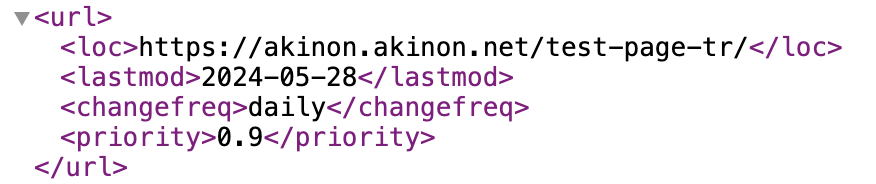
A sitemap is created in XML format and includes the following elements:

* `<loc>`: This element specifies the **URL** of a page or resource that is included in the sitemap. This is the most essential part of the sitemap as it directly informs the search engine about the exact location of the page.
* `<lastmod>`: This element indicates the **last modification date** of the page listed in the sitemap. It is used to tell search engines when the page was last updated or changed.
* `<changefreq>`: This element specifies how often the content on the page is expected to **change**. This helps search engines understand the **update frequency** of the page, and decide how often it should revisit the page to check for updates.
* `<priority>`: This element reflects the **importance** of a page relative to other pages on the site. It is used to guide search engines about how much importance they should assign to the page when deciding how frequently to crawl it.

For example:

<div align="left"><figure><img src="https://2911598027-files.gitbook.io/~/files/v0/b/gitbook-x-prod.appspot.com/o/spaces%2FlQinVPnOffBiOp126ldR%2Fuploads%2Fgit-blob-687f4cb268e50ab3adc74ef0ec5682ca96beee7f%2Fimage.png?alt=media" alt="" width="375"><figcaption></figcaption></figure></div>

## <mark style="color:red;">Sitemap Configuration</mark>

This section delves into the sitemap configuration options, focusing on key page types, configuration parameters, filtering options, and advanced customization techniques. By leveraging these features, businesses can tailor their sitemaps to reflect their unique content strategy, prioritize high-value pages, and exclude irrelevant or outdated content.

{% hint style="warning" %}
Sitemaps are updated every 6 hours automatically.
{% endhint %}

<figure><img src="https://2911598027-files.gitbook.io/~/files/v0/b/gitbook-x-prod.appspot.com/o/spaces%2FlQinVPnOffBiOp126ldR%2Fuploads%2Fgit-blob-3c4acaf2bf3a08dd6f9d9a0eba0105df6d7d9fa1%2Fimage.png?alt=media" alt=""><figcaption></figcaption></figure>

The sitemap configuration supports five primary page types, each serving a distinct purpose within the overall structure of the site. These page types ensure that key areas of the website are indexed and accessible to search engines and users.

**1. Landing Page:** Represents high-level entry points or home page links, often serving as gateways to other sections of the site.

* *Common Examples:*
  * Homepage (e.g., `https://example.com`)
  * Campaign landing pages (e.g., `https://example.com/summer-sale`)
* *Key Features:*
  * Typically prioritize user engagement and search visibility.
  * Can include promotional pages or pages designed to drive traffic to specific areas of the website.

**2. Category:** Represents category or collection pages, often used in e-commerce or content-heavy websites to group related items.

* *Common Example:*
  * Product categories (e.g., `https://example.com/electronics`)
* *Key Feature:*
  * Organizes content hierarchically, aiding navigation and SEO.

**3. Flat Page:** Static content pages that provide information not frequently updated.

* *Common Examples:*
  * About Us (e.g., `https://example.com/about`)
  * Terms of Service (e.g., `https://example.com/terms`)
* *Key Features:*
  * Focuses on presenting evergreen content.
  * Excludes pages requiring user authentication by default (e.g., registration-only content).

**4. Special Page:** Dedicated to unique or custom pages that don’t fit traditional content categories but are essential to the user experience or business goals.

* *Common Examples:*
  * Custom campaign pages with interactive content.
  * Microsites for specific promotions or events.
* *Key Features:*
  * Requires activation and a pretty URL to be included in the sitemap.
  * Often tailored for marketing purposes or specific user interactions.

**5. Product:** Showcases individual product pages, critical for e-commerce websites.

* *Common Examples:*
  * Product detail pages (e.g., `https://example.com/product/12345`)
  * Variations or configurations of products (e.g., `https://example.com/red-shirt`)
* *Key Features:*
  * Focuses on ensuring discoverability of active, listable products.
  * Includes stock visibility settings to determine whether out-of-stock items are listed.

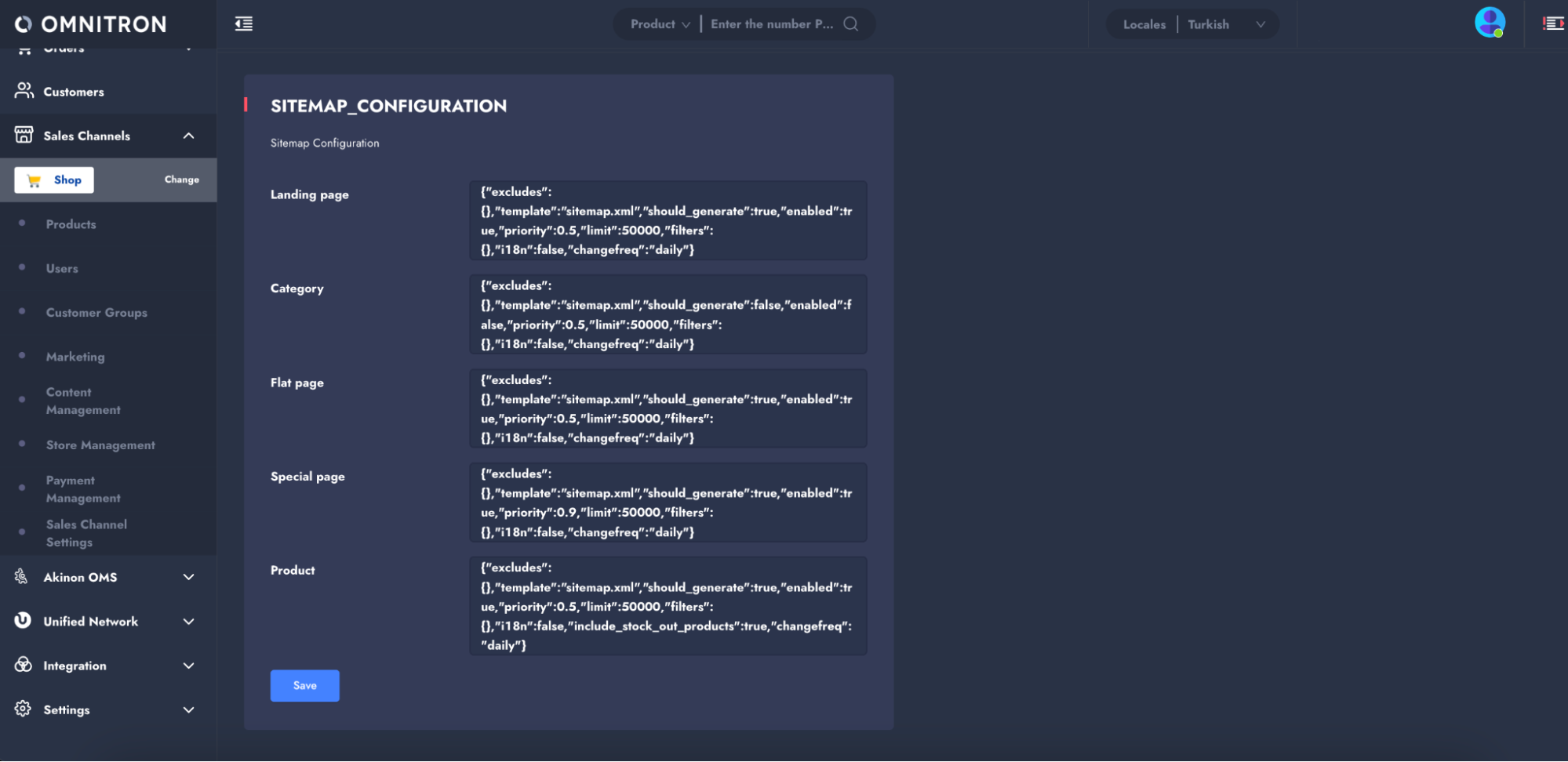
Sitemap configuration is used to structure, filter, and activate or deactivate specific page types in the sitemap. Defined in **Dynamic Settings** as `SITEMAP_CONFIGURATION`, it is stored in JSON format.

<figure><img src="https://2911598027-files.gitbook.io/~/files/v0/b/gitbook-x-prod.appspot.com/o/spaces%2FlQinVPnOffBiOp126ldR%2Fuploads%2Fgit-blob-1a52ad0528ea3b8dff94b1a8798d7ac658bf4491%2Fimage.png?alt=media" alt=""><figcaption></figcaption></figure>

This configuration allows only active content types to be reported to search engines. Configuration details for each page type are outlined in the **Pages** section.

### Configuration Parameters and Filtering Options

This section provides an overview of the configuration parameters for `SITEMAP_CONFIGURATION` dynamic setting and their filtering options available for sitemap objects. These parameters define the behavior, structure, and content of sitemaps, enabling precise control over what gets included or excluded.

***Configuration Parameters for Dynamic Setting:***

<table><thead><tr><th width="145.171875">Key</th><th width="504.09375">Description</th><th width="124.3125">Type</th></tr></thead><tbody><tr><td><code>excludes</code></td><td>Specifies conditions used to filter out items that should not appear in the sitemap. This can be used to remove certain pages or content that meet specific exclusion criteria, such as outdated content or pages that shouldn’t be indexed by search engines. It takes a dictionary format where the key-value pairs define the criteria for exclusion.</td><td>Dict</td></tr><tr><td><code>filters</code></td><td>Specifies conditions to include items in the sitemap. This can be used to include specific categories, pages, or products based on active status, date of creation, or other criteria that make the item suitable for the sitemap. Similar to excludes, it uses a dictionary format where the keys are field names, and the values define the conditions for inclusion.</td><td>Dict</td></tr><tr><td><code>should_generate</code></td><td>Used to control whether a specific item (page, category, product, etc.) should be generated and included in the sitemap file. It acts as a flag indicating if the item should be processed and considered for inclusion during the sitemap generation process. This setting is often used to prevent certain pages or content from appearing in the sitemap under specific conditions, such as when they are part of a special campaign, or are not relevant for search engines at the moment. When <strong>true</strong>: The specified item (page, category, product, etc.) is generated and included in the sitemap file. When <strong>false</strong>: The specified item is not generated and is excluded from the sitemap file.</td><td>Boolean</td></tr><tr><td><code>enabled</code></td><td>Determines whether an item is actively included in the sitemap based on its current status or conditions. This can be used to control the visibility of items in the sitemap depending on whether they are marked as active or enabled within the system. This parameter is commonly used in situations where certain items may exist in the system (e.g., products, pages) but are not intended to be public or visible at the moment due to being inactive or archived. When <strong>true</strong>: The item is actively included in the sitemap. When <strong>false</strong>: The item is marked as inactive and excluded from the sitemap.</td><td>Boolean</td></tr><tr><td><code>priority</code></td><td>Indicates the importance level of a page or item relative to others in the sitemap and helps search engines understand which pages are most important.</td><td>Float</td></tr><tr><td><code>limit</code></td><td>Specifies the maximum number of items (URLs) to include in the sitemap. This can be used to limit the total number of URLs listed in a sitemap file. (min: 1, max: 50,000).</td><td>Integer</td></tr><tr><td><code>template</code></td><td>Defines the template to be used when generating the sitemap. It defaults to "sitemap.xml" but can be customized if a different template file is desired.</td><td>String</td></tr><tr><td><code>i18n</code></td><td>The i18n (internationalization) parameter indicates whether the item supports multiple languages or locales. If set to “true”, the content is adapted for different languages, allowing the sitemap to include links to pages in various languages. If set to “false”, the content is not localized, and the sitemap will only include the default language versions.</td><td>Boolean</td></tr><tr><td><code>changefreq</code></td><td>Specifies how often the content of a page is expected to change. This helps search engines determine how frequently to crawl the page. Possible values include <code>always</code>, <code>hourly</code>, <code>daily</code>, <code>weekly</code>, <code>monthly</code>, <code>yearly</code>, and <code>never</code>.</td><td>Choice String</td></tr><tr><td><code>include_stock_out_products</code></td><td>Applies only to Product sitemaps and controls whether out-of-stock products are included in the sitemap. If set to “true”, even out-of-stock products will be included in the sitemap. If set to “false”, only products that are in stock will appear.</td><td>Boolean</td></tr></tbody></table>

Filters define criteria for inclusion or exclusion in the sitemap. These filters are used for the "`excludes`" and "`filters`" parameters in the above Configuration Parameters.

Both the "`excludes`" and "`filters`" fields accept data in JSON format, as shown below. The key should follow the pattern `"{field}__{filter_key}"`, and the value should contain the expected value.

***Filtering Options:***

<table><thead><tr><th width="148.4140625">Filter</th><th>Description</th></tr></thead><tbody><tr><td><code>exact</code></td><td>Filters for an exact match of the value. The value must match exactly with the field’s content. e.g., "field_name__exact": "value" (Matches records where the field is exactly "value")</td></tr><tr><td><code>iexact</code></td><td>Filters for an exact match, but case-insensitive. e.g., "field_name__iexact": "value" (Matches records where the field is "value", "VALUE", "VaLuE", etc.)</td></tr><tr><td><code>contains</code></td><td>Filters for records where the field contains a specific substring. e.g., "field_name__contains": "value" (Matches "value", "some value", "the value is here", etc.)</td></tr><tr><td><code>icontains</code></td><td>Filters for records where the field contains a specific substring, case-insensitive. e.g., "field_name__icontains": "value" (Matches "value", "VALUE", "Some VALUE here", etc.)</td></tr><tr><td><code>gt/lt</code></td><td>Filters for values greater than / less than the specified value. e.g., "field_name__gt": 10 (Matches records where the field is greater than "10")</td></tr><tr><td><code>gte/lte</code></td><td>Filters for values greater than or equal / less than or equal to the specified value. e.g., "field_name__gte": 10 (Matches records where the field is greater than or equal to "10")</td></tr><tr><td><code>in</code></td><td>Filters for values that are contained within a given list of values. e.g., "field_name__in": [value1, value2, value3] (Matches records where the field is "value1", "value2", or "value3")</td></tr><tr><td><code>isnull</code></td><td>Filters for fields that are either null or not null. e.g., "field_name__isnull": true (Matches records where the field is null)</td></tr><tr><td><code>startswith</code></td><td>Filters for records where the field starts with a specified substring. e.g., "field_name__startswith": "value" (Matches records where the field starts with "value", e.g., "value123", "valueabc", etc.)</td></tr><tr><td><code>istartswith</code></td><td>Filters for records where the field starts with a specified substring, case-insensitive. e.g., "field_name__istartswith": "value" (Matches "value", "VALUEabc", "VaLuE123", etc.)</td></tr><tr><td><code>endswith</code></td><td>Filters for records where the field ends with a specified substring. e.g., "field_name__endswith": "value" (Matches records where the field ends with "value", e.g., "endvalue", "testvalue")</td></tr><tr><td><code>iendswith</code></td><td>Filters for records where the field ends with a specified substring, case-insensitive. e.g., "field_name__iendswith": "value" (Matches "value", "VALUE", "endVALUE", etc.)</td></tr></tbody></table>

These filters can be combined to create complex queries tailored to specific requirements and pages. Below are some examples: (The use of filters along with fields specific to each page is provided in the [Pages](https://github.com/akinon/docs/blob/main/technicalguides/commerce/broken-reference/README.md) section.)

***Excluding Specific Pages:***

Exclude pages with a "draft" (exact) status and URLs starting with "help."

```javascript
{
  "excludes": {
    "status__exact": "draft",
    "url__startswith": "help"
  }
}
```

* Expected Outcome:
  * All pages with a "draft" status are excluded.
  * Pages with URLs starting with "help" are not included in the sitemap.

***Including Specific Pages:***

To filter records where the `title` field contains “page” (case-insensitive) and the `url` field contains “test” (case-insensitive):

```javascript
{
  "filters": {
  "title__icontains": "page",
  "url__icontains": "test"
  }
}
```

* Expected Outcome:
  * The query will return all records where:
    * The `title` field contains "page" (e.g., "landing page", "home PAGe").
    * The `url` field contains "test" (e.g., "<https://example.com/test-page>", "<https://example.com/page/TEST>").

### Configurations via Project Settings

This section details the configuration options defined in the related environment.

**STATICSITEMAPS\_ROOT\_DIR**\
Defines the directory where sitemap files are stored. This setting specifies the root directory for sitemap files, such as `'sitemaps/'`. While it can be updated via environment variables (ENV), rebuilding the project is required for changes to take effect.

**STATICSITEMAPS\_URL**\
Sets the base URL path for accessing the sitemap. Defaults to:\
<https://s3.eu-central-1.amazonaws.com/{ST\\_S3\\_BUCKET\\_NAME}/sitemaps/sitemaps/.\\>
If the files are stored locally, this URL must be updated accordingly. While it can be updated via environment variables (ENV), rebuilding the project is required for changes to take effect.

{% hint style="danger" %}
To store sitemaps under the domain specified in the `STATICSITEMAPS_URL` in the `.env` file, ensure that both the Shop URL and the subsequent path are correctly entered. For example, the URL could look like <https://www.yourshopdomain.com/sitemaps/> or [https://www.yourshopdomain.com/sitemap/](https://www.yourshopdomain.com/sitemaps/).

The `STATICSITEMAPS_URL` should include the full URL path where the sitemaps will be stored, and this may vary depending on the user's preferences or system setup. It's important that the URL and path match the expected structure for proper sitemap generation.

After updating the `.env` file with the correct Shop URL and path, rebuild the project for the changes to take effect and ensure that the sitemaps are stored in the correct location.
{% endhint %}

### Custom Sitemap Template

To create a custom template for sitemaps (e.g., including an image field for a product page), follow these steps:

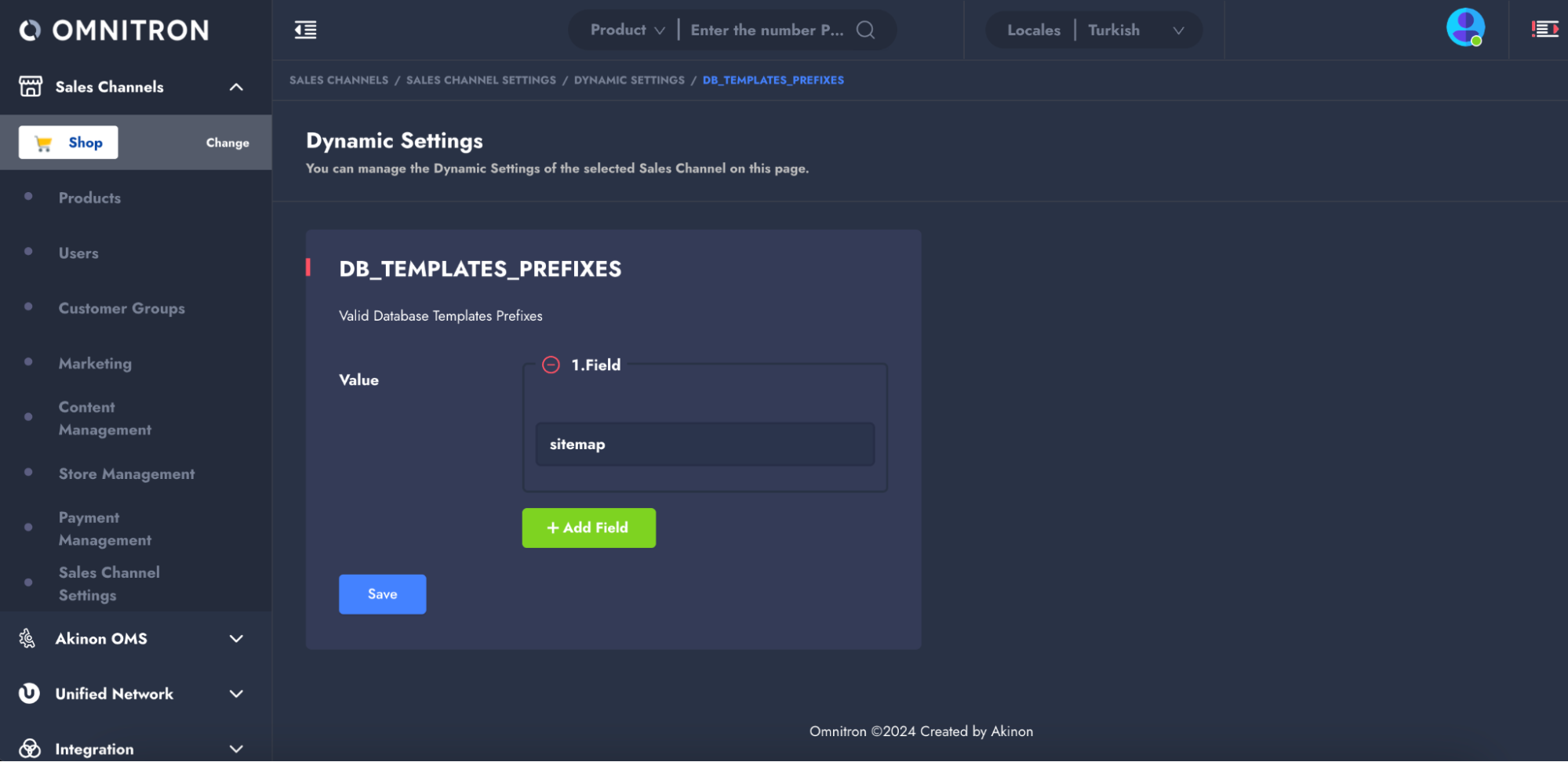
**1.** Add sitemap template prefix to `DB_TEMPLATES_PREFIXES` in Dynamic Settings.

<figure><img src="https://2911598027-files.gitbook.io/~/files/v0/b/gitbook-x-prod.appspot.com/o/spaces%2FlQinVPnOffBiOp126ldR%2Fuploads%2Fgit-blob-130e439ea18702ec1ef1804a06f959d1b31a8b98%2Fimage.png?alt=media" alt=""><figcaption></figcaption></figure>

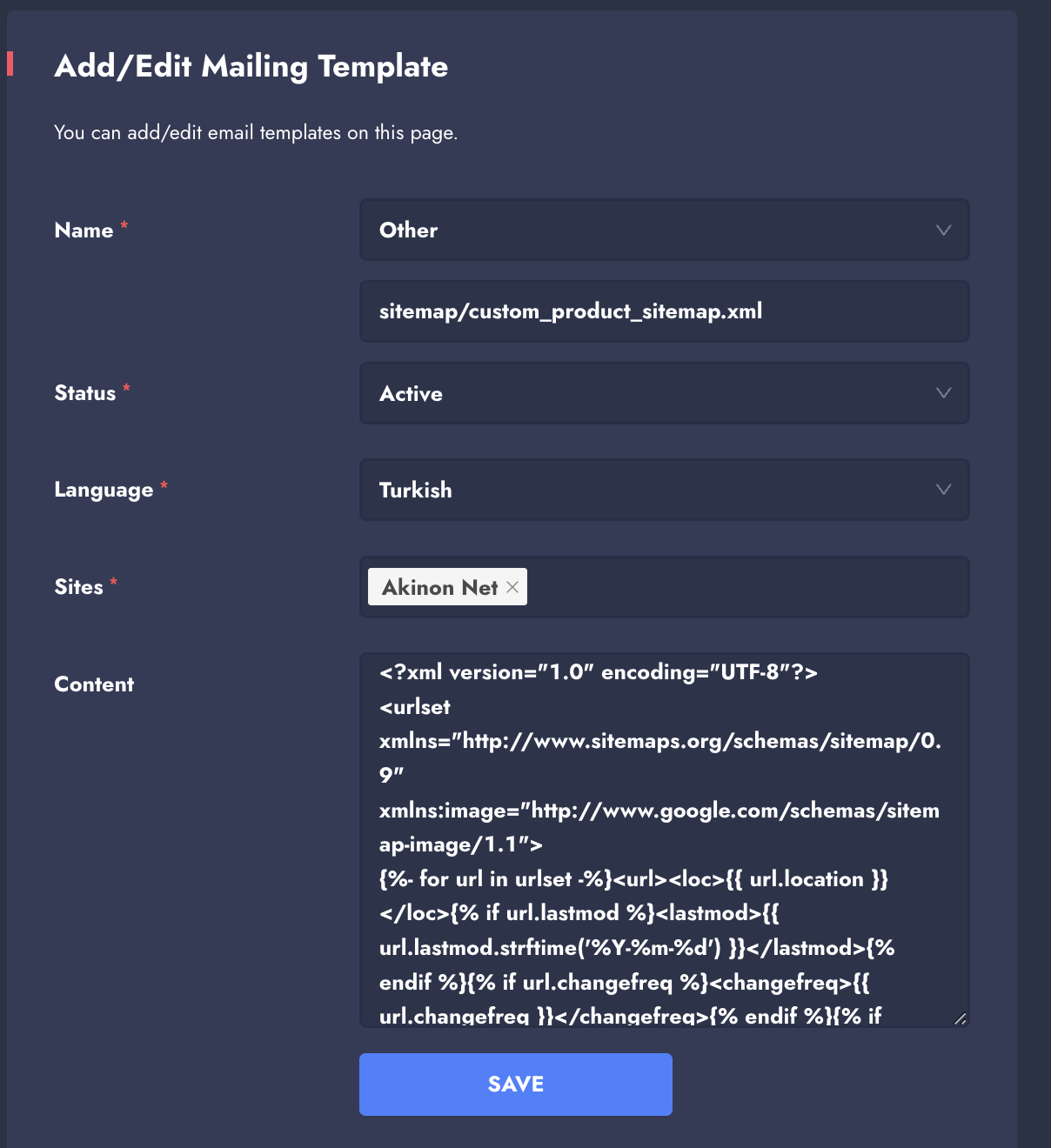
**2.** Create a new template via **Sales Channels>Content Management>Mailing Templates**, filling out fields appropriately. When the "Name" parameter is selected as the "Other", a field will appear allowing manual entry of the name. Here, you should enter the name of the XML file that starts with the sitemap template prefix added in step 1 under dynamic settings (Format: `{sitemap_template_prefix}/{template_name.xml}`). This name is important as it will be used in step

<div align="left"><figure><img src="https://2911598027-files.gitbook.io/~/files/v0/b/gitbook-x-prod.appspot.com/o/spaces%2FlQinVPnOffBiOp126ldR%2Fuploads%2Fgit-blob-191dbe6405c1402cc91502198ca3f193e5596af3%2Fimage.png?alt=media" alt="" width="375"><figcaption></figcaption></figure></div>

**3.** Use a custom XML structure for **Content** field such as:

```xml
<?xml version=\"1.0\" encoding=\"UTF-8\"?>\n
<urlset xmlns=\"http://www.sitemaps.org/schemas/sitemap/0.9\" xmlns:image=\"http://www.google.com/schemas/sitemap-image/1.1\">\n{%- for url in urlset -%}
    <url>
        <loc>{{ url.location }}</loc>{% if url.lastmod %}
        <lastmod>{{ url.lastmod.strftime('%Y-%m-%d') }}</lastmod>{% endif %}
        {% if url.changefreq %}<changefreq>{{ url.changefreq }}</changefreq>{% endif %}
        {% if url.priority %}<priority>{{ url.priority }}</priority>{% endif %} 
        {% for image in url.item.product.productimage_set.all() %}
        <image:image>
            <image:loc>{{ image.image.url }}</image:loc>
            <image:title>{{ (url.item.product.name.replace('ı','i')|slugify).split('-')|join(' ')|title }}</image:title>
        </image:image>{% endfor %}
    </url>
{%- endfor -%}\n
</urlset>
```

**4.** Update the `template` parameter in `SITEMAP_CONFIGURATION` with the name to the custom template (`{sitemap_template_prefix}/{template_name.xml}`) defined in step 2.

```json
{
    "excludes": {},
    "filters": {},
    "should_generate": true,
    "enabled": true,
    "priority": 0.5,
    "limit": 50000,
    "template": "sitemap/custom_product_sitemap.xml",
    "i18n": false,
    "include_stock_out_products": true,
    "changefreq": "daily"
}
```

### Manually Triggering the Sitemap

When an update is made and saved in the `SITEMAP_CONFIGURATION` form within Dynamic Settings, the sitemap is automatically updated.

### Accessing the Sitemap

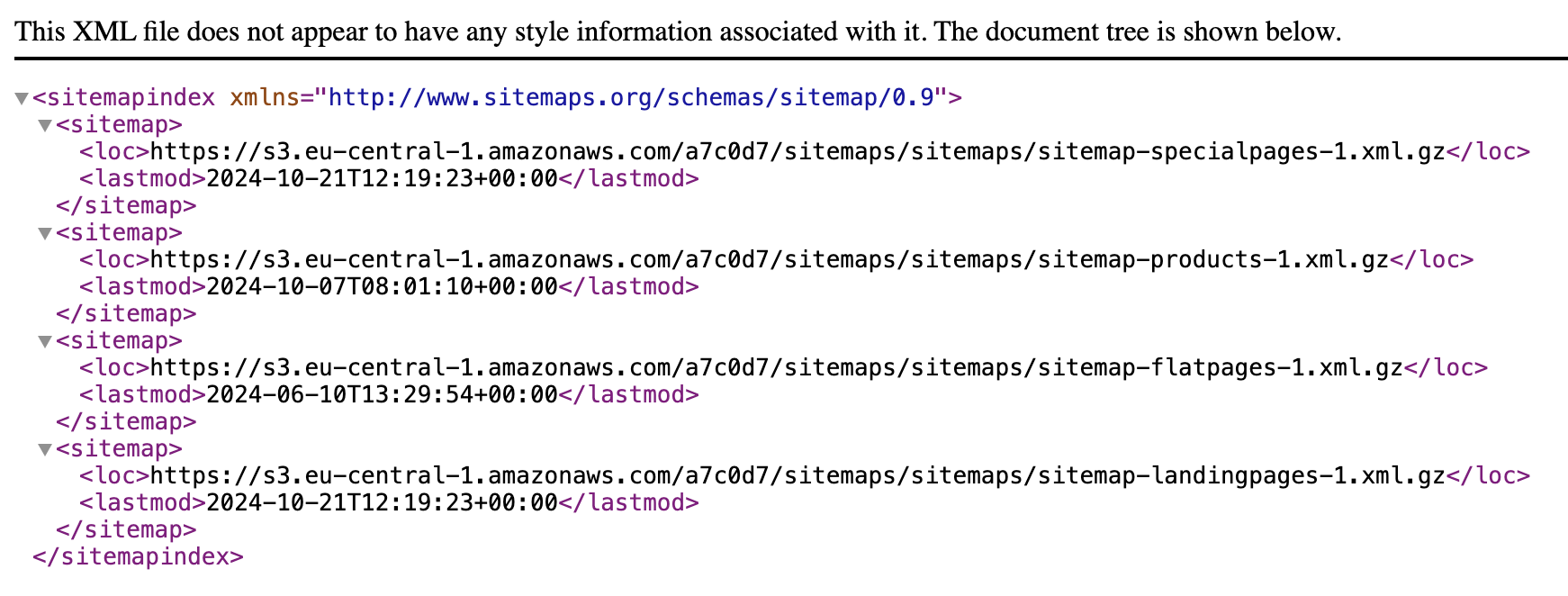
If the sitemap has been generated, it can be accessed by `{commerce\_url/storefront\_url}/sitemap.xml`.

If you have multi-language support, your storefront URL may change depending on the language of the site. The storefront URL is linked to the URL path of the site in the specific language. For example, if your website supports both English and Spanish, the URLs for the sitemaps could look like:

* For English: `{commerce_url}/en/sitemap.xml`
* For Spanish: `{commerce_url}/es/sitemap.xml`

## <mark style="color:red;">Pages</mark> <a href="#pages" id="pages"></a>

This section outlines the filtering and configuration options for various pages included in a sitemap. Each page type —**Landing Page**, **Category**, **Flat Page**, **Special Page**, and **Product**— has specific criteria, default settings, and fields available for filtering.

### 1. Landing Page

During the filtering process for Landing Pages:

* **filters**: Landing Pages are included based on specified criteria.
* **excludes**: Landing Pages are excluded based on specified criteria.

***Default Settings:***

<table><thead><tr><th width="168.23828125">Key</th><th width="168.16796875">Default Value</th><th>Type</th></tr></thead><tbody><tr><td>excludes</td><td>{}</td><td>Dict</td></tr><tr><td>filters</td><td>{}</td><td>Dict</td></tr><tr><td>should_generate</td><td>true</td><td>Boolean</td></tr><tr><td>enabled</td><td>false</td><td>Boolean</td></tr><tr><td>priority</td><td>0.5</td><td>Float</td></tr><tr><td>limit</td><td>50000</td><td>Integer (Min:1, Max:50000)</td></tr><tr><td>template</td><td>sitemap.xml</td><td>String</td></tr><tr><td>i18n</td><td>false</td><td>Boolean</td></tr><tr><td>changefreq</td><td>daily</td><td>Choice String ['always', 'hourly', 'daily', 'weekly', 'monthly', 'yearly', 'never']</td></tr></tbody></table>

***Fields:***

The following fields can be used for filtering:

* id
* created\_date
* modified\_date
* name
* url
* template
* is\_active

#### Example Configuration

```json
{
  "excludes": {
    "template__icontains": "test",
    "name__icontains": "temporary",
  },
  "template": "sitemap.xml",
  "enabled": true,
  "priority": 0.5,
  "limit": 50000,
  "filters": {
    "is_active": true,
    "url__startswith": "/landing/",
  },
  "i18n": false,
  "changefreq": "daily"
}
```

`excludes` Field:

* `template__icontains: "test"`\
  Excludes landing pages using templates containing "test" in their names, as they are likely for staging or experimentation.
* `name__icontains: "temporary"`\
  Excludes landing pages with "temporary" in their names, as these are usually not relevant for long-term indexing.

`filters` Field:

* `is_active: true`\
  Includes only active landing pages to ensure they are relevant for users and search engines.
* `url__startswith: "/landing/"`\
  Includes landing pages where the URL begins with "/landing/", indicating that they are categorized as landing pages.

### 2. Category

During the filtering process for Categories:

* **filters**: Category Pages are included based on specified criteria.
* **excludes**: Category Pages are excluded based on specified criteria.

{% hint style="warning" %}
If `depth` is not defined in `excludes`, Categories with `depth=1` are excluded by default. *(*`depth` *refers to the level of hierarchy in a category tree, indicating how many layers or levels deep a category is within the structure.)*
{% endhint %}

***Default Settings:***

<table><thead><tr><th width="170.87109375">Key</th><th width="132.8203125">Default Value</th><th>Type</th></tr></thead><tbody><tr><td>excludes</td><td>{}</td><td>Dict</td></tr><tr><td>filters</td><td>{}</td><td>Dict</td></tr><tr><td>should_generate</td><td>true</td><td>Boolean</td></tr><tr><td>enabled</td><td>true</td><td>Boolean</td></tr><tr><td>priority</td><td>0.5</td><td>Float</td></tr><tr><td>limit</td><td>50000</td><td>Integer (Min:1,Max:50000)</td></tr><tr><td>template</td><td>sitemap.xml</td><td>String</td></tr><tr><td>i18n</td><td>false</td><td>Boolean</td></tr><tr><td>changefreq</td><td>daily</td><td>Choice String ['always', 'hourly', 'daily', 'weekly', 'monthly', 'yearly', 'never']</td></tr></tbody></table>

{% hint style="warning" %}
The default value of `i18n` is taken from the `PRETTY_URL_MULTI_LANGUAGE` setting in the `ENV` file and is set to "False". This setting manages multilingual URL structures.
{% endhint %}

***Fields:***

The following fields can be used for filtering:

* id
* created\_date
* modified\_date
* uuid
* path
* depth
* numchild
* order
* name

#### Example Configuration

```json
{
  "excludes": {
    "name__icontains": "test",
  },
  "template": "sitemap.xml",
  "enabled": true,
  "priority": 0.5,
  "limit": 50000,
  "filters": {
    "depth__lte": 3,
    "name__icontains": "sale",
  },
  "i18n": false,
  "changefreq": "weekly"
}
```

`excludes` Field:

* `name__icontains: "test"`\
  Excludes categories with "test" in their name (case-insensitive).

`filters` Field:

* `depth__lte: 3`\
  Includes only categories up to level 3 in the hierarchy.
* `name__icontains: "sale"`\
  Includes categories with "sale" in their name (case-insensitive).

### 3. Flat Page

To list Flat Pages, the following condition must be met:

* `registration_required=False` (Authentication): The `registration_required` attribute of the Flat Page must be set to `false`.

During the filtering process for Flat Pages:

* **filters**: Flat Pages are included based on specified criteria.
* **excludes**: Flat Pages are excluded based on specified criteria.

***Default Settings:***

<table><thead><tr><th width="176.0703125">Key</th><th width="155.04296875">Default Value</th><th>Type</th></tr></thead><tbody><tr><td>excludes</td><td>{}</td><td>Dict</td></tr><tr><td>filters</td><td>{}</td><td>Dict</td></tr><tr><td>should_generate</td><td>true</td><td>Boolean</td></tr><tr><td>enabled</td><td>true</td><td>Boolean</td></tr><tr><td>priority</td><td>0.5</td><td>Float</td></tr><tr><td>limit</td><td>50000</td><td>Integer (Min:1,Max:50000)</td></tr><tr><td>template</td><td>sitemap.xml</td><td>String</td></tr><tr><td>i18n</td><td>false</td><td>Boolean</td></tr><tr><td>changefreq</td><td>daily</td><td>Choice String ['always', 'hourly', 'daily', 'weekly', 'monthly', 'yearly', 'never']</td></tr></tbody></table>

{% hint style="warning" %}
The default value of `i18n` is taken from the `PRETTY_URL_MULTI_LANGUAGE` setting in the `ENV` file and is set to "False". This setting manages multilingual URL structures.
{% endhint %}

***Fields:***

The following fields can be used for filtering:

* id
* url
* title
* content
* enable\_comments
* template\_name
* registration\_required

#### Example Configuration

```json
{
  "excludes": {
    "template_name__contains": "test",
    "content__exact": "draft"
  },
  "template": "sitemap.xml",
  "enabled": true,
  "priority": 0.6,
  "limit": 10000,
  "filters": {
    "enable_comments": false,
    "registration_required": false,
    "url__startswith": "/public/",
    "title__icontains": "guide"
  },
  "i18n": false,
  "changefreq": "monthly"
}
```

`excludes` Field:

* `template_name__icontains: "test"`\
  Excludes pages using templates with "test" in their name (case-sensitive).
* `content__icontains: "draft"`\
  Excludes pages where the content is matched "draft" exactly.

`filters` Field:

* `enable_comments: false`\
  Includes pages where comments are disabled to focus on static, indexable content.
* `registration_required: false`\
  Includes only pages that do not require registration to ensure public accessibility.
* `url__startswith: "/public/"`\
  Includes pages where the URL starts with "/public/", indicating public-facing pages.
* `title__icontains: "guide"`\
  Includes pages with "guide" in their title.

### 4. Special Page

To list Special Pages, the following conditions must be met:

* The Special Page must be active.
* The Special Page must have a pretty URL.

During the filtering process for Special Pages:

* **filters**: Special Pages are included based on specified criteria.
* **excludes**: Special Pages are excluded based on specified criteria.

***Default Settings:***

<table><thead><tr><th width="188.96875">Key</th><th width="194.83203125">Default Value</th><th>Type</th></tr></thead><tbody><tr><td>excludes</td><td>{}</td><td>Dict</td></tr><tr><td>filters</td><td>{}</td><td>Dict</td></tr><tr><td>should_generate</td><td>true</td><td>Boolean</td></tr><tr><td>enabled</td><td>false</td><td>Boolean</td></tr><tr><td>priority</td><td>0.9</td><td>Float</td></tr><tr><td>limit</td><td>50000</td><td>Integer (Min:1,Max:50000)</td></tr><tr><td>template</td><td>sitemap.xml</td><td>String</td></tr><tr><td>i18n</td><td>false</td><td>Boolean</td></tr><tr><td>changefreq</td><td>daily</td><td>Choice String ['always', 'hourly', 'daily', 'weekly', 'monthly', 'yearly', 'never']</td></tr></tbody></table>

***Fields:***

The following fields can be used for filtering:

* id
* created\_date
* modified\_date
* name
* url
* template
* banner
* banner\_mobile
* banner\_url
* banner\_description
* is\_active
* extraction\_strategy
* video\_embedded\_code

#### Example Configuration

```json
{
  "excludes": {
    "name__icontains": "test",
    "banner__isnull": true
  },
  "template": "sitemap.xml",
  "enabled": true,
  "priority": 0.8,
  "limit": 1000,
  "filters": {},
  "i18n": true,
  "changefreq": "weekly"
}
```

`excludes` Field:

* `name__icontains: "test"`\
  Excludes pages with "test" in the name, often used for staging or testing purposes.
* `banner__isnull: true`\
  Excludes pages without a banner, as banners are a critical design element for special pages.

### 5. Product

When listing products, if the `is_hidden` attribute exists, only products where `is_hidden` is `None` or `false` are considered.

To list products, the following conditions must also be met:

* `is_active=True`: The product must be active.
* `is_listable=True`: The product must be listable.
* Stock transactions must have been performed within the last 30 days.

During the filtering process for products:

* **filters**: Product Pages are included based on specified criteria.
* **excludes**: Product Pages are excluded based on specified criteria.

***Default Settings:***

<table><thead><tr><th width="237.41796875">Key</th><th width="184.44140625">Default Value</th><th>Type</th></tr></thead><tbody><tr><td>excludes</td><td>{}</td><td>Dict</td></tr><tr><td>filters</td><td>{}</td><td>Dict</td></tr><tr><td>should_generate</td><td>true</td><td>Boolean</td></tr><tr><td>enabled</td><td>false</td><td>Boolean</td></tr><tr><td>priority</td><td>0.5</td><td>Float</td></tr><tr><td>limit</td><td>50000</td><td>Integer (Min:1,Max:50000)</td></tr><tr><td>template</td><td>sitemap.xml</td><td>String</td></tr><tr><td>i18n</td><td>false</td><td>Boolean</td></tr><tr><td>include_stock_out_products</td><td>true</td><td>Boolean</td></tr><tr><td>changefreq</td><td>daily</td><td>Choice String ['always', 'hourly', 'daily', 'weekly', 'monthly', 'yearly', 'never']</td></tr></tbody></table>

{% hint style="warning" %}
The default value of `i18n` is taken from the `PRETTY_URL_MULTI_LANGUAGE` setting in the `ENV` file and is set to "False". This setting manages multilingual URL structures.
{% endhint %}

{% hint style="warning" %}
The default value of `include_stock_out_products` is taken from the `INCLUDE_STOCK_OUT_PRODUCTS_ON_SITEMAP` setting in the `ENV` file and is set to "True". This setting determines whether out-of-stock products are included in the sitemap.
{% endhint %}

***Fields:***

The following fields can be used for filtering:

* id
* created\_date
* modified\_date
* name
* base\_code
* sku
* listing\_code
* is\_seller\_product
* is\_form\_required
* product\_\_productstock\_\_stock
* product\_\_productprice\_\_price

#### Example Configuration

```json
{
  "excludes": {
    "is_seller_product": true,
  },
  "template": "sitemap.xml",
  "enabled": true,
  "priority": 0.7,
  "limit": 50000,
  "filters": {
    "base_code__startswith": "PRD-",
    "product__productstock__stock__gt":0
  },
  "i18n": false,
  "include_stock_out_products": true,
  "changefreq": "daily"
}
```

`excludes` Field:

* `is_seller_product: true`\
  Excludes products that are exclusively managed by sellers, as they might not meet certain criteria for direct indexing.

`filters` Field:

* `base_code__startswith: "PRD-"`\
  Includes products with a base code that starts with "PRD-", signifying a standard product classification.
* `product__productstock__stock__gt: 0`\
  Includes only products with stock levels greater than 0 in the sitemap.