> For the complete documentation index, see [llms.txt](https://docs.akinon.com/llms.txt). Markdown versions of documentation pages are available by appending `.md` to page URLs; this page is available as [Markdown](https://docs.akinon.com/tutorials/commerce/how-to-enable-passwordless-registration-and-otp-login.md).
# How to Enable Passwordless Registration and OTP Login
By default, Commerce requires every customer to choose a password when registering. This document explains how to make password optional at sign-up, so that customers can create an account and sign back in using only a one-time code sent by SMS — no password ever needed.
Commerce already supports OTP login out of the box: a registered customer can sign in by entering their phone number and confirming a code sent by SMS. What this guide adds is **passwordless registration** — letting customers create accounts without choosing a password in the first place.
## 1. Overview
`PasswordlessRegisterSerializer` makes the `password` field optional at `POST /users/registration/`. A customer who registers without a password gets an account with an unusable password — standard password sign-in never works for that account, so **OTP login becomes their only sign-in route**.
**What does not change**
* Existing customers with usable passwords are not affected — they can still sign in the way they always have.
* The OTP login endpoint (`POST /users/otp-login/`) is unchanged. Customers identify themselves with their phone number, exactly as before.
**Configuration surface**
| What | Where | Value | Reference | Section |
| ------------------------------------------------ | --------------------------------------------- | ------------------------------------------------------------------------------------------------ | ---------------------------------------------------------------------------------------------------------- | ------------------ |
| Switch registration to the OTP-capable view | `REST_REGISTER_VIEW` env variable | `omnishop.users.views.RegisterSMSOtpView` | [Environment Variables](https://docs.akinon.com/technical-guides/commerce/environment-variables), entry 70 | [2.1](#id-2-setup) |
| Make password optional at registration | `REST_AUTH_REGISTER_SERIALIZERS` env variable | `{"REGISTER_SERIALIZER": "omnishop.users.resources.serializers.PasswordlessRegisterSerializer"}` | [Environment Variables](https://docs.akinon.com/technical-guides/commerce/environment-variables), entry 71 | [2.1](#id-2-setup) |
| Authentication backend for phone-based OTP login | `AUTHENTICATION_BACKENDS` env variable | Must include `omnishop.users.backends.PhoneNumberAuthenticationBackend` | [Environment Variables](https://docs.akinon.com/technical-guides/commerce/environment-variables), entry 72 | [2.2](#id-2-setup) |
| Attempt budget, code lifetime, resend cooldown | `OTP_PURPOSE_SETTINGS` dynamic setting | See [2.3](#id-2-setup) | [Dynamic Settings](https://docs.akinon.com/technical-guides/commerce/dynamic-settings), section 141 | [2.3](#id-2-setup) |
{% hint style="info" %}
The SMS gateway must be configured and operational before any of this works: see the [`SMS_GATEWAY` and `SMS_GATEWAYS`](https://docs.akinon.com/technical-guides/commerce/dynamic-settings#id-42.-smsgateways) entries in Dynamic Settings. Every step below assumes codes can actually be delivered.
{% endhint %}
## 2. Setup
### 2.1. Enabling passwordless registration
Two environment variables must be set together in the Commerce service in ACC.
**First**, switch the registration endpoint to the OTP-capable view:
```
Name: REST_REGISTER_VIEW
Value: omnishop.users.views.RegisterSMSOtpView
```
The default registration view does not support the two-step send/verify flow. `RegisterSMSOtpView` adds that: it sends an OTP on the first request and creates the account only after the code is verified on the second.
The full description of this variable is entry 70 of [Environment Variables](https://docs.akinon.com/technical-guides/commerce/environment-variables).
**Second**, make the `password` field optional:
```
Name: REST_AUTH_REGISTER_SERIALIZERS
Value: {"REGISTER_SERIALIZER": "omnishop.users.resources.serializers.PasswordlessRegisterSerializer"}
```
`PasswordlessRegisterSerializer` extends the OTP registration serializer and marks `password` as optional. Required fields like `first_name`, `phone`, `email` are unchanged.
When a customer registers without providing a password (or provides an empty string), the account is created with an unusable password — only OTP login works for that account.
The full description of this variable is entry 71 of [Environment Variables](https://docs.akinon.com/technical-guides/commerce/environment-variables).
{% hint style="danger" %}
An account with an unusable password can only sign in via OTP. Make sure OTP login is working before enabling passwordless registration — otherwise those customers will have no way to access their account.
{% endhint %}
### 2.2. Registering the authentication backend
OTP login requires an authentication backend to resolve a phone number to an account. `AUTHENTICATION_BACKENDS` must include:
```
omnishop.users.backends.PhoneNumberAuthenticationBackend
```
Whether this is the only entry or sits alongside other backends (e.g. `allauth.account.auth_backends.AuthenticationBackend` for social auth) depends on the project. See entry 72 of [Environment Variables](https://docs.akinon.com/technical-guides/commerce/environment-variables) for the variable itself.
### 2.3. Tuning OTP behaviour with OTP\_PURPOSE\_SETTINGS
This dynamic setting controls the attempt limit, code lifetime, and resend cooldown. Registration challenges have no specific purpose tag, so they resolve against the `default` entry. Every field, its type, and its fallback value are described in section 141 of [Dynamic Settings](https://docs.akinon.com/technical-guides/commerce/dynamic-settings).
1. Log in to **Omnitron** using your own credentials.
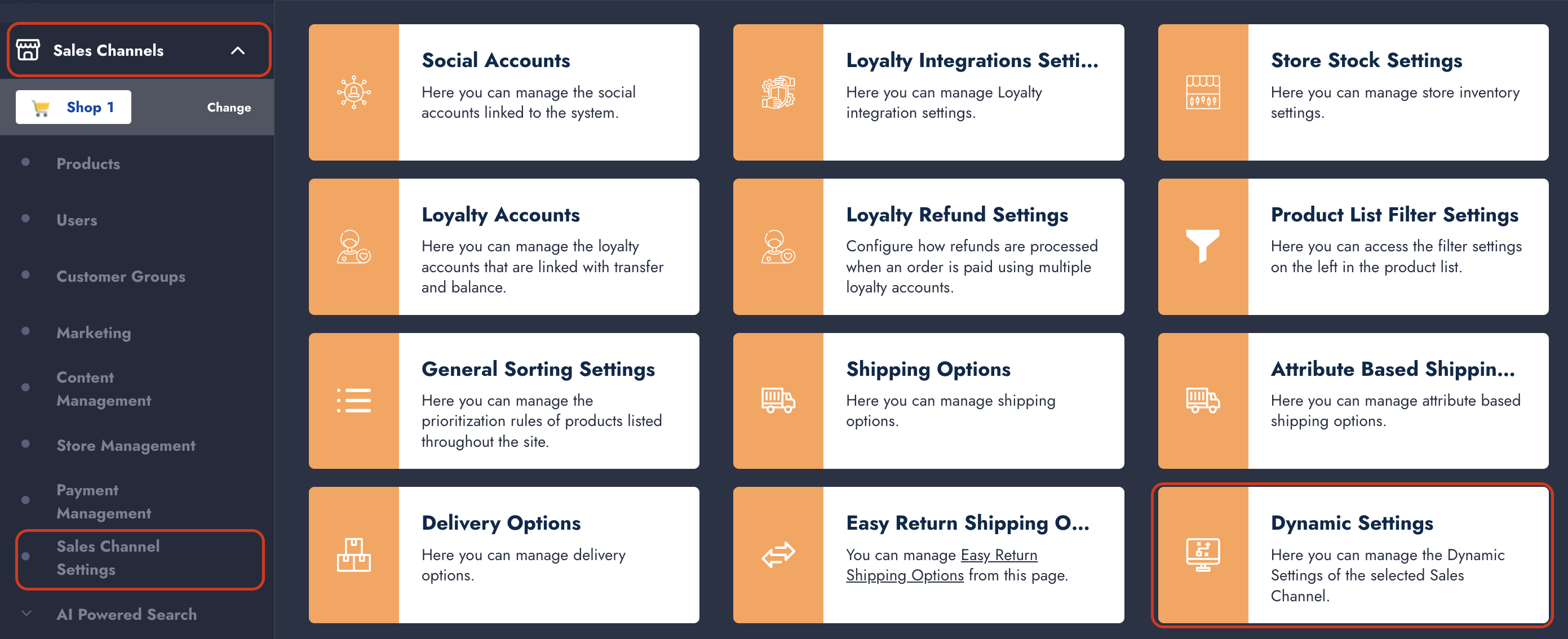
2. Navigate to **Sales Channels → Sales Channel Settings → Dynamic Settings**.
3. Search for **OTP\_PURPOSE\_SETTINGS** in the search box and click on it in the list.
4. Enter the configuration and save it:
```json
{
"default": {"max_attempts": 5, "expire_time": 600, "resent_time_gap": 60}
}
```
| Key | Description |
| ----------------- | ------------------------------------------------------------------------------------------------------------------------ |
| `max_attempts` | Wrong-guess budget for a single code. On reaching it the challenge is discarded and the customer must request a new one. |
| `expire_time` | How long a sent code stays valid, in seconds. |
| `resent_time_gap` | Minimum wait before a new code can be sent for the same challenge, in seconds. |
{% hint style="warning" %}
Set `resent_time_gap` deliberately. Every resend is an SMS you pay for. A cooldown of `0` lets a script drive that cost; a value around a minute is usually enough to stop the abuse without frustrating a customer whose first message was slow to arrive.
{% endhint %}
## 3. The registration flow
Registration is a two-step flow on the same endpoint. The customer submits their details first (the backend sends an OTP), then submits again with the code to create the account. Request and response details for `POST /users/registration/` are in the **Users** OpenAPI specification, under *API Reference → Commerce OpenAPIs → Users*.
1. **Send the code.** Post the registration fields without a `code`. `password` may be omitted or sent as an empty string for a passwordless account:
```json
{
"first_name": "Ada",
"last_name": "Lovelace",
"email": "ada@example.com",
"phone": "05551234567",
"confirm": true
}
```
The response is `202 Accepted` and echoes back the submitted fields (excluding `password` and `code`, which are write-only). An OTP is sent to the provided phone number.
2. **Verify the code.** Repost the same fields with the code appended:
```json
{
"first_name": "Ada",
"last_name": "Lovelace",
"email": "ada@example.com",
"phone": "05551234567",
"confirm": true,
"code": "123456"
}
```
On success the response is `201 Created` and includes an authentication token:
```json
{"key": "9944b09199c62bcf9418ad846dd0e4bbdfc6ee4"}
```
3. **Resending the code.** Add `"resend": true` to the step 1 request and repost it with the same cookie:
```json
{
"first_name": "Ada",
"last_name": "Lovelace",
"email": "ada@example.com",
"phone": "05551234567",
"confirm": true,
"resend": true
}
```
The response is `202 Accepted` with an empty body. The `resent_time_gap` cooldown applies — disable the resend button for that long rather than letting the customer discover the limit through an error.
{% hint style="info" %}
The two steps share a session: the backend uses the session cookie to associate the verification challenge with the registration attempt. Make sure the client sends and preserves the session cookie between the two requests.
{% endhint %}
## 4. The sign-in flow
Sign-in is also a two-step flow on a single endpoint. The same endpoint sends the code and verifies it — the backend infers the step from the session. Request and response details for `POST /users/otp-login/` are in the **Users** OpenAPI specification.
1. **Send the code.** Post the customer's phone number with no `code`:
```json
{"phone": "05551234567"}
```
The response is `200 OK` with an empty body. An OTP is sent to that phone number.
2. **Verify the code.** Repost the same phone number together with the code:
```json
{"phone": "05551234567", "code": "123456"}
```
On success the customer is signed in, a session cookie is set, and the response includes an authentication token and a redirect URL:
```json
{
"key": "9944b09199c62bcf9418ad846dd0e4bbdfc6ee4",
"redirect_url": "/"
}
```
3. **Resending.** Repeat step 1 exactly as it was. There is no separate resend endpoint. The `resent_time_gap` cooldown from `OTP_PURPOSE_SETTINGS` applies — disable the resend button for that long.
**Handling failures**
Branch on `error_code`, not on the message text — messages are translated and will change per language.
| `error_code` | What happened | What to show |
| ------------------------ | ------------------------ | ------------------------------------------------------------------------------------------------------ |
| `sms_verification_100_2` | Wrong code | "The code is incorrect." The challenge is still alive — keep the customer on the same screen. |
| `sms_verification_100_4` | Code expired | "The code has expired." Offer a resend. |
| `sms_verification_100_3` | Resend too soon | "Please wait before requesting a new code." |
| `sms_verification_100_6` | Attempt budget exhausted | The challenge is **discarded**. Send the customer back to step 1 rather than letting them keep trying. |
{% hint style="warning" %}
HTTP 429 (throttled) has no numeric retry field. The number of seconds to wait is embedded in the `detail` message (`"Expected available in N seconds."`). Parse it to show a countdown; otherwise show a generic "please try again shortly".
{% endhint %}
## 5. Verifying the setup
Walk through both flows once as a customer would and confirm each of the following:
**Registration**
1. Submitting the registration form without a `password` field returns `202 Accepted` and triggers an SMS.
2. Submitting the form again with the correct code returns `201 Created` with an authentication token.
3. The created account has no usable password — attempting to sign in with any password should fail.
4. Submitting the form with a password works as before: the account is created and password sign-in succeeds.
5. Submitting a weak password (e.g. `"123"`) returns a `400` validation error. Submitting an empty string does not — it is treated as passwordless.
**Login**
6. Signing in with a phone number returns `200 OK` and triggers an SMS. Entering the correct code signs the customer in.
7. An unknown phone number produces a generic rejection with no hint that it does not exist.
8. Entering a wrong code the configured number of times (`max_attempts`) ends with `sms_verification_100_6`, after which a new code is required rather than another attempt.
9. Requesting a resend immediately returns `sms_verification_100_3`, and succeeds once the `resent_time_gap` has elapsed.
10. An account registered without a password can sign in via OTP and cannot sign in with any password.
---
# Agent Instructions
This documentation is published with GitBook. GitBook is the documentation platform designed so that both humans and AI agents can read, navigate, and reason over technical content effectively. Learn more at gitbook.com.
## Querying This Documentation
If you need additional information that is not directly available in this page, you can query the documentation dynamically by asking a question.
Perform an HTTP GET request on the current page URL with the `ask` query parameter, and the optional `goal` query parameter:
```
GET https://docs.akinon.com/tutorials/commerce/how-to-enable-passwordless-registration-and-otp-login.md?ask=&goal=
```
`ask` is the immediate question: it should be specific, self-contained, and written in natural language.
`goal` is optional and describes the broader end goal you are ultimately trying to accomplish on behalf of the user. GitBook uses it to tailor the answer towards what is most useful for that goal.
The response will contain a direct answer to the question and relevant excerpts and sources from the documentation.
Use this mechanism when the answer is not explicitly present in the current page, you need clarification or additional context, or you want to retrieve related documentation sections.