> For the complete documentation index, see [llms.txt](https://docs.akinon.com/llms.txt). Markdown versions of documentation pages are available by appending `.md` to page URLs; this page is available as [Markdown](https://docs.akinon.com/tutorials/commerce/how-to-moderate-product-reviews-and-questions.md). Agents can also search and read this documentation through its [MCP server](https://docs.akinon.com/~gitbook/mcp).
# How to Moderate Product Reviews and Questions
This guide explains how to set up and run **moderation of product reviews and questions** in Commerce. Every review and question a customer posts is held back until a moderator approves it. When a moderator rejects one instead, it is never published, and its author is told by e-mail why, and which of your publishing rules it broke.
Every decision is recorded with its date and time, so you can later show a regulator or your legal team what happened to any review, when, and on what grounds. The consumer review regulation in force since 1 August 2026 expects both: that the author of a post that is not published is told why, and that every action on a review can be reported in detail.
## 1. Overview
A new review or question starts hidden and waits for a moderator. The moderator either **approves** it, which publishes it on the storefront, or **rejects** it, which keeps it hidden and sends the author an e-mail with the moderator's explanation and the rule that was broken. A decision can be reversed later.
Customers can post three kinds of conversation, and each follows its own rules:
| | Review | Question | Private message |
| ------------------------------ | ------------------------------------- | ----------------------------------- | --------------------------------------- |
| Moderated before it appears | Yes | Yes | No. It is never public. |
| What it is about | An item from the customer's own order | A product, or nothing in particular | An order item, or nothing in particular |
| Star rating | Required, 1 to 5 | Not allowed | Not allowed |
| Who can start it | The customer only | The customer only | The customer or the seller |
| Seller can reply | No | Yes, and the reply is not moderated | Yes |
| Customer can add more messages | No. A review is written once. | No. The seller answers it. | Yes |
What this feature does:
* **Publishes nothing on its own.** Only a moderator's approval puts a review or question on the storefront.
* **Makes every rejection explain itself.** A moderator cannot reject without writing an explanation and choosing one of your rules, and the author receives both by e-mail.
* **Lets you change your mind, but not repeat yourself.** An approved review can be taken down and a rejected one can be published. The same decision cannot be made twice in a row, so repeating a rejection never e-mails the author a second time.
* **Ties reviews to real purchases.** A review has to name an item from the customer's own order, and by default only once it has been delivered.
* **Records everything.** Every submission, decision and reply is kept with the time it happened and can be listed for reporting. A decision made from Omnitron also names the Omnitron user who made it; see [section 3](#id-3-moderating-reviews-and-questions).
**Settings used in this guide**
| What it controls | Setting | Where | Section |
| ------------------------------------------ | --------------------------------------------------------------- | ------------------------------------------------------------------------------------------------------------------------------------------ | ------------------ |
| The rules a moderator cites when rejecting | Rejection reasons | Omnitron API, see [Conversation & Messages](https://docs.akinon.com/technical-guides/commerce/conversation-and-messages#rejection-reasons) | [2.1](#id-2-setup) |
| Whether a review has to wait for delivery | `REVIEW_REQUIRES_PURCHASE` | Dynamic Settings, section 148 | [2.2](#id-2-setup) |
| Wording of the rejection e-mails | **Review Rejected** and **Question Rejected** mailing templates | [E-mail Templates](https://docs.akinon.com/technical-guides/commerce/e-mail-templates), entries 24 and 25 | [2.3](#id-2-setup) |
| Whether the rejection e-mails are sent | `DISABLED_EMAIL_TEMPLATES` | Dynamic Settings, section 138 | [2.3](#id-2-setup) |
| Copies of the rejection e-mails | `EMAIL_BCC_AND_CC` | Dynamic Settings, section 132 | [2.3](#id-2-setup) |
The dynamic settings are documented in [Dynamic Settings](https://docs.akinon.com/technical-guides/commerce/dynamic-settings).
{% hint style="warning" %}
The moderation screens are not yet available in Omnitron. Until they are released, rejection reasons, approvals, rejections and the reporting feed are handled through the Omnitron API. Each step below says what to do and links to the page that describes the request. This guide will be updated once the screens are released.
{% endhint %}
## 2. Setup
### 2.1. Creating rejection reasons
A rejection reason is one of your published rules, such as "no insults" or "no personal data". A moderator has to cite one every time they reject a review or question, and the author sees its wording in the rejection e-mail.
**Nothing can be rejected until at least one active rejection reason exists.** Until then, every rejection is refused.
1. Agree the list of rules with your legal or content team. They should match the publishing rules you show to customers.
2. Create each rule through the Omnitron API. The request is described under **Rejection Reasons** in [Conversation & Messages](https://docs.akinon.com/technical-guides/commerce/conversation-and-messages#rejection-reasons).
Each rule has three parts:
* **A short code**, such as `profanity`, that identifies the rule for good. Reports group rejections by this code, so choose one that will never need to change.
* **The text the author will read.** It is quoted in the rejection e-mail as the rule the post broke, so write it for the customer. If your storefront has more than one language, also store the text in each of them (`translations`): the e-mail quotes the rule in the author's language when a translation exists, and the stored text otherwise.
* **Whether it is active.** Moderators can cite only active rules. A new rule is active.
**Example set of rules:**
| Code | Text |
| --------------- | ---------------------------------------------------------------- |
| `profanity` | Contains profanity or insults |
| `personal-data` | Shares personal information such as a phone number or an address |
| `off-topic` | Is not about the product |
| `advertising` | Contains advertising or links to other websites |
{% hint style="warning" %}
**Retire a rule instead of deleting it.** Once a rule has been cited in a rejection, it cannot be deleted: the request is refused, because the rejection record points to it. Make it inactive instead. A retired rule can no longer be cited, and past rejections keep pointing to it. A rule that has never been cited can be deleted.
{% endhint %}
{% hint style="info" %}
Reports show a rule's **current** wording next to its code, including for rejections made before you edited it. The e-mails already sent keep the wording they had. Fixing a typo is fine. If the meaning of a rule changes, retire it and create a new one with a new code, so past rejections keep reading as they were decided.
{% endhint %}
### 2.2. Deciding when a customer can review (REVIEW\_REQUIRES\_PURCHASE)
A review is always tied to an item from the customer's own order. This setting decides whether that item also has to be delivered first. It is on by default.
1. Log in to **Omnitron** using your own credentials.
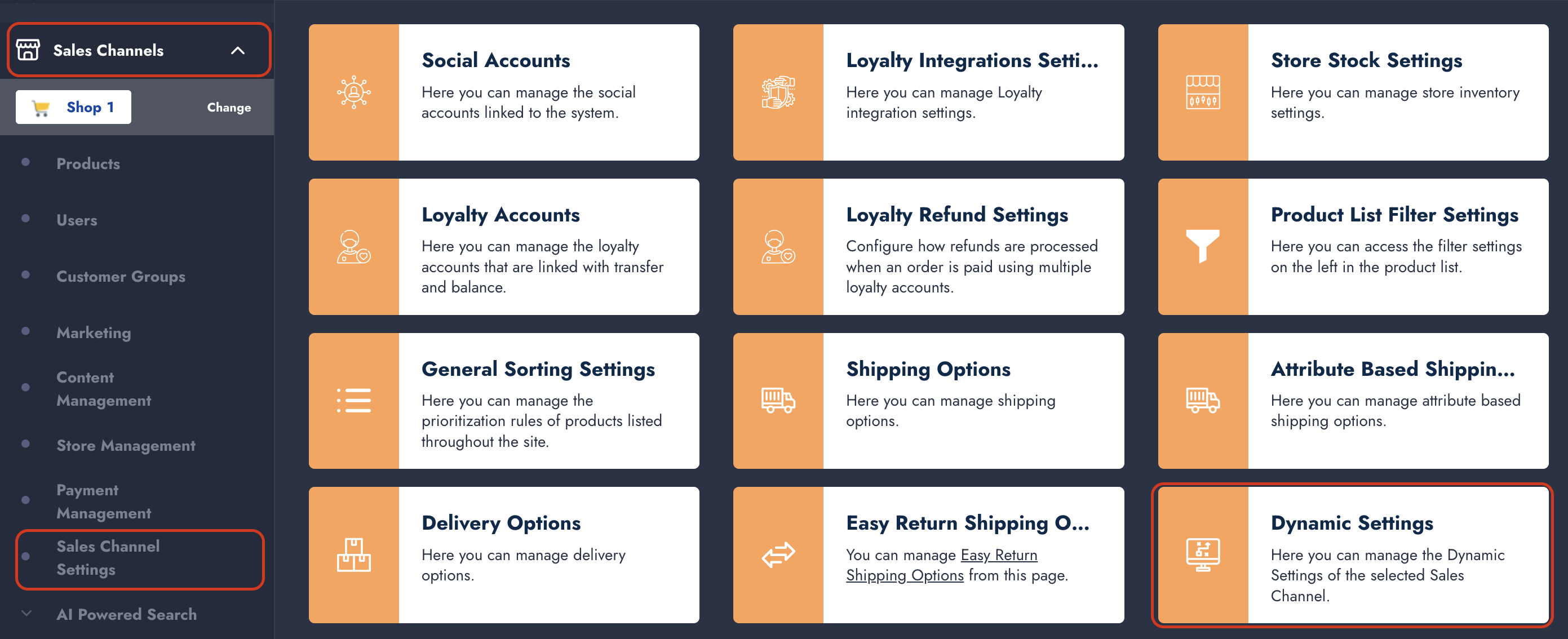
2. Go to **Sales Channels → Sales Channel Settings → Dynamic Settings**.
3. Type **REVIEW\_REQUIRES\_PURCHASE** in the search box and click it in the list.
4. Choose the value and save.
| Value | What it means |
| ---------------- | --------------------------------------------------------------------------------------------------------------------------------------- |
| `true` (default) | A customer can review an item only after it has been delivered to them. An item that was refunded afterwards can no longer be reviewed. |
| `false` | A customer can review an item as soon as they have bought it, for example while it is still being shipped. |
Whatever the value, a review must name an item from the customer's **own** order, must carry a star rating, and each purchased item can be reviewed only once. A rejected review does not count toward that limit, so the customer can write a new one for the same item.
{% hint style="info" %}
Despite its name, the setting controls **delivery**, not purchase: ownership of the purchase is checked in both cases. It affects reviews only. Questions need no order at all, and any signed-in customer can ask one.
{% endhint %}
See section 148 of [Dynamic Settings](https://docs.akinon.com/technical-guides/commerce/dynamic-settings) for the full description.
### 2.3. Preparing the rejection e-mails
When a review or question is rejected, its author receives an e-mail saying it was not published, the moderator's explanation and the rule that was broken. There is one template for reviews and one for questions, each with its own subject template.
{% hint style="danger" %}
**The body shipped with Commerce is in Turkish only.** Customers who use your site in another language still receive the Turkish text until you add a template for their language. When there is no template in their language, a template saved in your site's default language is used instead, if there is one. Review both templates before you start rejecting.
{% endhint %}
1. In **Omnitron**, go to **Sales Channels → Content Management → Mailing Templates**.
2. Add a template named **Review Rejected**, choose the language, and enter the content. Repeat for each language you sell in.
3. Do the same for **Review Rejected Subject**, **Question Rejected** and **Question Rejected Subject**.
For the steps on that screen, see [How to Manage Mailing Templates in Omnitron?](https://docs.akinon.com/tutorials/omnitron/sales-channels/content-management/how-to-manage-mailing-templates-in-omnitron.md).
| Template | Path |
| ------------------------- | --------------------------------------------- |
| Review Rejected | `emails/users/review-rejected.html` |
| Review Rejected Subject | `emails/users/review-rejected-subject.html` |
| Question Rejected | `emails/users/question-rejected.html` |
| Question Rejected Subject | `emails/users/question-rejected-subject.html` |
Keep these three things in every version of the body, since they are what the author must be told:
| Value | What it shows |
| -------------------------------------------- | ------------------------------------------------------------------------------------------------------------- |
| `reason_detail` | The explanation the moderator wrote, exactly as they wrote it. |
| `rejection_reason.text` | The wording of the rule the moderator cited, in the author's language when the rule has a translation for it. |
| A sentence saying the post was not published | Plain text in the template. |
The template also receives the rejected review or question itself, including its author's name (for example `conversation.user.first_name`), and your site's domain. The full list of values is in entries 24 and 25 of [E-mail Templates](https://docs.akinon.com/technical-guides/commerce/e-mail-templates).
How the e-mail is sent:
* It goes to the author's e-mail address, in the language saved on their account. If none is saved, the language active when the moderator acts is used.
* It is sent once for each rejection, including when a review that was already published is taken down. Word the text so that it fits both cases.
* Approving never sends an e-mail.
* If the subject template comes out empty, the generic subject "Your post was not published." is used.
**Keep the e-mails switched on.** Both are enabled by default. In the `DISABLED_EMAIL_TEMPLATES` dynamic setting (section 138), the keys `emails/users/review-rejected` and `emails/users/question-rejected` must be left out or set to `false`.
{% hint style="danger" %}
If either template is disabled, or its content cannot be rendered (for example because of a template syntax error), rejections still go through, but the author is never told. That breaks the notification the regulation requires, and nothing warns you that it happened.
{% endhint %}
**Keeping a copy (optional).** To send a copy of each rejection e-mail to, for example, your legal team, open the `EMAIL_BCC_AND_CC` dynamic setting and, under the keys `emails/users/review-rejected` and `emails/users/question-rejected`, add the addresses that should receive it, either as a visible copy (cc) or a hidden copy (bcc). If the setting already holds entries for other templates, keep them and add these alongside. The setting is described in section 132 of [Dynamic Settings](https://docs.akinon.com/technical-guides/commerce/dynamic-settings#id-132.-email-bcc-and-cc).
## 3. Moderating reviews and questions
The requests for listing, approving and rejecting are described under **Moderation** in [Conversation & Messages](https://docs.akinon.com/technical-guides/commerce/conversation-and-messages#moderation). Every decision is recorded with its date and time.
{% hint style="info" %}
**Who decided is recorded with the Omnitron user.** Decisions made from Omnitron all use the same Omnitron integration account, so the staff account on a decision is the same for everyone. The moderator is recorded separately, as the Omnitron user the request was made for (e-mail address, username and Omnitron user ID).
{% endhint %}
### 3.1. Finding what is waiting
List conversations with the `status` filter set to `pending`. This returns every review and question waiting for a decision. You can narrow the list further, for example to reviews only, to one seller, to one product or to a date range.
Each item carries its own history, so a moderator can see what has already happened to it before deciding.
{% hint style="warning" %}
**Reviews and questions posted before moderation was introduced do not appear under `pending`.** Their status is empty. They stay as they were: the ones that were public remain public, and the ones that were hidden remain hidden. You can still approve or reject them like a pending item. To find them, list conversations without the status filter, limited to dates before moderation was introduced, and look for items with no status.
{% endhint %}
Private messages have no status and never appear in the queue: they are not moderated and cannot be approved or rejected.
### 3.2. Approving
Approving a review or question publishes it:
* It appears in the storefront's public reviews or public questions for the product.
* An approved review with a star rating starts counting toward the product's rating. See [section 6](#id-6-notes-for-the-storefront-team).
* The approval is recorded with its date and time. No e-mail is sent.
### 3.3. Rejecting
A rejection needs two things. If either is missing, nothing changes and no e-mail is sent.
| Field | Description |
| ----------------------------- | ------------------------------------------------------------------------------------------------------------------------------------------- |
| Explanation (`reason_detail`) | Your own words on why the post was not published, up to 500 characters. It is sent to the author exactly as written, so address it to them. |
| Rule (`rejection_reason`) | One of your active rejection reasons from [section 2.1](#id-2-setup). |
When the rejection goes through:
* The review or question stays hidden, or is removed from the storefront if it was public.
* A rejected review stops counting toward the product's rating.
* The author receives the rejection e-mail from [section 2.3](#id-2-setup).
* The rejection is recorded with its date and time, the explanation and the rule.
The author can post again. A rejected review does not use up the purchase, so the customer can write a new review of the same item, which then goes through moderation like any other.
{% hint style="info" %}
A rejection cannot be edited afterwards. To correct the explanation or the rule, you would have to approve the post and reject it again, which publishes it in between and sends the author a second e-mail. Check both before you reject.
{% endhint %}
### 3.4. Changing a decision
A decision can be reversed, but not repeated:
| From | To | Effect |
| -------- | --------------------------------- | ----------------------------------------------------------------------------------------------------------------------- |
| Pending | Approved or rejected | The normal decision. |
| Approved | Rejected | Takes the post down. The author receives the rejection e-mail. |
| Rejected | Approved | Publishes the post. No e-mail is sent. The earlier rejection stays in the history. |
| Approved | Approved, or rejected to rejected | Refused. This keeps the author from receiving the same e-mail twice and keeps reports from counting one decision twice. |
{% hint style="warning" %}
Visibility now follows moderation only. The former public/private switch for conversations no longer changes anything: it is refused with an explanation, and editing a conversation can neither make it public nor change its type or its author, so a review cannot be taken off the storefront by turning it into a message or be moved to another customer. If your own tools used that switch, move them to approve and reject.
{% endhint %}
## 4. Answering questions
A seller answers a question by replying to it through the Omnitron API, as described under **Messages** in [Conversation & Messages](https://docs.akinon.com/technical-guides/commerce/conversation-and-messages#messages).
* **Replies are not moderated.** A reply is attached to the question at once. It shows on the storefront together with the question, so it is visible as soon as the question is approved, or immediately if the question already is.
* **The customer is told.** The customer receives the **Conversation Replied** e-mail in their own language, even while the question is still pending. Moderate the question first, then answer it: otherwise a customer can receive your answer and then a rejection for the same question.
* **The question is marked as answered** when the seller replies. It can also be marked as answered or unanswered by hand, and both are recorded.
* **The customer cannot add to a question.** A question is asked once and the seller answers it. A follow-up is a new question.
**Reviews cannot be replied to.** A review is the customer's verdict on a purchase, and the seller cannot reply to it or add to it. If a review breaks one of your rules, reject it. Otherwise, it stands as written.
Private messages work both ways: the customer and the seller can both keep writing, and nothing is moderated or published.
## 5. Reporting and audit requests
Every action on every review, question and private message is recorded, and all of it can be listed through the **conversation events** feed in the Omnitron API. It is the place to go when a regulator, your legal team or a customer asks what happened to a post. The request and its filters are described under **Audit Trail and Reporting** in [Conversation & Messages](https://docs.akinon.com/technical-guides/commerce/conversation-and-messages#audit-trail-and-reporting).
| Event | Recorded when | Who is recorded |
| ----------------- | --------------------------------------------------------------------------------- | ----------------------------------------------------------------------------------------------------- |
| Submitted | A review, question or private message is posted, with the text that was posted | Nobody for a customer's post; the Omnitron user when the seller opens a private message from Omnitron |
| Approved | A moderator approves | The Omnitron user who approved |
| Rejected | A moderator rejects, with the explanation and the rule | The Omnitron user who rejected |
| Replied | The seller replies, with the reply text | The Omnitron user who replied |
| Marked answered | The seller replies, or someone marks the conversation as answered | The Omnitron user who replied or marked it |
| Marked unanswered | The customer writes again in a private message, or someone marks it as unanswered | The Omnitron user who marked it, or nobody when it follows a customer message |
The Omnitron user is recorded for actions taken from Omnitron. Approvals, rejections and answered-status changes made by hand also carry the staff account the request was made with, which is the same Omnitron integration account for everyone. Submissions, replies and the answered-status changes a message causes carry no staff account.
You can filter the feed by event type, by conversation, by seller and by date range, and sort it oldest or newest first. Some typical requests:
| You are asked for | Filter by |
| -------------------------------------------------- | ---------------------------------------------------------------------------------------------------------------------------- |
| Every review rejected in a period, with the reason | Event type **Rejected** and the date range. Group the results by rule code. |
| The full history of one review | That conversation |
| How quickly posts are moderated | Event types **Submitted**, **Approved** and **Rejected**, one request per type, then compare the times for each conversation |
| Everything that happened on one seller's products | That seller |
Things to know about the history:
* It is returned by the Omnitron API and sent in the conversation reply webhook. It is never shown to customers.
* It starts when moderation was introduced. Posts created before then have no **Submitted** entry.
* If a reply is later deleted, its **Replied** entry remains, but without the text.
* The rule shown on a rejection is the rule's current wording. The code does not change. See [section 2.1](#id-2-setup).
## 6. Notes for the storefront team
The request and response details for posting and listing reviews are in [User Support & Conversation](https://apidocs.akinon.com/commerce/users/user-support-and-conversation), and the public listings under **Public Questions & Reviews** in [Conversation & Messages](https://docs.akinon.com/technical-guides/commerce/conversation-and-messages#public-questions--reviews).
**Posting a review.** A review has to:
* name an item from the signed-in customer's own order (not the product itself),
* carry a star rating from 1 to 5,
* include a text of up to 500 characters: stars alone are not accepted.
By default the order item must be delivered and not refunded (see [section 2.2](#id-2-setup)), and each purchased item can have only one review that has not been rejected (pending, approved, or written before moderation was introduced). A review that breaks any of these rules is refused with an error.
**Posting a question.** A question is about a product, or about nothing in particular. It cannot carry a rating, and the customer cannot add further messages to it.
**Sending it to the right seller.** The product or order item must exist, and on a marketplace the post must be sent to the seller that sells the product or sold the order item. On a single-seller site, where products and order items name no seller, the seller is not checked.
{% hint style="danger" %}
**Everything starts hidden.** A visibility flag sent with a new review or question is ignored. It becomes public only when a moderator approves it, so after posting, tell the customer that their review or question is waiting for approval.
{% endhint %}
**Showing customers their own posts.** A customer's own list includes their pending and rejected posts with their status, so you can show "Waiting for approval" or "Not published" next to them.
**Public reviews and questions.** Only approved posts are listed, along with older posts that were already public before moderation was introduced. The author appears by display name only, the first name and the initial of the last name, for example "Ahmet Y."; e-mail addresses, phone numbers and order numbers are not shown, and the listing cannot be searched by a customer's name or an order number. Filtering by product also finds reviews written for order items of that product. To show the reviews of all variants on one page, filter by the product's base code.
**Star rating on product pages.** Product detail, group product and product listing responses carry `review_stats`, with the number of reviews counted and their average rating, rounded to two decimals. The average is empty when no review is counted yet. A review is counted when:
* it is public,
* it has been approved, or it was written before moderation was introduced,
* it has a star rating,
* it was written for an order item of exactly that product. Reviews are not combined across variants.
Reviews posted before moderation was introduced have no star rating, since ratings arrived together with moderation and cannot be added to an existing review, so they are not counted. The full counting rule is under **Ratings and Review Stats** in [Conversation & Messages](https://docs.akinon.com/technical-guides/commerce/conversation-and-messages#ratings-and-review-stats).
{% hint style="info" %}
The numbers are cached. After a review is approved or rejected, the product page can take up to about 20 minutes to show the change, and product listings up to about 25 minutes.
{% endhint %}
{% hint style="info" %}
Error messages are translated into the request's language, so never handle an error by its text. A post that breaks a conversation rule, for example a rating on a question or a message added to a review, is refused with `406` and an `error_code` such as `conversation_100_10`; handle it by that code. Other errors, including the delivery and one-review-per-purchase checks, are refused with `400` on a field or under `non_field_errors`; handle them by the field. The codes are listed under **Error Codes** in [Conversation & Messages](https://docs.akinon.com/technical-guides/commerce/conversation-and-messages#error-codes).
{% endhint %}
## 7. Checking your setup
Go through the flow once with a test customer and confirm each of the following:
1. At least one active rejection reason exists. Without one, a test rejection is refused.
2. A review of a delivered item appears in the `pending` list and **not** on the product page.
3. With `REVIEW_REQUIRES_PURCHASE` left at `true`, a review of an item that has not been delivered yet is refused.
4. Approving the review makes it appear in the product's public reviews, and within about 20 minutes the product's `review_stats` changes.
5. Rejecting a review removes it from the storefront, and the author receives the rejection e-mail in their own language, with your explanation and the rule. If you set up a copy in `EMAIL_BCC_AND_CC`, it arrives too.
6. Rejecting the same review a second time is refused, and no second e-mail arrives.
7. A seller reply to an approved question appears under it on the storefront, and the customer receives the reply e-mail. A reply to a review is refused.
8. The conversation events feed shows the test posts as submitted, approved, rejected and replied, each with the date and time it happened. The approvals, rejections and replies name the Omnitron user who made them.
9. A retired rejection reason can no longer be cited, and deleting a reason that has already been cited is refused.
---
# Agent Instructions
This documentation is published with GitBook. GitBook is the documentation platform designed so that both humans and AI agents can read, navigate, and reason over technical content effectively. Learn more at gitbook.com.
## Querying This Documentation
If you need additional information that is not directly available in this page, you can query the documentation by asking a question.
Perform an HTTP GET request on the following URL with the `ask` and `goal` query parameters:
```
GET https://docs.akinon.com/tutorials/commerce/how-to-moderate-product-reviews-and-questions.md?ask=&goal=
```
`ask` is the immediate question: it should be specific, self-contained, and written in natural language.
`goal` is what the user is ultimately trying to achieve, the reason they need the answer. Sharing it helps GitBook give you a better, more relevant answer. A goal is most helpful when it describes the outcome the user wants rather than restating the question. For example, with `ask=how do I create an API token`, a goal like `automate deployments from our CI pipeline` lets GitBook tailor the answer to that use case.
The response will contain a direct answer to the question and relevant excerpts and sources from the documentation.
Use this mechanism when the answer is not explicitly present in the current page, you need clarification or additional context, or you want to retrieve related documentation sections.