> For the complete documentation index, see [llms.txt](https://docs.akinon.com/llms.txt). Markdown versions of documentation pages are available by appending `.md` to page URLs; this page is available as [Markdown](https://docs.akinon.com/tutorials/integrator/flows/generic-delta-flow.md).
# Generic Delta Flow
The Generic Delta flow provides a flexible, delta-based (i.e. "changes since last run") synchronization pattern that isn't tied to a specific Omnitron resource such as stock, price, or product. It is intended for building custom integrations that follow the same inbound/outbound querying model used by the dedicated flow types, but where the data being synchronized, its schema, and how it should ultimately be written don't match any of the predefined flow types. Like other delta flows, it can operate as inbound or outbound. Inbound means that the flow triggers itself at specific intervals set by the user, such as once every minute, every 1 hour, every day at midnight, every 5th day of a month etc., to read data from a source system and process it. Outbound means that data is pushed directly to the flow from an external source for processing. Unlike Stock, Price or Product flows, Generic Delta flow does not write to a fixed Omnitron endpoint with a fixed payload shape — instead, it exposes a **Line Script Step** where the integrator defines, per record, exactly what should happen with the data (e.g. calling any Omnitron or ERP endpoint, or a third-party system).
### Generic Delta Flow Types
* **Inbound Flow:** Indicates that the flow will read data from a source system (ERP or Omnitron, see **Which login should be used for request?** below). A cron schedule is set up to ensure it runs, for example, every 5 minutes.
By default entegrator will use a standard REST API structure to read data from the source system. Without any customization the request will be made as follows:
| Property | Value |
| --------------------------- | ----------------------------------------------------------------------------------------------------- |
| URL Structure | \/?modified\_date\_\_gt=2025-12-21T12:00:30.000000\&number=1 |
| HTTP Method | GET |
| Content-Type (HTTP Header) | application/json |
| Authorization (HTTP Header) | \ or \, depending on the "Which login should be used for request?" setting |
* **Outbound Flow:** Signifies that data will be posted to the flow from an external system, skipping the step of reading data from the source system. With outbound flows, the data is sent to the outbound URL found in the flow configuration using the HTTP POST method.
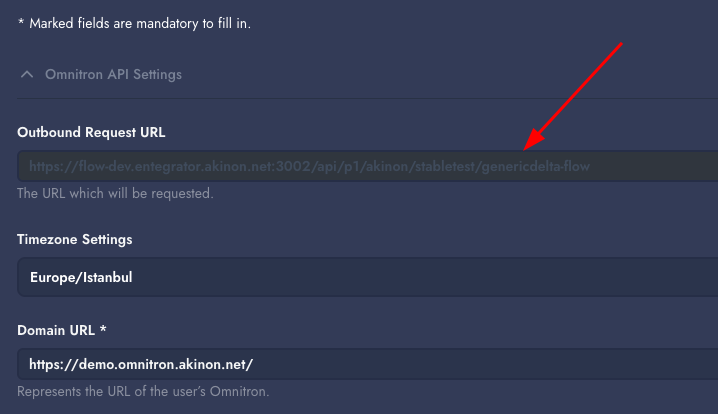
In outbound flows, triggers will be configured to send a POST request to the URL specified in the "Outbound Request URL" setting under the Configuration card. Because Generic Delta flow has no predefined schema, the shape of the POST body is entirely up to the integration being built — it must simply match what the Script, Mapping and Line Script steps configured for that flow expect to receive.
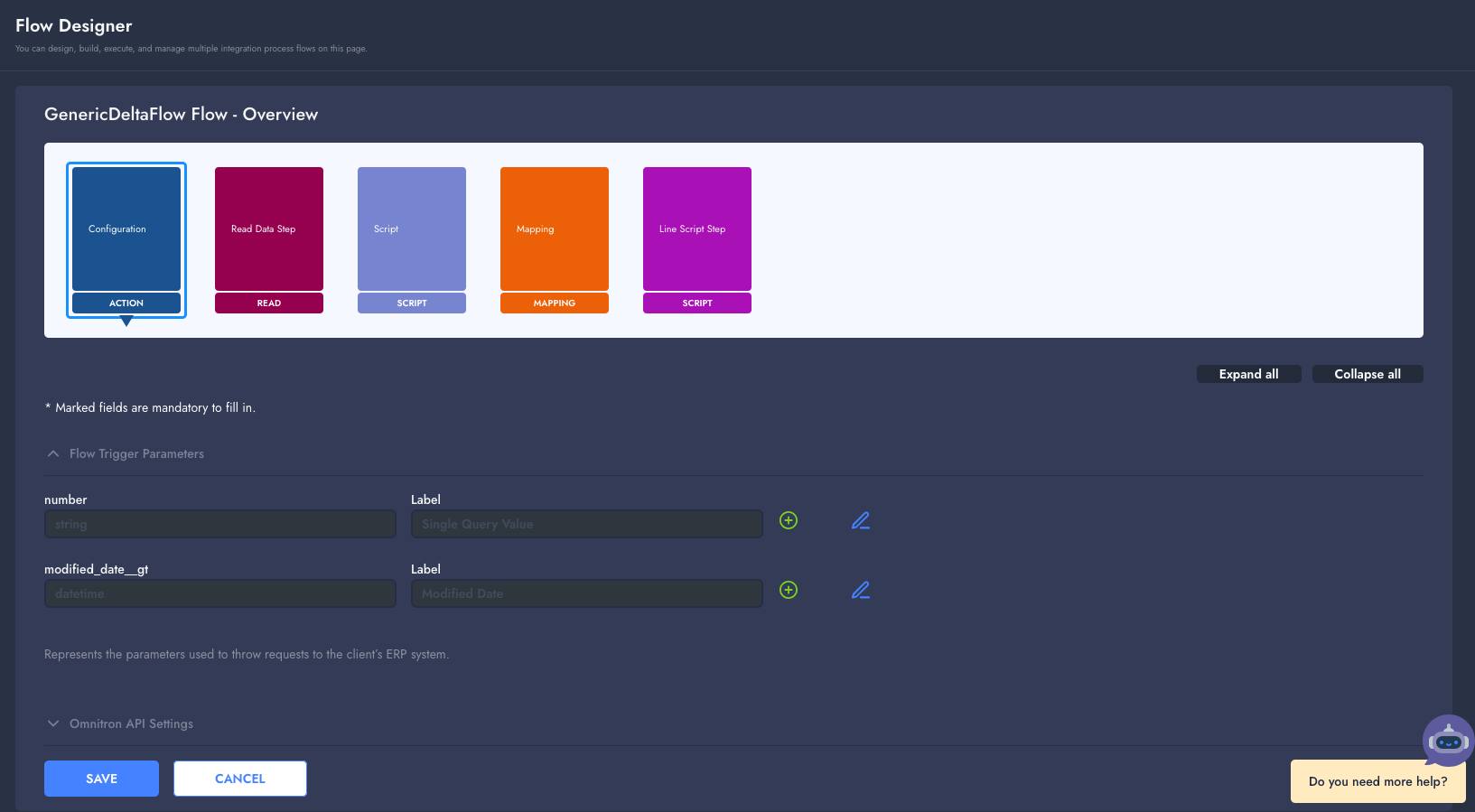
Unlike Stock, Price or Product flows, Generic Delta flow ships with **no fixed sample data structure**. The default trigger parameter is intentionally generic — it is labeled **"Single Query Value"** and its underlying querystring key defaults to `number` rather than `sku`, so it can be repurposed for any kind of single-value lookup (an order number, a customer id, an invoice number, etc.) instead of only product identifiers. Both the key and the label of this parameter, as well as the data shape itself, can be freely redefined for the integration being built.
### Flow Steps
* **Login Step:** Handles logging into Omnitron and (if configured) the ERP system. If an error occurs during this step, the details are logged.
* **Read Data Step:** For inbound flows, delta queries are made from the source system. Outbound flows proceed directly to the next step.
* **Script Step (Optional):** Transformation operations on the data are performed using Python, if required.
* **Mapping Step (Optional):** Transformation operations on the data are performed using the Jolt Transform library. Further details can be found at the [Jolt Transform](https://jolt-demo.appspot.com/#inception) website.
* **Line Script Step (Optional):** The incoming data is split into individual lines/items, and a Python script is executed once per line. Since Generic Delta flow has no built-in "write to Omnitron" step, this is where the integrator implements the actual write/processing logic for each record — for example, making custom requests to Omnitron or ERP. Each line is logged individually, and can be identified in the logs using a configurable identifier path.
### Detailed Flow Designer Settings
#### Configuration Card
* **Trigger Settings:** Configures the key values to be used for single and date-based queries against the source system. A generic single-value parameter (`number` by default, labeled "Single Query Value") and `modified_date__gt` are created by default and are required values. These settings are used on the trigger page to build the trigger URL. `modified_date__gt` is also used when creating automatic inbound request URLs.
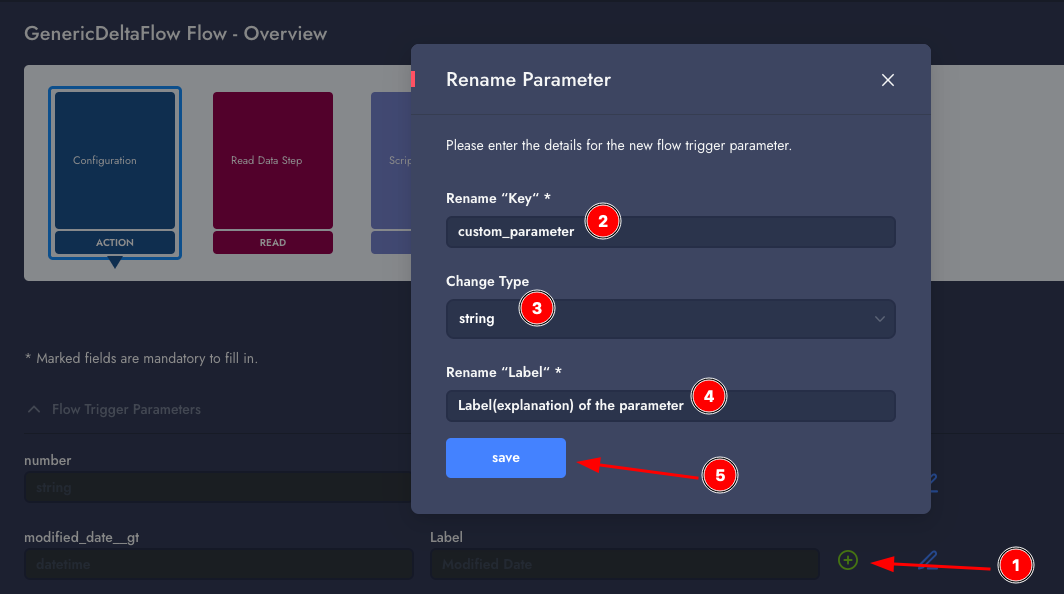
Because this flow is generic, both the querystring key and the display label of the single-value parameter can be renamed to fit the integration — for example, changing the key from `number` to `order_no` or `customer_id`, and updating its label accordingly. Additional query parameters can be added the same way as in other delta flows (Stock, Price, Product, etc.).
***Adding a new query parameter:***
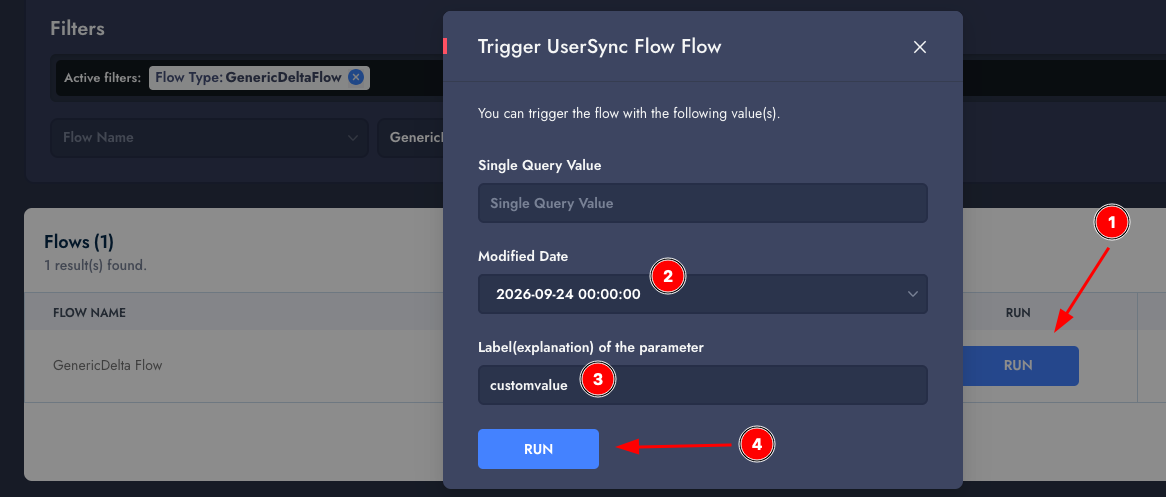
***Using newly added parameters:***
***Effects of the custom/default parameters:***
* Using the single query value:
* [*http://example.com/api/orders?number=1234*](http://example.com/api/orders?number=1234)
* Using with Modified Date:
* [*http://example.com/api/orders?modified\_date\_\_gt=2024-07-01T01:30:59.000Z*](http://example.com/api/orders?modified_date__gt=2024-07-01T01:30:59.000Z)
* **Domain Url:** Omnitron's domain URL, example: [*https://demo.omnitron.akinon.net/*](https://demo.omnitron.akinon.net/).
* **ERP Type:** ERP integration type used for the flow (`akinon` or `nebim`).
* **Timezone Settings:** Timezone used for date-based queries from the source system, this value is used with inbound task requests to modify the `modified_date__gt` value for a specific timezone. The date time format is the following: `yyyy-MM-dd'T'HH:mm:ss.SSSSSS`, ex: `2024-12-31T13:30:59.000001`
The Configuration card also has **no "Fetch Missing" / Productization settings**, no dedicated stock-list (or equivalent) identifier setting, and no fixed Omnitron sub-endpoints — these concepts don't apply since the flow isn't tied to a specific Omnitron resource.
#### Read Data Step Card
* **Source API URL:** URL for reading data from the source system.
* **HTTP Method:** `GET` or `POST`.
* **Send raw query params:** When enabled, query parameters are sent without URL-encoding.
* **Erp Response Data Type:** `json` or `xml`.
* **Retry limit on failure requests:** Number of retries attempted on failed requests, default `5`.
* **Which login should be used for request?** `Omnitron Login` or `ERP Login` (default: `ERP Login`). This is unique to Generic Delta flow and lets the Read Data Step authenticate against either Omnitron or the ERP system, since a generic delta sync isn't necessarily ERP-bound — for example, it can be used to pull delta data directly from Omnitron itself to push elsewhere.
* **Add Extra Headers as Dict Format:** Additional headers to be sent during the query, example: `{"Accept-Encoding": "*"}`.
* **Extra Params:** Additional parameters used when the request is made; it must be a valid dict — used as query parameters for a GET request, or sent in the request body for a POST request.
* **Path for data in response as array path:** Array path used to locate the data list inside the response body, e.g. `["data"]`, `["results"]`.
* **Custom response path for 200 status / Comparison value for custom response:** Used to treat responses that don't return a standard HTTP status as success/empty based on a value found at a given path in the response body.
**Dynamic URL Usage:**
It is possible to create a URL dynamically changing during runtime using Nifi Expression Language, it is possible to use attributes like `http.query.string`, `http.query.param.number` (or whatever key the single-value parameter is renamed to), `http.query.param.modified_date__gt` and create different urls based on conditions.
For more information about Nifi Expression Language please check [this page](https://nifi.apache.org/docs/nifi-docs/html/expression-language-guide.html).
```
${http.query.string:isEmpty():not():
ifElse(
${http.query.param.number:isEmpty():not()
:ifElse(
${literal("http://127.0.0.1:12345/(S({TOKEN}))/service/run?{'name': 'Akinon', 'Parameters': [{'Name': 'Number', 'Value': '{NUMBER}'}]}")
:replace("{NUMBER}", ${http.query.param.number})
:replace("{TOKEN}",${token.erp})
},
${literal("http://127.0.0.1:12345/(S({TOKEN}))/service/run?{'name': 'Akinon', 'Parameters': [{'Name': 'Date', 'Value': '{MODIFIED_DATE}'}]}")
:replace("{MODIFIED_DATE}", ${http.query.param.modified_date__gt:replaceAll("(\.\d*)?Z?$","")})
:replace("{TOKEN}",${token.erp})
}
)},
${literal("http://127.0.0.1:12345/(S({TOKEN}))/service/run?{'name': 'Akinon', 'Parameters': [{'Name': 'Date', 'Value': '{MODIFIED_DATE}'}]}")
:replace("{MODIFIED_DATE}", ${last.request:replaceAll("(\.\d*)?Z?$","")})
:replace("{TOKEN}",${token.erp})
}
)
}
```
**Pagination:** Pagination works the same way as in other delta flows — a new execution is created for each page, using the same initial parameters and continuing with the configured pagination method, until the response no longer contains valid data (an empty body or a non-2xx status code). The `modified_date__gt` value is only advanced after all pages have been fetched successfully.
{% hint style="info" %}
"Status codes to be assumed as empty page for pagination" setting can be configured to make Integrator consider a certain status code as "Empty" response resulting in an overall successful execution. This is useful if the API endpoint used responds with a non 2xx http status code when an empty page is queried.
{% endhint %}
* **Offset pagination** retrieves a fixed number of items per request starting from a specified offset. This offset indicates the position from which to begin fetching data. This pagination type is useful when pages are constructed by skipping an amount of data, for example:
* First page: `/api/data/?modified_date__gt=2025-07-22T10:30:27.000000&limit=50&skip=0`
* Second page: `/api/data/?modified_date__gt=2025-07-22T10:30:27.000000&limit=50&skip=50`
* Third page: `/api/data/?modified_date__gt=2025-07-22T10:30:27.000000&limit=50&skip=100`
* **Seek pagination** fetches pages sequentially by incrementing a numeric page parameter with each request. Each page contains a fixed number of items. This pagination type is useful when the API expects explicit page numbers, for example:
* First page: `/api/data/?modified_date__gt=2025-07-22T10:30:27.000000&page=1&limit=50`
* Second page: `/api/data/?modified_date__gt=2025-07-22T10:30:27.000000&page=2&limit=50`
* Third page: `/api/data/?modified_date__gt=2025-07-22T10:30:27.000000&page=3&limit=50`
* **Next field pagination** follows a URL or token included in the response itself (e.g. a `next` field) to retrieve the next set of results, continuing until it is null or not present, for example:
```json
{
"results": [ /* items */ ],
"next": "/api/data/?cursor=abc123"
}
```
#### Script Card (Optional)
This is a base script. The process step within this script can be updated to enable the use of the script step.
```
import json
import traceback
from java.nio.charset import StandardCharsets
from org.apache.commons.io import IOUtils
from org.apache.nifi.processor.io import StreamCallback
class TransformCallback(StreamCallback):
def __init__(self, flowFile):
self.flowFile = flowFile
self.omnitron_token = flowFile.getAttribute("token.omnitron")
self.erp_token = flowFile.getAttribute("token.erp")
def process(self, inputStream, outputStream):
input_text = IOUtils.toString(inputStream, StandardCharsets.UTF_8)
input_obj = json.loads(input_text)
# Transform content
output_obj = self.transform(input_obj)
# Write output content
outputStream.write(bytearray(json.dumps(output_obj, indent=4).encode('utf-8')))
def transform(self, output_obj):
# Transform content
return output_obj
flowFile = session.get()
if flowFile != None:
try:
flowFile = session.write(flowFile, TransformCallback(flowFile))
# Finish by transferring the FlowFile to an output relationship
session.transfer(flowFile, REL_SUCCESS)
except:
var = traceback.format_exc()
session.putAttribute(flowFile, 'log.error.script_error', str(var))
session.transfer(flowFile, REL_FAILURE)
session.commit()
```
**Script Testing:** The response from the source system is placed in the input field, and the result of the script is viewed in the result field.
#### Mapping Card (Optional)
Details can be found at the [Jolt Transform](https://jolt-demo.appspot.com/#inception) website.
Since Generic Delta flow has no fixed target schema, the default mapping is a blank passthrough template that the integrator fills in for the specific data being handled:
```
[
{
"operation": "shift",
"spec": {
"@": ""
}
}
]
```
**Mapping Testing:** The response from the script is placed in the input field, and the result of the mapping is viewed in the result field.
#### Line Script Step Card (Optional)
This step runs once per line/item of the incoming data, after the Script and Mapping steps. It is where the integrator implements what should actually happen with each record — most commonly, writing it to Omnitron or the ERP system via custom API calls, since Generic Delta flow does not ship with a predefined "Write Data to Omnitron" step or endpoint.
* **Python Script:** Custom per-line logic. Optional — if left empty, no per-line processing is performed.
* **Line log identifier path:** Path within a line's data whose value is used to identify that line in the execution logs, e.g. `["attributes", "mail"]`. This makes it easier to find a specific record's log entry instead of relying on a generic line index.
### Outbound Flow
In outbound flows, triggers will be configured to send a POST request to the URL specified in the "Outbound Request URL" setting under the Configuration card. Because Generic Delta flow has no predefined data schema, the content of the POST request is defined by the integration itself — it should contain whatever fields the Script, Mapping, and Line Script steps configured for that flow expect to process.
There can not be more than 5 active executions in a flow at the same time; if a flow has 5 logs in "processing" state, new outbound executions will not be accepted. Our suggested batch size is 5000 lines per execution.
**Example response (HTTP 200):**
```json
{
"execution_id": "4054eae0-6165-43d3-9305-cf33b185086b"
}
```
{% hint style="info" %}
Before sending data to this outbound flow, you must log in with an Integrator user and obtain an authorization token. The login method is documented in the [Login API documentation](https://apidocs.akinon.com/integrator/authentication), and the token must be included in the `Authorization` header as `Bearer `.
{% endhint %}
---
# Agent Instructions
This documentation is published with GitBook. GitBook is the documentation platform designed so that both humans and AI agents can read, navigate, and reason over technical content effectively. Learn more at gitbook.com.
## Querying This Documentation
If you need additional information that is not directly available in this page, you can query the documentation by asking a question.
Perform an HTTP GET request on the following URL with the `ask` and `goal` query parameters:
```
GET https://docs.akinon.com/tutorials/integrator/flows/generic-delta-flow.md?ask=&goal=
```
`ask` is the immediate question: it should be specific, self-contained, and written in natural language.
`goal` is what the user is ultimately trying to achieve, the reason they need the answer. Sharing it helps GitBook give you a better, more relevant answer. A goal is most helpful when it describes the outcome the user wants rather than restating the question. For example, with `ask=how do I create an API token`, a goal like `automate deployments from our CI pipeline` lets GitBook tailor the answer to that use case.
The response will contain a direct answer to the question and relevant excerpts and sources from the documentation.
Use this mechanism when the answer is not explicitly present in the current page, you need clarification or additional context, or you want to retrieve related documentation sections.