> For the complete documentation index, see [llms.txt](https://docs.akinon.com/llms.txt). Markdown versions of documentation pages are available by appending `.md` to page URLs; this page is available as [Markdown](https://docs.akinon.com/tutorials/integrator/flows/order-cancellation-request-flow.md).
# Order Cancellation Request Flow
The **Order Cancellation Request Flow** facilitates the processing of individual cancellation requests within Omnitron. Unlike the Order Cancel Flow which processes cancellation plans, this flow retrieves a list of cancellation requests that match a specific cancellation request status configured by the user in the flow settings. The flow operates only in an inbound mode.
Inbound order cancellation request flow means that the flow triggers itself at specific intervals set by the user, such as once every minute, every 1 hour, every day at midnight, every 5th day of a month, etc., to fetch eligible cancellation requests from Omnitron. It processes these requests based on the configured cancellation request status, ensuring the correct actions are taken for each request.
This process ensures reliable and efficient handling of individual order item cancellation requests within the system, maintaining consistency and accuracy for cancellation data in Omnitron.
### Order Cancellation Request Flow Types
* **Inbound Flow:** Indicates that the flow will read data from the Omnitron. A cron schedule is set up to ensure it runs, for example, every 5 minutes.
Example data structure for an order object and its related items can be found at the end of this document under the ["Example Order Cancellation Request Data Structure from Omnitron"](#example-order-cancellation-request-data-structure-from-omnitron) section.
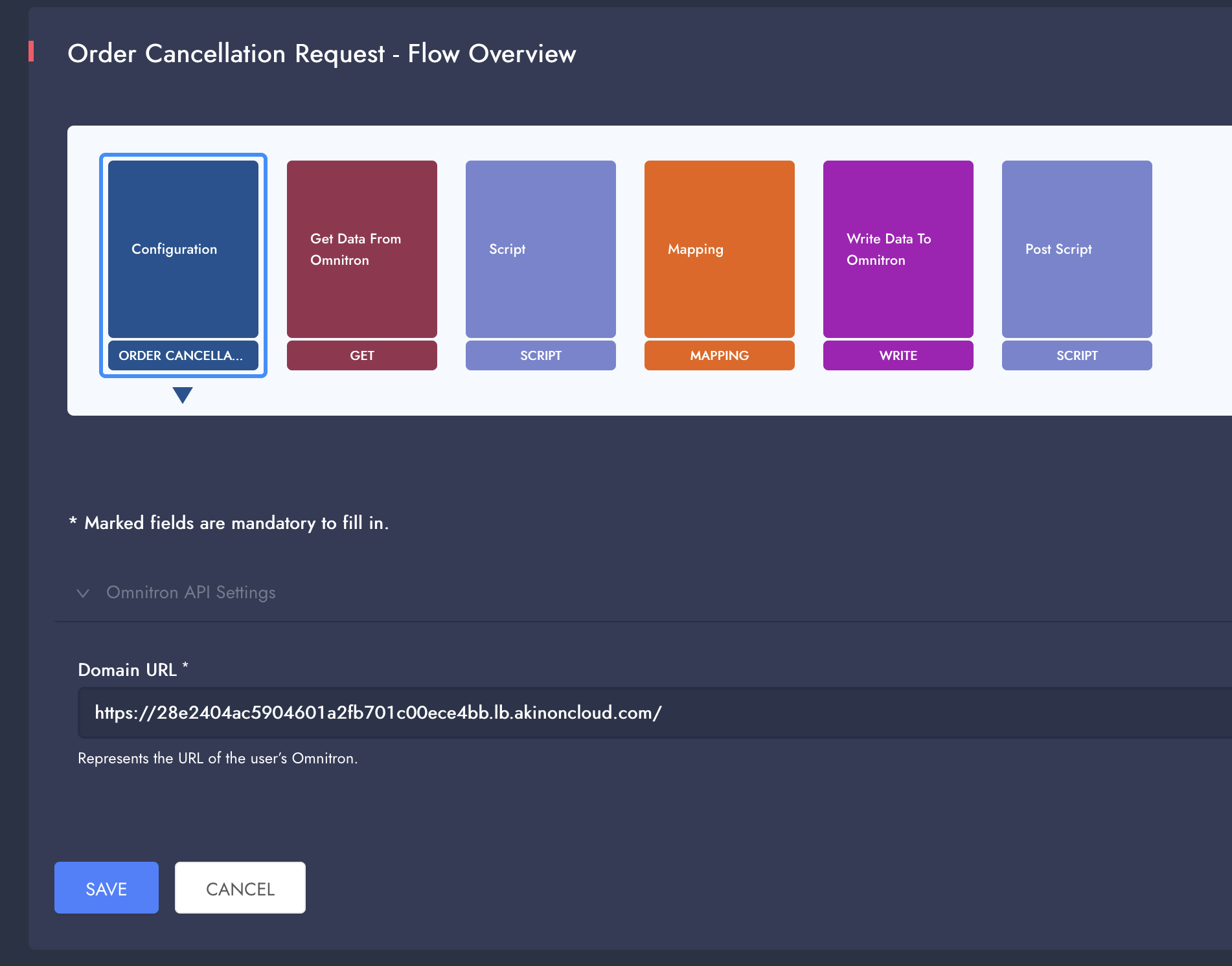
### Flow Steps
* **Login Step**: Handles logging into Omnitron and (if configured) the ERP system. If an error occurs during this step, the details are logged.
* **Get Data From Omnitron Step**: Queries are made to the Omnitron system to fetch cancellation requests matching the user-defined cancellation request status, cancellation type and channel filters.
* **Script Step (Optional)**: Transformation operations on each cancellation request object are performed using Python, if required.
* **Mapping Step (Optional)**: Transformation operations on each cancellation request object are performed using the Jolt Transform library. Further details can be found at the [Jolt Transform](https://jolt-demo.appspot.com/#inception) website.
* **Write Data to ERP Step**: The transformed cancellation request information is sent to the ERP system.
* **Custom Response Script Step**: The Write Data to ERP step's input data and the ERP response for each cancellation request are provided to a Python script one by one to check if ERP requests are successful.
* **Write Data to Omnitron Step**: For each successfully processed cancellation request, the relevant updates are made in Omnitron based on the result of the **Write Data to ERP Step**.
* **Post Script Step**: Runs after the Write Data to Omnitron Step if every prior step is successful.
### Detailed Flow Designer Settings
#### Configuration Card
* **Omnitron API Settings**
* **Domain URL:** Omnitron's domain URL, Example: .
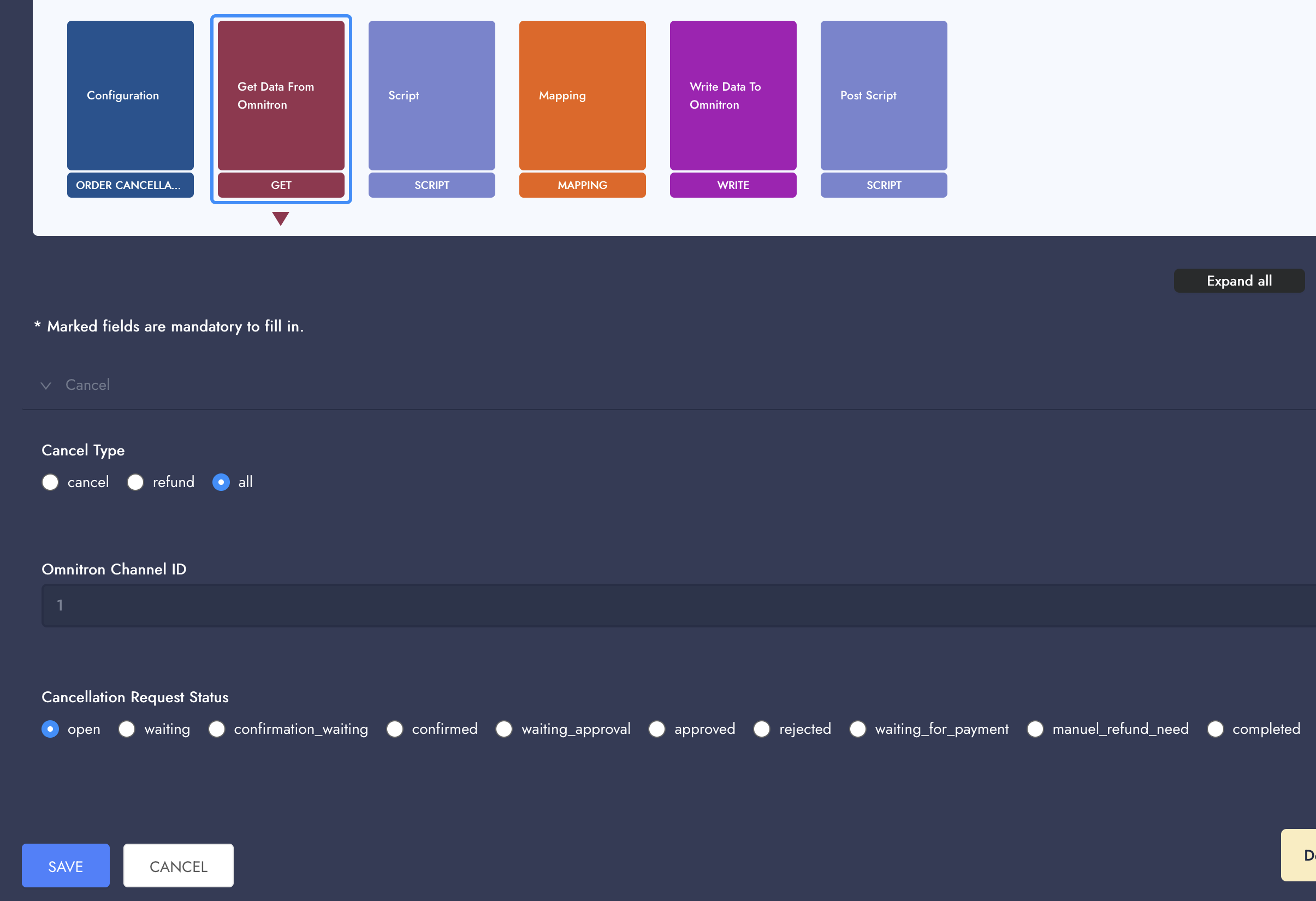
#### Get Data From Omnitron
Omnitron is queried for cancellation requests matching settings in this step.
**Cancel Type**: Select the type of cancellation request to retrieve from Omnitron. Options include:
* **Cancel**: Fetch only cancellation requests.
* **Refund**: Fetch only refund requests.
* **All**: Fetch both cancellation and refund requests.
**Cancellation Request Status**: Select the status of the cancellation requests to fetch from Omnitron. Options include:
* **Open**: Fetch cancellation requests that are newly created and open.
* **Waiting**: Fetch cancellation requests that are awaiting processing.
* **Confirmation Waiting**: Fetch cancellation requests awaiting confirmation.
* **Confirmed**: Fetch cancellation requests that have been confirmed.
* **Waiting Approval**: Fetch cancellation requests that are waiting for approval.
* **Approved**: Fetch cancellation requests that have been approved.
* **Rejected**: Fetch cancellation requests that have been rejected.
* **Waiting for Payment**: Fetch cancellation requests that are waiting for payment processing.
* **Manuel Refund Need**: Fetch cancellation requests that require manual refund processing.
* **Completed**: Fetch cancellation requests that have been fully processed.
**Omnitron Channel ID**: Enter the ID of the channel from which to fetch cancellation requests. This field is optional and used to narrow the scope of the data to a specific channel. When left empty, the flow will run for all Omnitron channels. Channel IDs can be retrieved from Omnitron, Sales Channels screens.
Based on the above settings, the following query string is used:
```
/api/v1/cancellation_requests/?status=&cancellation_type=&channel=&sort=modified_date&limit=5&modified_date__gt=
```
#### Script Card (Optional)
This is a base script that can be updated to enable script functionality within the process step.
Scripts can read incoming data from the `inputStream`, where the variable `input_text` contains a JSON string. This string should be parsed using Python's `json` library. Any outgoing data is written using the `outputStream.write()` method after converting the relevant Python object back into a JSON string.
Additionally, the script allows for the use of attributes, which provide supplementary information tied to the current execution process. These attributes can be freely accessed or modified throughout the script. For example, the `get_attribute()` function is used to read attribute values, while the `session.putAttribute()` method is used to write new string attribute values. Each attribute consists of a key-value pair, where the `key` uniquely identifies the attribute, and the `value` can be referenced in subsequent steps.
Attributes with keys starting with the prefix `log.` will be automatically logged at the end of the execution if a log file is generated, ensuring that important information is captured and available for later review.
**Example Script:**
```python
import json
import traceback
from java.nio.charset import StandardCharsets
from org.apache.commons.io import IOUtils
from org.apache.nifi.processor.io import StreamCallback
def get_attribute(flow_file, attr_name):
all_var = flow_file.getAttribute("allVar")
if all_var:
all_attributes = json.loads(all_var)
return all_attributes.get(attr_name, None)
return flow_file.getAttribute(attr_name)
class TransformCallback(StreamCallback):
def __init__(self, flowFile):
self.flowFile = flowFile
self.omnitronToken = get_attribute(flowFile, "token.omnitron")
self.erpToken = get_attribute(flowFile, "token.erp")
def process(self, inputStream, outputStream):
input_text = IOUtils.toString(inputStream, StandardCharsets.UTF_8)
input_obj = json.loads(input_text)
output_obj = self.transform(input_obj)
outputStream.write(bytearray(json.dumps(output_obj, indent=4).encode('utf-8')))
def transform(self, output_obj):
# Transform content
return output_obj
flowFile = session.get()
if flowFile != None:
try:
flowFile = session.write(flowFile, TransformCallback(flowFile))
session.transfer(flowFile, REL_SUCCESS)
except:
var = traceback.format_exc()
session.putAttribute(flowFile, 'log.script.error', str(var))
session.transfer(flowFile, REL_FAILURE)
session.commit()
```
**Script Testing:** The ERP response is placed in the input field, and the script's result along with the written attributes can be viewed in the result field. When the test script is run, attributes like `log.script.error` will appear under the "attributes" section in the result panel and should be referenced if any exceptions occur during execution. The script's output content will be found under the `result_data` value.
The "+ Add Attributes" button can be used to simulate incoming, readable, attributes for the script. This feature is useful when an attribute value is read and used in the script. Note that attributes added through the button are only for testing purposes and will not be saved in the flow information—they will be removed when the page is refreshed.
**Example Input:** Example input can be constructed using `/api/v1/cancellation_requests/detailed/?status=open&sort=modified_date&limit=1&cancellation_type=cancel` endpoint, the input will be a cancellation request object, **not** an array of objects.
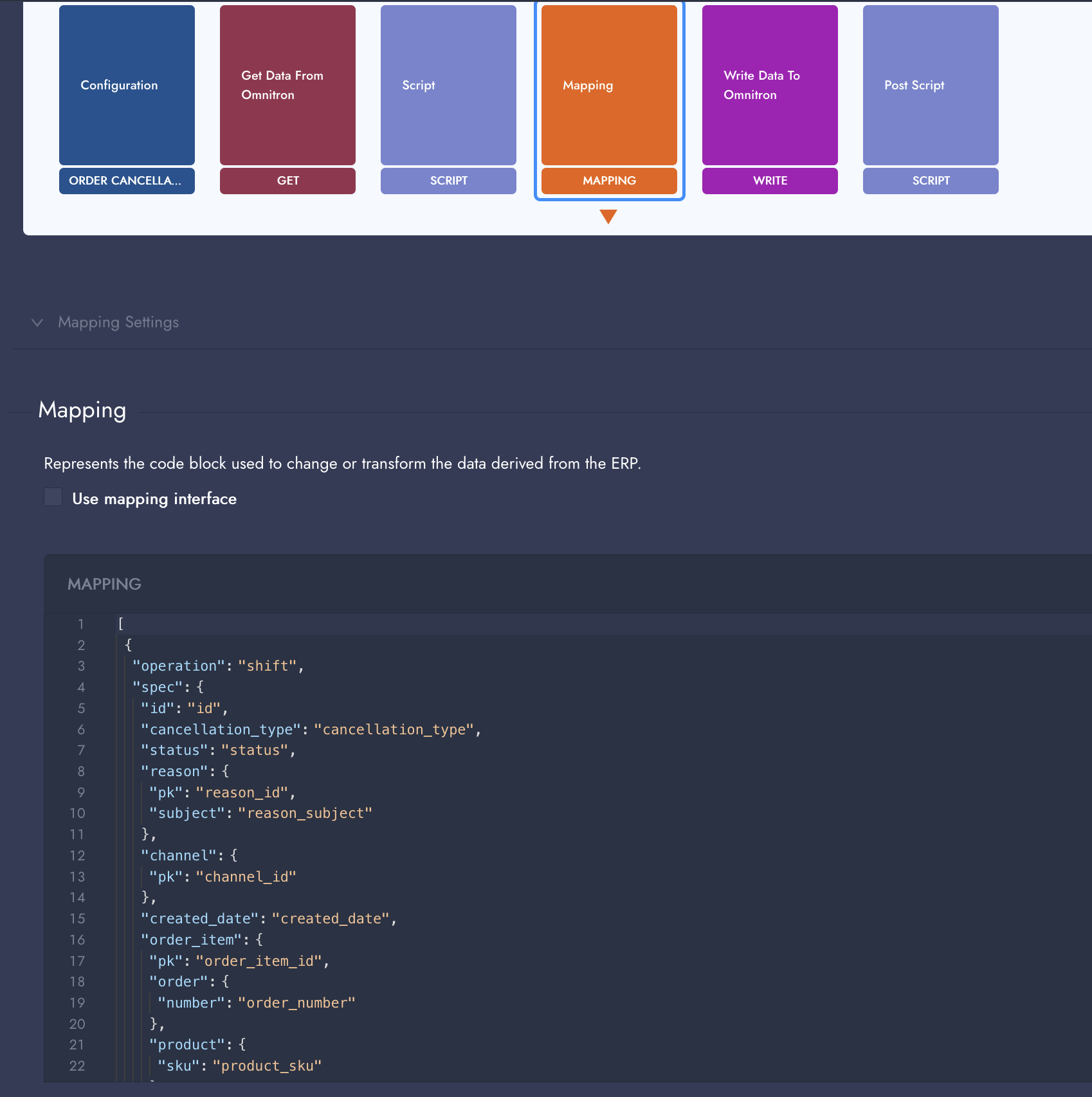
#### Mapping Card (Optional)
Details can be found at the [Jolt Transform](https://jolt-demo.appspot.com/#inception) website. The flow expects the following output to be a cancellation request object for each order item, as the input will also be a cancellation request of one order item. Integrator uses the output of this mapping step as the body of the ERP request, therefore there is no expected data structure; the output structure of the mapping step is fully dependent on ERP requirements.
**Example Mapping:**
```json
[
{
"operation": "shift",
"spec": {
"id": "id",
"cancellation_type": "cancellation_type",
"status": "status",
"reason": {
"pk": "reason_id",
"subject": "reason_subject"
},
"channel": {
"pk": "channel_id"
},
"created_date": "created_date",
"order_item": {
"pk": "order_item_id",
"order": {
"number": "order_number"
},
"product": {
"sku": "product_sku"
},
"price": "price"
}
}
}
]
```
**Mapping Testing:** The result from the script or the response of the Omnitron request for cancellation request data, if the script step is not used, is placed in the input field and the result of the mapping is viewed in the result field.
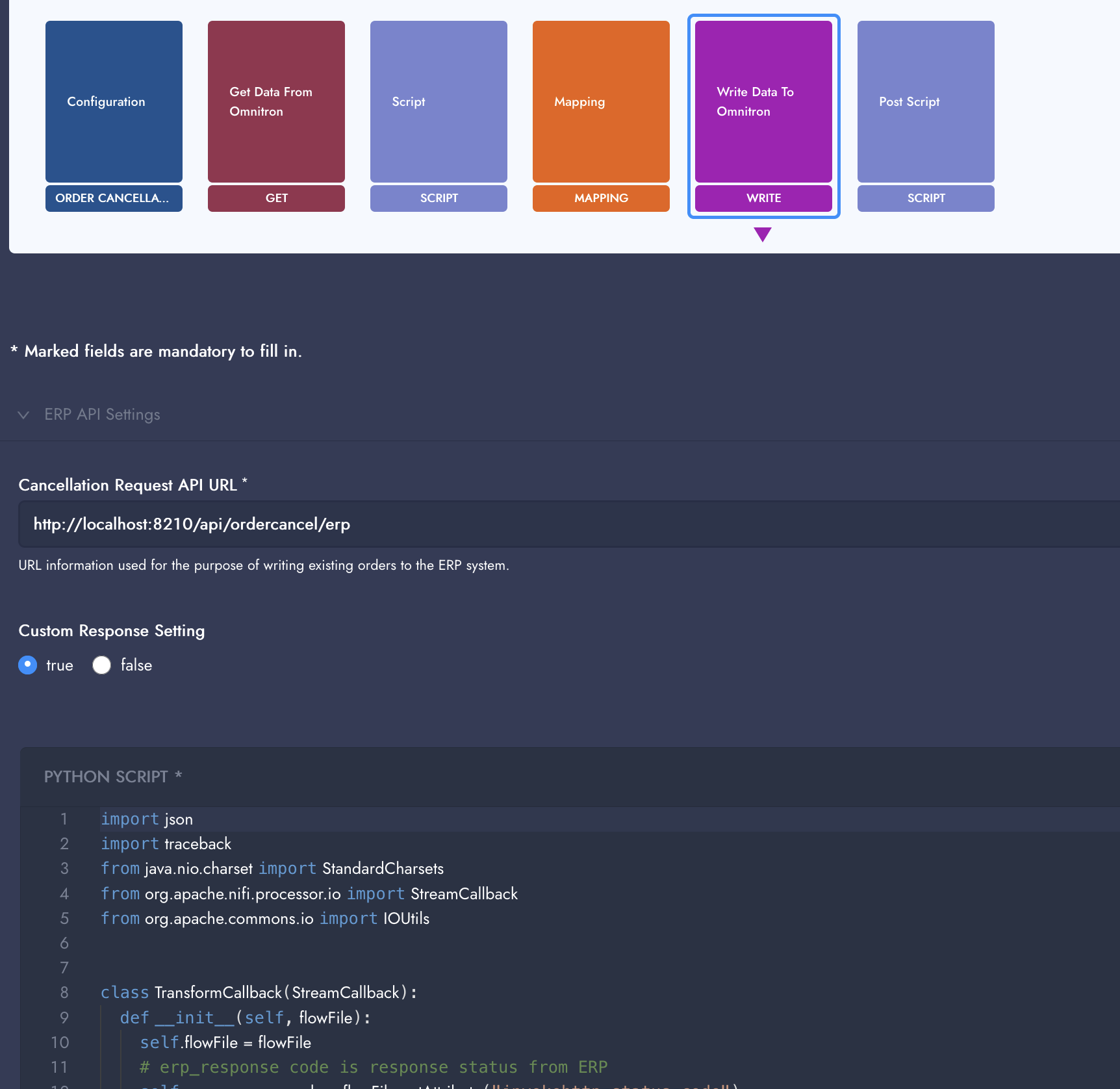
#### **Write Data to ERP**
The finalized data from Script and/or Mapping steps is sent to ERP using configuration entered in this step. A successful request must respond with 2xx HTTP status codes.
**Cancellation Request API URL**: Provide the URL endpoint for the ERP system's cancellation request API. This URL will be used to send cancellation or refund requests to the ERP system.
**HTTP Method**: Specify the HTTP method to use for communicating with the ERP system. Options include:
* **POST**: Send the data using the POST method.
* **GET**: Retrieve data using the GET method.
* **PUT**: Send data using the PUT method.
* **PATCH**: Send data using the PATCH method.
**Custom Response Setting**: Choose whether to enable custom response handling.
* **True**: Enable custom scripting for handling responses from the ERP system.
* **False**: Disable custom response handling, using default behavior instead.
#### **Custom Response Script**
The Custom Response Script is a user-configurable template designed to process and evaluate the ERP system's response for each cancellation request. It provides flexibility for users to customize the logic based on their specific requirements while maintaining default functionality. Below is the default script provided as a template in the flow and a description of its core features and customizable aspects:
```python
import json
import traceback
from java.nio.charset import StandardCharsets
from org.apache.nifi.processor.io import StreamCallback
from org.apache.commons.io import IOUtils
class TransformCallback(StreamCallback):
def __init__(self, flowFile):
self.flowFile = flowFile
# erp_response code is response status from ERP
self.erp_response_code = flowFile.getAttribute("invokehttp.status.code")
# relation information;
# continue = process will continue to next step assuming ERP request was successful
# failure = process will continue to next step assuming ERP request was failed
# do_nothing = process will be nothing, and it will be trying again in to next batch
# auth_fail = that means if response is authorization fail, it will be requested for new token and try again to send.
self.relation = 'continue'
def process(self, inputStream, outputStream):
input_text = IOUtils.toString(inputStream, StandardCharsets.UTF_8)
response_status = self.erp_response_code
output_obj = json.loads(input_text)
#erp response_body : output_obj.get(" log.erp.response.body")
#erp request_body : output_obj.get(" log.erp.request.body")
if response_status in ('401', '403'):
self.relation = 'auth_fail'
if not response_status.startswith('2') and response_status not in ('401', '403'):
self.relation = 'failure'
# Write output content
outputStream.write(bytearray(json.dumps(output_obj).encode('utf-8')))
flowFile = session.get()
if flowFile is not None:
try:
content = TransformCallback(flowFile)
flowFile = session.write(flowFile, content)
session.putAttribute(flowFile, 'relation', str(content.relation))
# Finish by transferring the FlowFile to an output relationship
session.transfer(flowFile, REL_SUCCESS)
except:
var = traceback.format_exc()
session.putAttribute(flowFile, 'log.script.error', str(var))
session.transfer(flowFile, REL_FAILURE)
session.commit()
```
* The script retrieves the ERP response status code (`invokehttp.status.code`) to evaluate the result of the request.
* The `relation` attribute is added to the FlowFile to indicate the next action:
* `continue`: Process will continue to the next step assuming the ERP request was successful.
* `failure`: Process will continue to the next step assuming the ERP request failed.
* `do_nothing`: Process will do nothing, and it will retry in the next batch.
* `auth_fail`: Authorization failed, a new token will be requested and the request will be retried.
#### Post Script (Optional)
This script runs with the "request\_data" and "response\_data" from the ERP write request after the Write Data to Omnitron step, if the Write Data to ERP step is successful.
This script is optional, and its output is not used. It can be used for additional tasks after the cancellation request is processed, such as updating CRM services or performing other actions.
### Example Order Cancellation Request Data Structure from Omnitron
```json
{
"id": 1,
"cancellation_type": "cancel",
"status": "approved",
"easy_return": null,
"order_item": {
"pk": 5,
"order": {
"pk": 3,
"number": "429452907",
"channel": 2,
"status": "100",
"date_placed": "2023-02-06T17:34:11.867000Z",
"customer": 1,
"shipping_address": 2,
"billing_address": 2,
"currency": "try",
"amount": "1905.84",
"shipping_amount": "0.00",
"shipping_tax_rate": "0.00",
"extra_field": {
},
"payment_option": null,
"payment_option_slug": null,
"bin_number": null,
"installment": null,
"installment_count": null,
"delivery_type": null,
"installment_interest_amount": "0.00",
"cargo_company": 2,
"invoice_number": null,
"invoice_date": null,
"e_archive_url": "https://www.google.com",
"refund_amount": "1905.84",
"discount_refund_amount": "0.00",
"shipping_refund_amount": "0.00",
"discount_amount": "0.00",
"is_send": false,
"net_shipping_amount": "0.00",
"shipping_interest_amount": "0.00",
"tracking_number": "7260000009966030",
"carrier_shipping_code": "",
"remote_addr": null,
"fundstransfertransaction_set": [],
"has_gift_box": false,
"gift_box_note": "",
"external_status": null,
"client_type": "default",
"language_code": "",
"notes": "",
"delivery_range": null,
"shipping_option_slug": "",
"segment": null,
"modified_date": "2023-02-07T08:35:33.982189Z",
"checkout_provider_id": null,
"created_date": "2023-02-07T07:04:10.600994Z",
"cancellation_info": {},
"shipping_company": null,
"cancel_status": null,
"defined_tracking_url": null,
"installment_free": false,
"first_refund_strategy": null
},
"product": {
"pk": 2,
"name": "Siyah Çorap",
"base_code": "AKN-005",
"sku": "AKN-005",
"product_type": "0",
"is_active": true,
"parent": null,
"attributes": {
"Yas": "18-25",
"size": "M",
"Brand": "8242",
"gender": "Kadın",
"Aciklama": "Yazlık",
"yikama_talimati": "30 derecede",
"integration_renk_tonu": "Pembe"
},
"attributes_kwargs": {
"Yas": {
"label": "18-25",
"value": "18-25",
"data_type": "dropdown"
}
},
"extra_attributes": {},
"is_seller_product": false,
"group_products": [],
"productimage_set": [],
"attribute_set": 6,
"custom_attribute_set": null,
"productization_date": null,
"listing_code": null,
"data_source": null,
"modified_date": "2025-11-28T14:43:04.157117Z",
"uuid": "e01a3ef5-eb51-42a4-925c-0e71cba81aad",
"created_date": "2023-01-25T12:21:04.609463Z",
"localized_attributes": {},
"localized_attributes_kwargs": {},
"tax_rate": null,
"weight": null,
"brand_id": null,
"description": null
},
"status": "100",
"price_currency": "try",
"price": "23.66",
"tax_rate": "8.00",
"extra_field": {},
"price_list": {
"pk": 1,
"name": "TY_price_list",
"code": "try",
"is_auto_sync": false,
"modified_date": "2023-01-26T08:19:31.230242Z",
"created_date": "2023-01-26T08:19:31.230222Z",
"currency": "try"
},
"stock_list": {
"pk": 1,
"name": "TY Stok Listesi",
"code": null,
"is_auto_sync": false,
"modified_date": "2023-01-26T08:15:47.630013Z",
"created_date": "2023-01-26T08:15:47.629991Z"
},
"invoice_number": null,
"invoice_date": null,
"e_archive_url": null,
"cancel_status": "completed",
"status_display": "cancelled",
"installment_interest_amount": "0.00",
"net_amount": "23.66",
"tracking_number": null,
"shipping_company": null,
"discount_amount": "0.00",
"shipment_code": null,
"benefitapplicant_set": [],
"external_status": null,
"retail_price": "0.00",
"attributes": {},
"attributes_kwargs": {},
"tracking_url": null,
"image": null,
"parent": null,
"data_source": null,
"estimated_delivery_date": null,
"datasource": null,
"defined_tracking_url": null,
"carrier_shipping_code": null,
"shipping_option_group": null,
"defined_shipping_company": null,
"forced_refund": false
},
"reason": {
"pk": 1,
"cancellation_type": "cancel",
"extra_information_needed": false,
"order": 100,
"subject": "Yanlış ürün aldım.",
"is_active": true,
"send_to_remote": false,
"modified_date": "2022-11-23T07:51:22.698626Z",
"created_date": "2022-11-23T07:51:22.534643Z",
"translations": null,
"uuid": "3d32baeb-69a2-4e9e-ad6f-d58027c22bef",
"send_to_oms": false
},
"channel": {
"pk": 2,
"name": "Trendyol:3_Channel",
"channel_type": "sales_channel",
"catalog": 2,
"modified_date": "2025-12-11T13:27:15.290446Z",
"created_date": "2022-12-05T10:47:24.864605Z",
"category_tree": 1,
"is_active": true,
"conf": {},
"schema": {}
},
"customer": {
"pk": 1,
"channel": 2,
"email": "dummy@example.com",
"first_name": "John",
"last_name": "Doe",
"phone_number": null,
"is_active": true,
"channel_code": "21823399",
"erp_code": null,
"extra_field": {},
"modified_date": "2026-01-20T13:48:35.483131Z",
"created_date": "2023-02-02T19:52:49.849547Z",
"date_joined": null,
"email_allowed": false,
"sms_allowed": false,
"call_allowed": false,
"gender": null,
"attributes": {},
"user_type": null,
"date_of_birth": null,
"attributes_kwargs": {},
"localized_attributes": {},
"localized_attributes_kwargs": {}
},
"created_date": "2023-02-07T08:35:33.392858Z",
"modified_date": "2023-02-07T08:35:33.572925Z",
"uuid": "0da0efc9-a828-4b5e-b4cd-5ffe03b8b7ac",
"description": null,
"iban": null,
"holder_name": null,
"quantity": null,
"fully_refund_as_loyalty_money": false
}
```
| parameter | data type | example | description | additional notes |
| --------------------------------- | -------------- | --------------------------------------- | ---------------------------------------------- | --------------------- |
| id | integer | 1 | Primary key of the cancellation request | |
| cancellation\_type | string | cancel | Type of cancellation (cancel/refund) | |
| status | string | approved | Current status of the cancellation request | |
| easy\_return | object / null | null | Easy return information if applicable | |
| order\_item | object | [Order Item Object](#order-item-object) | Related order item object | See order item object |
| reason | object | [Reason Object](#reason-object) | Cancellation reason details | See reason object |
| channel | object | [Channel Object](#channel-object) | Sales channel information | See channel object |
| customer | object | [Customer Object](#customer-object) | Customer information | See customer object |
| created\_date | string | 2023-02-07T08:35:33.392858Z | Record creation date | ISO-8601 format |
| modified\_date | string | 2023-02-07T08:35:33.572925Z | Last modification date | ISO-8601 format |
| uuid | string (UUID) | 0da0efc9-a828-4b5e-b4cd-5ffe03b8b7ac | Unique identifier | |
| description | string / null | null | Additional description for the cancellation | |
| iban | string / null | null | IBAN for refund payment | |
| holder\_name | string / null | null | Account holder name for refund | |
| quantity | integer / null | null | Quantity of items in the cancellation request | |
| fully\_refund\_as\_loyalty\_money | boolean | false | Indicates if refund should be as loyalty money | |
#### Order Item Object
```json
{
"pk": 5,
"order": { ... },
"product": { ... },
"status": "100",
"price_currency": "try",
"price": "23.66",
"tax_rate": "8.00",
"extra_field": {},
"price_list": { ... },
"stock_list": { ... },
"invoice_number": null,
"invoice_date": null,
"e_archive_url": null,
"cancel_status": "completed",
"status_display": "cancelled",
"installment_interest_amount": "0.00",
"net_amount": "23.66",
"tracking_number": null,
"shipping_company": null,
"discount_amount": "0.00",
"shipment_code": null,
"benefitapplicant_set": [],
"external_status": null,
"retail_price": "0.00",
"attributes": {},
"attributes_kwargs": {},
"tracking_url": null,
"image": null,
"parent": null,
"data_source": null,
"estimated_delivery_date": null,
"datasource": null,
"defined_tracking_url": null,
"carrier_shipping_code": null,
"shipping_option_group": null,
"defined_shipping_company": null,
"forced_refund": false
}
```
| parameter | data type | example | description | additional notes |
| ----------------------------- | ---------------- | --------------------------------------- | ---------------------------------- | ------------------------- |
| pk | integer | 5 | Primary key of the order item | |
| order | object | [Order Object](#order-object) | Related order object | See order object |
| product | object | [Product Object](#product-object) | Related product object | See product object |
| status | string | 100 | Order item status | Uses status value mapping |
| price\_currency | string | try | Currency code for the price | ISO 4217 |
| price | string / decimal | 23.66 | Item price | |
| tax\_rate | string / decimal | 8.00 | Tax rate applied to the item | |
| extra\_field | object | { } | Additional custom fields | Optional |
| price\_list | object | [Price List Object](#price-list-object) | Price list details | See price list object |
| stock\_list | object | [Stock List Object](#stock-list-object) | Stock list details | See stock list object |
| invoice\_number | string / null | null | Invoice number | |
| invoice\_date | string / null | null | Invoice date | ISO-8601 if present |
| e\_archive\_url | string / null | null | E-archive invoice URL | |
| cancel\_status | string | completed | Cancellation status of the item | |
| status\_display | string | cancelled | Human-readable status | |
| installment\_interest\_amount | string / decimal | 0.00 | Interest amount due to installment | |
| net\_amount | string / decimal | 23.66 | Net amount after discounts | |
| tracking\_number | string / null | null | Shipping tracking number | |
| shipping\_company | string / null | null | Shipping company name | |
| discount\_amount | string / decimal | 0.00 | Discount applied to the item | |
| shipment\_code | string / null | null | Shipment code | |
| benefitapplicant\_set | array \[object] | \[] | Benefits applied to the item | |
| external\_status | string / null | null | External system status | |
| retail\_price | string / decimal | 0.00 | Retail price of the item | |
| attributes | object | { } | Item attributes | |
| attributes\_kwargs | object | { } | Additional attribute parameters | |
| tracking\_url | string / null | null | Tracking URL | |
| image | string / null | null | Item image URL | |
| parent | integer / null | null | Parent order item identifier | |
| data\_source | string / null | null | Data source identifier | |
| estimated\_delivery\_date | string / null | null | Estimated delivery date | ISO-8601 if present |
| datasource | string / null | null | Datasource identifier | |
| defined\_tracking\_url | string / null | null | Predefined tracking URL | |
| carrier\_shipping\_code | string / null | null | Carrier-specific shipping code | |
| shipping\_option\_group | string / null | null | Shipping option group | |
| defined\_shipping\_company | string / null | null | Predefined shipping company | |
| forced\_refund | boolean | false | Indicates if refund was forced | |
#### Order Object
```json
{
"pk": 3,
"number": "429452907",
"channel": 2,
"status": "100",
"date_placed": "2023-02-06T17:34:11.867000Z",
"customer": 1,
"shipping_address": 2,
"billing_address": 2,
"currency": "try",
"amount": "1905.84",
"shipping_amount": "0.00",
"shipping_tax_rate": "0.00",
"extra_field": {},
"payment_option": null,
"payment_option_slug": null,
"bin_number": null,
"installment": null,
"installment_count": null,
"delivery_type": null,
"installment_interest_amount": "0.00",
"cargo_company": 2,
"invoice_number": null,
"invoice_date": null,
"e_archive_url": "https://www.google.com",
"refund_amount": "1905.84",
"discount_refund_amount": "0.00",
"shipping_refund_amount": "0.00",
"discount_amount": "0.00",
"is_send": false,
"net_shipping_amount": "0.00",
"shipping_interest_amount": "0.00",
"tracking_number": "7260000009966030",
"carrier_shipping_code": "",
"remote_addr": null,
"fundstransfertransaction_set": [],
"has_gift_box": false,
"gift_box_note": "",
"external_status": null,
"client_type": "default",
"language_code": "",
"notes": "",
"delivery_range": null,
"shipping_option_slug": "",
"segment": null,
"modified_date": "2023-02-07T08:35:33.982189Z",
"checkout_provider_id": null,
"created_date": "2023-02-07T07:04:10.600994Z",
"cancellation_info": {},
"shipping_company": null,
"cancel_status": null,
"defined_tracking_url": null,
"installment_free": false,
"first_refund_strategy": null
}
```
| parameter | data type | example | description | additional notes |
| ----------------------------- | ---------------- | --------------------------- | ------------------------------------------ | ------------------------- |
| pk | integer | 3 | Primary key of the order | |
| number | string | 429452907 | Order number | |
| channel | integer | 2 | Sales channel identifier | |
| status | string | 100 | Order status | Uses status value mapping |
| date\_placed | string | 2023-02-06T17:34:11.867000Z | Date when the order was placed | ISO-8601 format |
| customer | integer | 1 | Customer identifier | |
| shipping\_address | integer | 2 | Shipping address identifier | |
| billing\_address | integer | 2 | Billing address identifier | |
| currency | string | try | Currency code | ISO 4217 |
| amount | string / decimal | 1905.84 | Total order amount including taxes | |
| shipping\_amount | string / decimal | 0.00 | Shipping cost | |
| shipping\_tax\_rate | string / decimal | 0.00 | Tax rate applied to shipping | |
| extra\_field | object | { } | Additional custom fields | Optional |
| payment\_option | object / null | null | Payment option details | |
| payment\_option\_slug | string / null | null | Payment option identifier | |
| bin\_number | string / null | null | Card BIN number | |
| installment | integer / null | null | Installment option | |
| installment\_count | integer / null | null | Number of installments | |
| delivery\_type | string / null | null | Delivery type | |
| installment\_interest\_amount | string / decimal | 0.00 | Interest amount applied due to installment | |
| cargo\_company | integer | 2 | Cargo / shipping company identifier | |
| invoice\_number | string / null | null | Invoice number | |
| invoice\_date | string / null | null | Invoice date | ISO-8601 if present |
| e\_archive\_url | string | | E-archive invoice URL | |
| refund\_amount | string / decimal | 1905.84 | Total refunded amount | |
| discount\_refund\_amount | string / decimal | 0.00 | Refunded discount amount | |
| shipping\_refund\_amount | string / decimal | 0.00 | Refunded shipping amount | |
| discount\_amount | string / decimal | 0.00 | Discount applied to the order | |
| is\_send | boolean | false | Indicates whether the order was sent | |
| net\_shipping\_amount | string / decimal | 0.00 | Net shipping amount | |
| shipping\_interest\_amount | string / decimal | 0.00 | Interest amount related to shipping | |
| tracking\_number | string | 7260000009966030 | Shipping tracking number | |
| carrier\_shipping\_code | string | | Carrier-specific shipping code | Can be empty |
| remote\_addr | string / null | null | Client IP address | |
| fundstransfertransaction\_set | array \[object] | \[] | Funds transfer transactions | |
| has\_gift\_box | boolean | false | Indicates if gift box is included | |
| gift\_box\_note | string | | Gift box note | Optional |
| external\_status | string / null | null | External system order status | |
| client\_type | string | default | Client type | |
| language\_code | string | | Language code | |
| notes | string | | Internal notes | |
| delivery\_range | string / null | null | Delivery time range | |
| shipping\_option\_slug | string | | Shipping option identifier | |
| segment | string / null | null | Customer or order segment | |
| modified\_date | string | 2023-02-07T08:35:33.982189Z | Last modification date | ISO-8601 format |
| checkout\_provider\_id | string / null | null | Checkout provider identifier | |
| created\_date | string | 2023-02-07T07:04:10.600994Z | Order creation date | ISO-8601 format |
| cancellation\_info | object | { } | Cancellation-related information | |
| shipping\_company | string / null | null | Shipping company name | |
| cancel\_status | string / null | null | Cancellation status | |
| defined\_tracking\_url | string / null | null | Predefined tracking URL | |
| installment\_free | boolean | false | Indicates if installment is interest-free | |
| first\_refund\_strategy | string / null | null | Strategy used for the first refund | |
#### Product Object
```json
{
"pk": 2,
"name": "Siyah Çorap",
"base_code": "AKN-005",
"sku": "AKN-005",
"product_type": "0",
"is_active": true,
"parent": null,
"attributes": {
"Yas": "18-25",
"size": "M",
"Brand": "8242",
"gender": "Kadın"
},
"attributes_kwargs": {
"Yas": {
"label": "18-25",
"value": "18-25",
"data_type": "dropdown"
}
},
"extra_attributes": {},
"is_seller_product": false,
"group_products": [],
"productimage_set": [],
"attribute_set": 6,
"custom_attribute_set": null,
"productization_date": null,
"listing_code": null,
"data_source": null,
"modified_date": "2025-11-28T14:43:04.157117Z",
"uuid": "e01a3ef5-eb51-42a4-925c-0e71cba81aad",
"created_date": "2023-01-25T12:21:04.609463Z",
"localized_attributes": {},
"localized_attributes_kwargs": {},
"tax_rate": null,
"weight": null,
"brand_id": null,
"description": null
}
```
| parameter | data type | example | description | additional notes |
| ----------------------------- | -------------- | ------------------------------------ | ---------------------------------- | ------------------- |
| pk | integer | 2 | Primary key of the product | |
| name | string | Siyah Çorap | Product name | |
| base\_code | string | AKN-005 | Base product code | |
| sku | string | AKN-005 | Stock Keeping Unit | |
| product\_type | string | 0 | Product type identifier | |
| is\_active | boolean | true | Indicates if the product is active | |
| parent | integer / null | null | Parent product identifier | |
| attributes | object | { "Yas": "18-25", "size": "M" } | Product attributes | |
| attributes\_kwargs | object | { ... } | Additional attribute parameters | |
| extra\_attributes | object | { } | Extra custom attributes | |
| is\_seller\_product | boolean | false | Indicates if it's a seller product | |
| group\_products | array | \[] | Related group products | |
| productimage\_set | array | \[] | Product images | |
| attribute\_set | integer | 6 | Attribute set identifier | |
| custom\_attribute\_set | integer / null | null | Custom attribute set identifier | |
| productization\_date | string / null | null | Date when product was productized | ISO-8601 if present |
| listing\_code | string / null | null | Listing code | |
| data\_source | string / null | null | Data source identifier | |
| modified\_date | string | 2025-11-28T14:43:04.157117Z | Last modification date | ISO-8601 format |
| uuid | string (UUID) | e01a3ef5-eb51-42a4-925c-0e71cba81aad | Unique identifier | |
| created\_date | string | 2023-01-25T12:21:04.609463Z | Creation date | ISO-8601 format |
| localized\_attributes | object | { } | Localized attribute values | |
| localized\_attributes\_kwargs | object | { } | Localized attribute parameters | |
| tax\_rate | string / null | null | Tax rate for the product | |
| weight | string / null | null | Product weight | |
| brand\_id | integer / null | null | Brand identifier | |
| description | string / null | null | Product description | |
#### Price List Object
```json
{
"pk": 1,
"name": "TY_price_list",
"code": "try",
"is_auto_sync": false,
"modified_date": "2023-01-26T08:19:31.230242Z",
"created_date": "2023-01-26T08:19:31.230222Z",
"currency": "try"
}
```
| parameter | data type | example | description | additional notes |
| -------------- | --------- | --------------------------- | --------------------------------- | ---------------- |
| pk | integer | 1 | Primary key of the price list | |
| name | string | TY\_price\_list | Name of the price list | |
| code | string | try | Price list code | |
| is\_auto\_sync | boolean | false | Indicates if auto-sync is enabled | |
| modified\_date | string | 2023-01-26T08:19:31.230242Z | Last modification date | ISO-8601 format |
| created\_date | string | 2023-01-26T08:19:31.230222Z | Creation date | ISO-8601 format |
| currency | string | try | Currency code | ISO 4217 |
#### Stock List Object
```json
{
"pk": 1,
"name": "TY Stok Listesi",
"code": null,
"is_auto_sync": false,
"modified_date": "2023-01-26T08:15:47.630013Z",
"created_date": "2023-01-26T08:15:47.629991Z"
}
```
| parameter | data type | example | description | additional notes |
| -------------- | ------------- | --------------------------- | --------------------------------- | ---------------- |
| pk | integer | 1 | Primary key of the stock list | |
| name | string | TY Stok Listesi | Name of the stock list | |
| code | string / null | null | Stock list code | |
| is\_auto\_sync | boolean | false | Indicates if auto-sync is enabled | |
| modified\_date | string | 2023-01-26T08:15:47.630013Z | Last modification date | ISO-8601 format |
| created\_date | string | 2023-01-26T08:15:47.629991Z | Creation date | ISO-8601 format |
#### Reason Object
```json
{
"pk": 1,
"cancellation_type": "cancel",
"extra_information_needed": false,
"order": 100,
"subject": "Yanlış ürün aldım.",
"is_active": true,
"send_to_remote": false,
"modified_date": "2022-11-23T07:51:22.698626Z",
"created_date": "2022-11-23T07:51:22.534643Z",
"translations": null,
"uuid": "3d32baeb-69a2-4e9e-ad6f-d58027c22bef",
"send_to_oms": false
}
```
| parameter | data type | example | description | additional notes |
| -------------------------- | ------------- | ------------------------------------ | -------------------------------------------------------- | ---------------- |
| pk | integer | 1 | Primary key of the cancellation reason | |
| cancellation\_type | string | cancel | Type of cancellation (refund/cancel) | |
| extra\_information\_needed | boolean | false | Indicates whether extra information is required | |
| order | integer | 100 | Display order for the reason | |
| subject | string | Yanlış ürün aldım. | Cancellation reason description | |
| is\_active | boolean | true | Indicates if the reason is active | |
| send\_to\_remote | boolean | false | Indicates if the reason should be sent to remote systems | |
| modified\_date | string | 2022-11-23T07:51:22.698626Z | Last modification date | ISO-8601 format |
| created\_date | string | 2022-11-23T07:51:22.534643Z | Creation date | ISO-8601 format |
| translations | object / null | null | Translation values for the subject | |
| uuid | string (UUID) | 3d32baeb-69a2-4e9e-ad6f-d58027c22bef | Unique identifier | |
| send\_to\_oms | boolean | false | Indicates if reason should be sent to OMS | |
#### Channel Object
```json
{
"pk": 2,
"name": "Trendyol:3_Channel",
"channel_type": "sales_channel",
"catalog": 2,
"modified_date": "2025-12-11T13:27:15.290446Z",
"created_date": "2022-12-05T10:47:24.864605Z",
"category_tree": 1,
"is_active": true,
"conf": {},
"schema": {}
}
```
| parameter | data type | example | description | additional notes |
| -------------- | --------- | --------------------------- | ---------------------------------- | ---------------- |
| pk | integer | 2 | Primary key of the channel | |
| name | string | Trendyol:3\_Channel | Channel name | |
| channel\_type | string | sales\_channel | Type of the channel | |
| catalog | integer | 2 | Catalog identifier | |
| modified\_date | string | 2025-12-11T13:27:15.290446Z | Last modification date | ISO-8601 format |
| created\_date | string | 2022-12-05T10:47:24.864605Z | Creation date | ISO-8601 format |
| category\_tree | integer | 1 | Category tree identifier | |
| is\_active | boolean | true | Indicates if the channel is active | |
| conf | object | { } | Channel configuration | |
| schema | object | { } | Channel schema | |
#### Customer Object
```json
{
"pk": 1,
"channel": 2,
"email": "dummy@example.com",
"first_name": "John",
"last_name": "Doe",
"phone_number": null,
"is_active": true,
"channel_code": "21823399",
"erp_code": null,
"extra_field": {},
"modified_date": "2026-01-20T13:48:35.483131Z",
"created_date": "2023-02-02T19:52:49.849547Z",
"date_joined": null,
"email_allowed": false,
"sms_allowed": false,
"call_allowed": false,
"gender": null,
"attributes": {},
"user_type": null,
"date_of_birth": null,
"attributes_kwargs": {},
"localized_attributes": {},
"localized_attributes_kwargs": {}
}
```
| parameter | data type | example | description | additional notes |
| ----------------------------- | ------------- | --------------------------- | ------------------------------------------- | ------------------- |
| pk | integer | 1 | Primary key of the customer | |
| channel | integer | 2 | Channel identifier | |
| email | string | | Customer email address | |
| first\_name | string | John | Customer first name | |
| last\_name | string | Doe | Customer last name | |
| phone\_number | string / null | null | Customer phone number | |
| is\_active | boolean | true | Indicates if the customer is active | |
| channel\_code | string | 21823399 | Customer code in the channel | |
| erp\_code | string / null | null | Customer code in ERP system | |
| extra\_field | object | { } | Additional custom fields | |
| modified\_date | string | 2026-01-20T13:48:35.483131Z | Last modification date | ISO-8601 format |
| created\_date | string | 2023-02-02T19:52:49.849547Z | Creation date | ISO-8601 format |
| date\_joined | string / null | null | Date when the customer joined | ISO-8601 if present |
| email\_allowed | boolean | false | Indicates if email communication is allowed | |
| sms\_allowed | boolean | false | Indicates if SMS communication is allowed | |
| call\_allowed | boolean | false | Indicates if call communication is allowed | |
| gender | string / null | null | Customer gender | |
| attributes | object | { } | Customer attributes | |
| user\_type | string / null | null | Type of user | |
| date\_of\_birth | string / null | null | Customer date of birth | ISO-8601 if present |
| attributes\_kwargs | object | { } | Additional attribute parameters | |
| localized\_attributes | object | { } | Localized attribute values | |
| localized\_attributes\_kwargs | object | { } | Localized attribute parameters | |
---
# Agent Instructions
This documentation is published with GitBook. GitBook is the documentation platform designed so that both humans and AI agents can read, navigate, and reason over technical content effectively. Learn more at gitbook.com.
## Querying This Documentation
If you need additional information that is not directly available in this page, you can query the documentation by asking a question.
Perform an HTTP GET request on the following URL with the `ask` and `goal` query parameters:
```
GET https://docs.akinon.com/tutorials/integrator/flows/order-cancellation-request-flow.md?ask=&goal=
```
`ask` is the immediate question: it should be specific, self-contained, and written in natural language.
`goal` is what the user is ultimately trying to achieve, the reason they need the answer. Sharing it helps GitBook give you a better, more relevant answer. A goal is most helpful when it describes the outcome the user wants rather than restating the question. For example, with `ask=how do I create an API token`, a goal like `automate deployments from our CI pipeline` lets GitBook tailor the answer to that use case.
The response will contain a direct answer to the question and relevant excerpts and sources from the documentation.
Use this mechanism when the answer is not explicitly present in the current page, you need clarification or additional context, or you want to retrieve related documentation sections.