> For the complete documentation index, see [llms.txt](https://docs.akinon.com/llms.txt). Markdown versions of documentation pages are available by appending `.md` to page URLs; this page is available as [Markdown](https://docs.akinon.com/tutorials/marketplace-dashboard/trendyol/product-insert.md).
# Product Insert
This tutorial explains how the **Product Insert** process works for the **Trendyol** integration in the Marketplace Dashboard: which products are picked up, which requests are made to Omnitron and Trendyol (with example data), how the end-to-end process works, and how to read the error codes it produces.
{% hint style="info" %}
For channel-level setup (feature flags, category mapping, failed integration rules, etc.), see [Trendyol Marketplace Setup Configurations](/technical-guides/marketplace-dashboard/trendyol-marketplace-setup-configurations.md) tutorial.
{% endhint %}
{% hint style="danger" %}
**This flow only logs a product as success if that product is already approved on Trendyol.** In every other case — including a product that was just sent and moved into Trendyol's approval stage — **this flow logs it as fail.** A "fail" log here does not necessarily mean the send failed; it may simply mean the product is still awaiting Trendyol's approval (see [Approval Is Required for a Real Success](#approval-is-required-for-a-real-success) below).
{% endhint %}
## What is Product Insert?
**Product Insert** sends products that exist in the Omnitron catalog but have **not been successfully listed on Trendyol yet** — either because they were never sent before, or because they were sent but are still waiting for Trendyol's approval. On the **Logs** screen, this process appears under the flow name **Product Create**.
## When Does It Run?
* Controlled by the **`send_products_inserted`** feature flag in the channel settings. When active, it runs automatically **every 5 minutes**.
* It can also be triggered manually from the **Dashboard** screen. Manual triggering from the Dashboard only covers the **create (insert)** process — it does **not** trigger updates of already-listed products.
* Runs are not overlapped: if a previous run of this flow is still in progress when the next 5-minute mark is reached, the new run waits for the running one to finish before it starts.
## Which Products Are Eligible?
By default (unless the channel's `only_valid_products` setting is disabled), a product is picked up only if it has:
* **Stock** greater than or equal to 0 or 1, depending on the **`send_products_with_stock_only`** channel setting (see below)
* A **Category** assigned
* A **Price** greater than 0
* At least one **Product Image**
{% hint style="info" %}
The stock threshold used above depends on the **`send_products_with_stock_only`** channel config:
* If **enabled**, only products with stock **≥ 1** are picked up (`productstock__stock__gte=1`).
* If **disabled** (default), products are picked up as long as they have a stock record at all, even if that stock is **0** (`productstock__stock__gte=0`).
{% endhint %}
{% hint style="warning" %}
The **quantity** field sent to Trendyol on insert is always **0** regardless of this setting. Stock is not pushed during Product Insert — it is synchronized separately by the **Stock** process once the product is listed.
{% endhint %}
## Fetching Products from Omnitron
Eligible products are fetched from Omnitron's catalog with a request such as:
```
GET {omnitron_url}/api/v1/channel/{channel_id}/products/inserts/
?product_type=0
&sort=modified_date
&limit=50&page=1
&productstock__stock__gte=1 # or 0 if send_products_with_stock_only is disabled
&productcategory__category__isnull=false
&productprice__price__gt=0
&productimage__isnull=false
```
{% hint style="info" %}
This whole set of extra filters (`productstock__stock__gte`, `productcategory__category__isnull`, `productprice__price__gt`, `productimage__isnull`) is only added to the request when the channel's **`only_valid_products`** setting is enabled (the default). If it's disabled, none of these filters are applied and the request only carries `product_type`, `sort`, `limit`, and `page`.
{% endhint %}
Example (simplified) response:
```json
{
"count": 128,
"results": [
{
"pk": 452871,
"sku": "TY-100234",
"name": "Women's Basic T-Shirt",
"images": ["https://cdn.example.com/products/100234-1.jpg"]
...
}
]
}
```
For each product returned, Omnitron is queried again to collect its **mapped attributes**, **price**, **stock**, **category**, and **required attribute values** — this combined data is what gets converted into the Trendyol payload in the next step.
## Checking the Product's Current Status on Trendyol
Before deciding how to send a product, Trendyol is asked whether the product already exists there:
```
GET {mp_host}/product/sellers/{supplierId}/product/{barcode}
```
* **404** → the product does not exist on Trendyol yet → it will be sent as a **new product**.
* **200**, `"approved": false` → the product already exists on Trendyol but is still **unapproved** → it will be sent through the **unapproved-update** request instead of being created again.
## Sending Products to Trendyol
Depending on the check above, products are grouped and sent to Trendyol in one of two batch requests:
**New products:**
```
POST {mp_host}/product/sellers/{supplierId}/v2/products
```
**Products that already exist but are still unapproved:**
```
POST {mp_host}/product/sellers/{supplierId}/products/unapproved-bulk-update
```
Example request body (same schema for both endpoints):
```json
{
"items": [
{
"barcode": "TY-100234",
"title": "Basic T-Shirt",
"productMainId": "100234",
"stockCode": "TY-100234",
"brandId": 1791,
"categoryId": 88123,
"quantity": 0,
"listPrice": 249.90,
"salePrice": 199.90,
"vatRate": 10,
"currencyType": "TRY",
"dimensionalWeight": 1,
"images": [{ "url": "https://cdn.example.com/products/100234-1.jpg" }],
"attributes": [
{ "attributeId": 1192, "attributeValueId": 10617344 },
{ "attributeId": 338, "attributeValueId": 4290 },
...
]
}
]
}
```
### Where Each Field Comes From
| Payload field | Source | If not mapped / not available |
| ------------------- | ---------------------------------------------------------------------------------------------------------------------------------------------------------------- | ----------------------------------------------------------------------------------------------------- |
| `title` | Mapped attribute **`Title`** | `product.name` |
| `barcode` | Mapped attribute **`RemoteId`** | `product.sku` |
| `stockCode` | Mapped attribute **`StockCode`** | `product.sku` |
| `productMainId` | Mapped attribute **`RemoteBaseCode`** | The product's **parent** product's ID (if it's a variant); if there's no parent, the product's own ID |
| `categoryId` | The category mapped to this product via the [Mapper](/tutorials/omnitron/sales-channels/sales-channel-settings/how-to-manage-marketplace-mapping-in-omnitron.md) | — (required; the product stops earlier with `2005` if missing) |
| `description` | Mapped attribute **`Description`** | Empty string `""` |
| `dimensionalWeight` | Mapped attribute **`DimensionWeight`**, then **`DimensionalWeight`** | `1` |
| `currencyType` | Mapped attribute **`CurrencyType`** | `"TRY"` |
| `quantity` | — | Always `0` (see hint above) |
| `listPrice` | Omnitron's **retail price** for the product | — |
| `salePrice` | Omnitron's **sale price** for the product | — |
| `vatRate` | Omnitron's **tax rate**, converted to a whole number | `0` |
| `images` | The product's images in Omnitron | Only the **first 8** are sent — any beyond that are not included |
{% hint style="warning" %}
* `title` is capped at **100 characters**. If the resolved title (mapped or fallback) is longer, it's trimmed down to the last full word that still fits within 100 characters — it never cuts a word in half.
* `dimensionalWeight` is read from **two possible mapped attribute names** (`DimensionWeight` is checked first, then `DimensionalWeight`) — if the product has both mapped, only the first one is used.
* `vatRate` is **truncated, not rounded**, to a whole number (e.g. Omnitron's `8.5` becomes `8`, not `9` or `8.5`).
* Trendyol only accepts **`10`** or **`20`** as `vatRate` — any other value (including `0`, or a truncated rate like `8`) causes Trendyol to **reject the entire batch outright**, not just the affected product. Make sure the tax rate mapped/configured in Omnitron for products sent to Trendyol resolves to one of these two values.
* `productMainId`, `stockCode`, and `barcode` are looked up as **mapped attributes first**; they don't need to be mapped at all if you're fine with Trendyol receiving the Omnitron SKU for all three.
{% endhint %}
{% hint style="info" %}
`brandId` and `origin` are also part of the payload, but they aren't a simple mapped-attribute-or-fallback lookup like the fields above (brand resolution and country-of-origin mapping use separate lookups) — not detailed in this table.
{% endhint %}
Trendyol processes this request **asynchronously** and immediately returns a batch ID:
```json
{ "batchRequestId": "d290f1ee-6c54-4b01-90e6-d701748f0851" }
```
{% hint style="info" %}
On the **Logs** screen, this is reflected in the `requestData` field: if the product was sent before and is still unapproved, it appears under **`unapproved_items`**; if it is being sent for the first time, it appears under **`insert_items`**.
```json
{
"data": {
"insert_items": [ ... ],
"unapproved_items": [ ... ]
}
}
```
{% endhint %}
## Delivery Duration and Other Optional Fields
Four extra fields are only included in the create payload if the product has the matching **mapped attribute** set in Omnitron (via the [Mapper](/tutorials/omnitron/sales-channels/sales-channel-settings/how-to-manage-marketplace-mapping-in-omnitron.md)) — if a mapped attribute is empty, its field is left out of the payload entirely and Trendyol falls back to its own default for that product/category:
| Omnitron mapped attribute | Payload field | Notes |
| ------------------------- | --------------------------------- | --------------------------------------------- |
| `ShippingLatency` | `deliveryOption.deliveryDuration` | Sent as a whole number (e.g. number of days). |
| `CargoCompanyId` | `cargoCompanyId` | Sent as a number. |
| `ReturningAddressid` | `returningAddressId` | |
| `ShipmentAddressId` | `shipmentAddressId` | |
{% hint style="info" %}
`deliveryDuration` is nested inside a `deliveryOption` object (`"deliveryOption": {"deliveryDuration": 3}`) — it is **not** a flat top-level field.
{% endhint %}
{% hint style="warning" %}
These fields are only sent **at creation time**. Once a product is listed, **Product Update does not resend `cargoCompanyId`, `returningAddressId`, or `shipmentAddressId`** — only delivery duration continues to be kept in sync afterwards, and it's sent through a separate mechanism. See [Delivery Duration Sync](/tutorials/marketplace-dashboard/trendyol/product-update.md#delivery-duration-sync) in the Product Update tutorial.
{% endhint %}
## Checking the Result
The batch result is checked periodically (about every 40 seconds) until Trendyol marks it as completed:
```
GET {mp_host}/product/sellers/{supplierId}/products/batch-requests/{batchRequestId}
```
```json
{
"batchRequestId": "d290f1ee-6c54-4b01-90e6-d701748f0851",
"status": "COMPLETED",
"items": [
{
"requestItem": { "barcode": "TY-100234", ... },
"status": "SUCCESS",
"failureReasons": []
}
]
}
```
{% hint style="warning" %}
This polling doesn't continue forever. The batch is only checked for as long as the channel's **"sent to remote"** window allows — by default **1 hour** from the moment it was sent, or a different duration if configured in the channel's **Failed Integration** settings (`sent_to_remote.EXPIRATION_HOUR`). If Trendyol hasn't reported the batch as `COMPLETED` (with all items accounted for) by the time this window runs out, the batch is marked as **expired** and treated as a failure — the products in it are not retried automatically as "still processing," they fall back to the normal failed-product retry behavior instead.
{% endhint %}
## How the Process Works — Summary
1. Eligible products are fetched from Omnitron.
2. Each product is enriched with its price, stock, category, mapped attributes, required attribute values, and its current status on Trendyol.
3. Required fields are validated; a product with missing data stops here with the relevant error code (see below).
4. Valid products are converted into Trendyol's product schema and split into **new** vs. **unapproved-update** groups (delivery duration, cargo company, and address fields are added here if mapped — see [Delivery Duration and Other Optional Fields](#delivery-duration-and-other-optional-fields)).
5. Each group is sent to Trendyol as a batch request.
6. The batch result is polled until Trendyol reports it as completed.
7. For accepted barcodes, Trendyol's content ID is fetched and stored.
8. The outcome of every product is written back and becomes visible on the **Logs** screen.
## Approval Is Required for a Real Success
{% hint style="warning" %}
Trendyol accepting a batch request does **not** mean the product is actually live and sellable. A product is only considered truly successful once it becomes **approved on Trendyol**.
{% endhint %}
* Products that are accepted by Trendyol's batch request move into Trendyol's **approval stage** — they are not yet approved.
* **Within this flow, only a product that is already approved on Trendyol is logged as success.** A product that was accepted and moved into the approval stage is still logged as **fail** here, with error code **`2026`** ("waiting for marketplace approval"), until it actually gets approved.
* Products in the approval stage are not individually re-checked one by one. Instead, the **Get Listing Products** flow periodically pulls the products Trendyol has approved within the **last 2 weeks** and matches them against the corresponding products in Omnitron. Depending on Trendyol's review time, a product's approval is typically reflected this way within **4 to 48 hours** after it was sent.
## Monitoring
1. From the left menu, go to **Trendyol > Marketplace Operations > Logs**.
2. Filter by flow name **Product Create**.
3. Use the **SKU** or **Execution ID** filters to locate a specific product.
{% hint style="info" %}
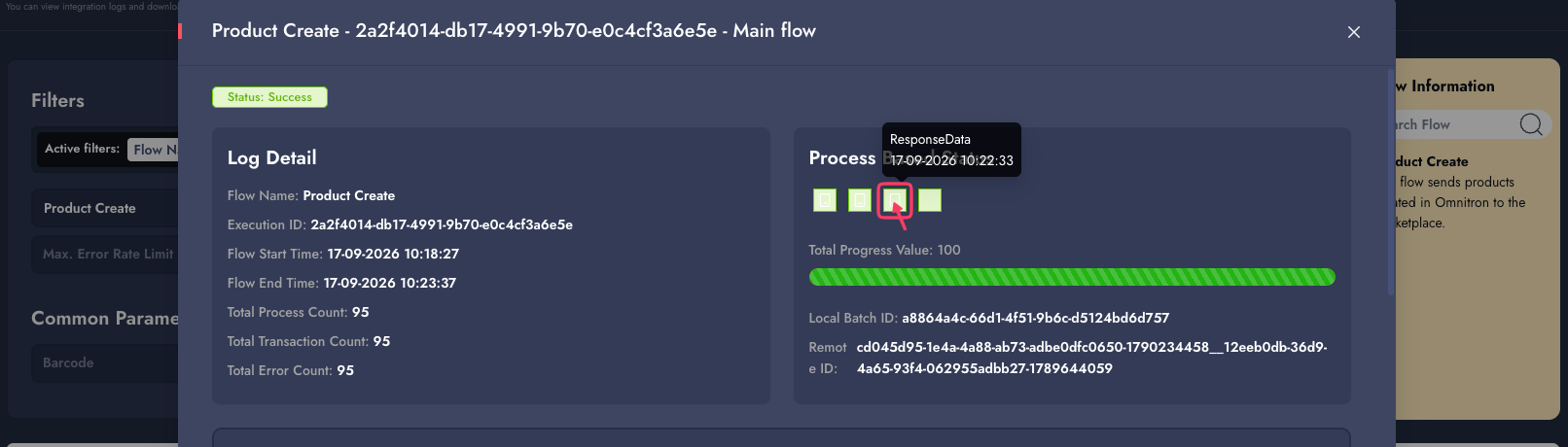
**Seeing "not found" as the error message?** This is a generic fallback message shown when Trendyol's result for that product could not be matched. If the product was actually rejected by Trendyol directly, click the **ResponseData** box on that log row to see Trendyol's raw response — it contains Trendyol's own error text, which shows the real reason the product was rejected (e.g. an invalid attribute value, a category mismatch, etc.).
{% endhint %}
## Error Codes and Explanations
| Code | Meaning |
| ------ | ------------------------------------------------------------------------------------------------------------------------------------------------------------------------------------------------------------------ |
| `2001` | Mapping information did not come from Omnitron — the product has not been mapped through the [Mapper](/tutorials/omnitron/sales-channels/sales-channel-settings/how-to-manage-marketplace-mapping-in-omnitron.md). |
| `2002` | Attribute configuration information did not come from Omnitron. |
| `2003` | Stock information did not come from Omnitron. |
| `2004` | Price information did not come from Omnitron. |
| `2005` | Category information did not come from Omnitron. |
| `2006` | A required attribute value cannot be empty. |
| `2007` | An error occurred while posting the product to Trendyol. |
| `2008` | The product was sent to Trendyol but came back with a failed result. |
| `2009` | The product did not come back with a result from Trendyol. |
| `2014` | An error occurred while fetching product data from Omnitron. |
| `2015` | An unexpected error occurred while preparing the data to be sent to Trendyol. |
| `2016` | An unexpected error occurred while checking the data returned from Trendyol. |
| `2017` | An error occurred while moving the product records into processing. |
| `2026` | The product has passed Trendyol's approval process and is waiting for marketplace approval — see [Approval Is Required for a Real Success](#approval-is-required-for-a-real-success) above. |
{% hint style="info" %}
Products that keep failing are retried according to the channel's **Failed Integration** settings. If a product stops being retried, it needs to be resent manually via the **Update by Uploading Files** option in the channel settings.
{% endhint %}
## Related Settings
* **Category Ids** and **Mapper** — determine which categories and attributes products can be mapped to.
* **`send_products_inserted`** feature flag — enables/disables the automatic 5-minute run of this process.
* **Failed Integration** settings — control how long and how often failed products are retried.
---
# Agent Instructions
This documentation is published with GitBook. GitBook is the documentation platform designed so that both humans and AI agents can read, navigate, and reason over technical content effectively. Learn more at gitbook.com.
## Querying This Documentation
If you need additional information that is not directly available in this page, you can query the documentation by asking a question.
Perform an HTTP GET request on the following URL with the `ask` and `goal` query parameters:
```
GET https://docs.akinon.com/tutorials/marketplace-dashboard/trendyol/product-insert.md?ask=&goal=
```
`ask` is the immediate question: it should be specific, self-contained, and written in natural language.
`goal` is what the user is ultimately trying to achieve, the reason they need the answer. Sharing it helps GitBook give you a better, more relevant answer. A goal is most helpful when it describes the outcome the user wants rather than restating the question. For example, with `ask=how do I create an API token`, a goal like `automate deployments from our CI pipeline` lets GitBook tailor the answer to that use case.
The response will contain a direct answer to the question and relevant excerpts and sources from the documentation.
Use this mechanism when the answer is not explicitly present in the current page, you need clarification or additional context, or you want to retrieve related documentation sections.