> For the complete documentation index, see [llms.txt](https://docs.akinon.com/llms.txt). Markdown versions of documentation pages are available by appending `.md` to page URLs; this page is available as [Markdown](https://docs.akinon.com/technical-guides/3rd-party-integration/promotion-integrations/zubizu-promotion-integration.md).
# ZUBİZU Promotion Integration
This document provides a comprehensive guide for integrating the **Zubizu Loyalty Promotion** with an Omnitron-based e-commerce architecture. It outlines the steps required to configure the Zubizu promotion gateway, define the necessary backend components, set up frontend interactions, and perform testing using dedicated tools and services.
## Implementation Checklist
* [x] **Define ZUBİZU Promotion Gateway in Omnitron**
* [x] **Create Non-Sellable Miscellaneous Product for Discount Handling**
* [x] **Define ExternalCampaignCode-Based Discount Code in Omnitron**
* [x] **Implement Custom Basket Logic for ZUBİZU Code via Frontend**
* [x] **Validate ZUBİZU Codes Using Retailer API for Testing**
## Configuring the Zubizu Promotion Gateway in Omnitron
#### **Navigating to Loyalty Integration Settings**
1. Log in to the **Omnitron**.
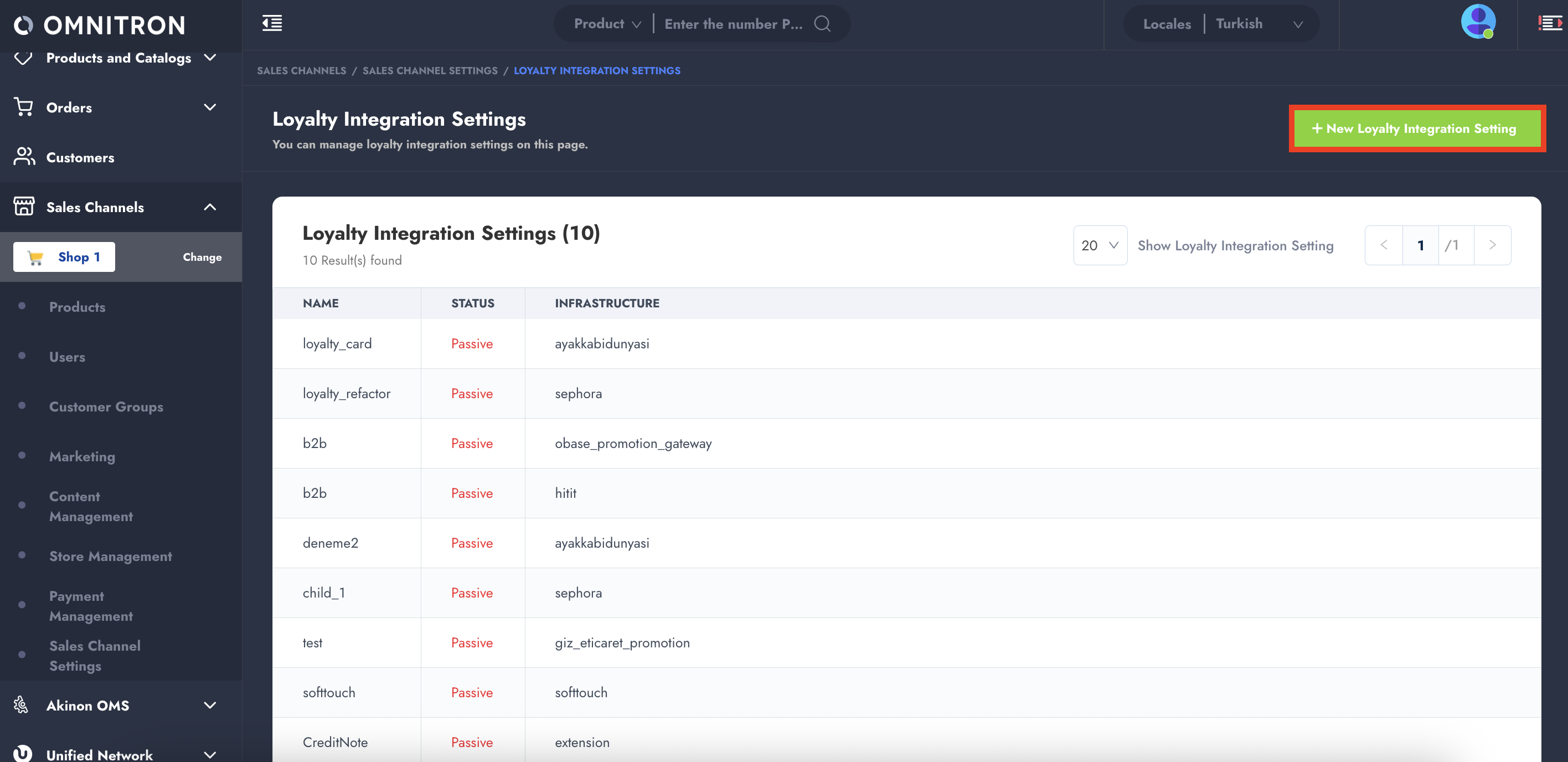
2. Navigate to: **Sales Channels → Sales Channel Settings → Loyalty Integration Settings**.
3. Click on the **“+ New Loyalty Integration Setting”** button located at the top-right corner.
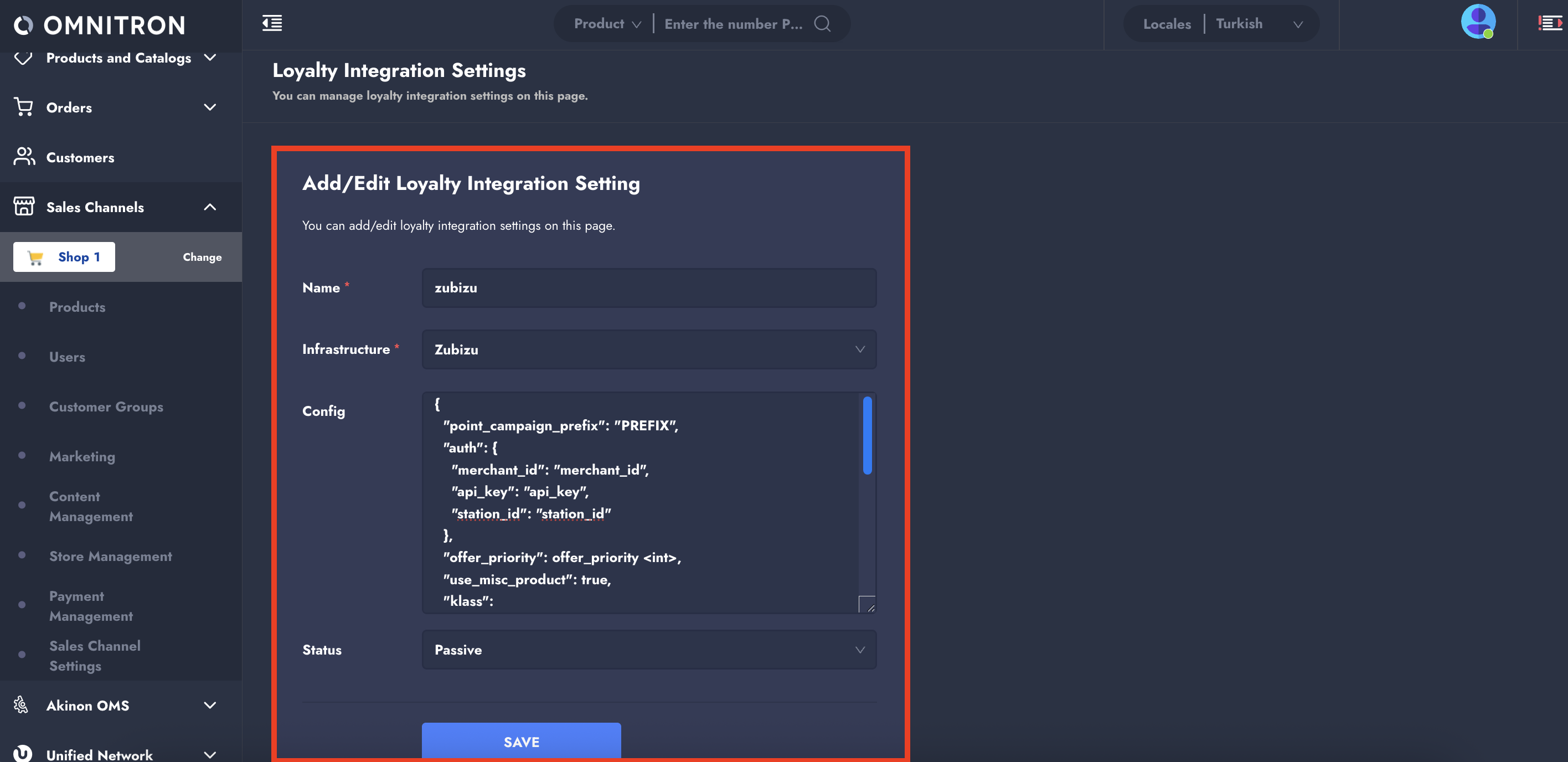
#### **Filling the Loyalty Integration Form**
Fill in the required fields as follows:
* **Name:** `zubizu` (this is case-sensitive)
* **Infrastructure:** Select `Zubizu`.
* **Status:** Initially set to `Passive`. It should only be activated after all integration flows have been tested end-to-end.
* **Integration Config:** Use the JSON configuration below:
```json
{
"point_campaign_prefix": "PREFIX",
"auth": {
"merchant_id": "your_merchant_id",
"api_key": "your_api_key",
"station_id": "your_station_id"
},
"offer_priority": 100,
"use_misc_product": true,
"klass": "omnishop.promotions.backend.zubizu.service.ZubizuProvider",
"urls": {
"offers_url": "https://api.zubizu.com/api/Retailer/GetCustomerByCode",
"cancel_url": "https://api.zubizu.com/api/Retailer/CancelByProduct",
"pay_url": "https://api.zubizu.com/api/Retailer/RegisterPaidCheck"
},
"read_timeout": 5,
"misc_product_sku": "ZUBIZU_MISCPROD_001"
}
```
{% hint style="warning" %}
You must acquire the `merchant_id`, `api_key`, and `station_id` values directly from ZUBİZU. These credentials are required for authenticating all API calls to ZUBİZU's external services.
{% endhint %}
## Creating the Miscellaneous Product in Omnitron
The ZUBİZU integration requires the creation of a **non-sellable product** ([miscellaneous product](/technical-guides/omnitron/product-types.md#id-41-miscellaneous-product)) that will be added to the basket programmatically when a ZUBİZU code is applied.
#### **Product Creation**
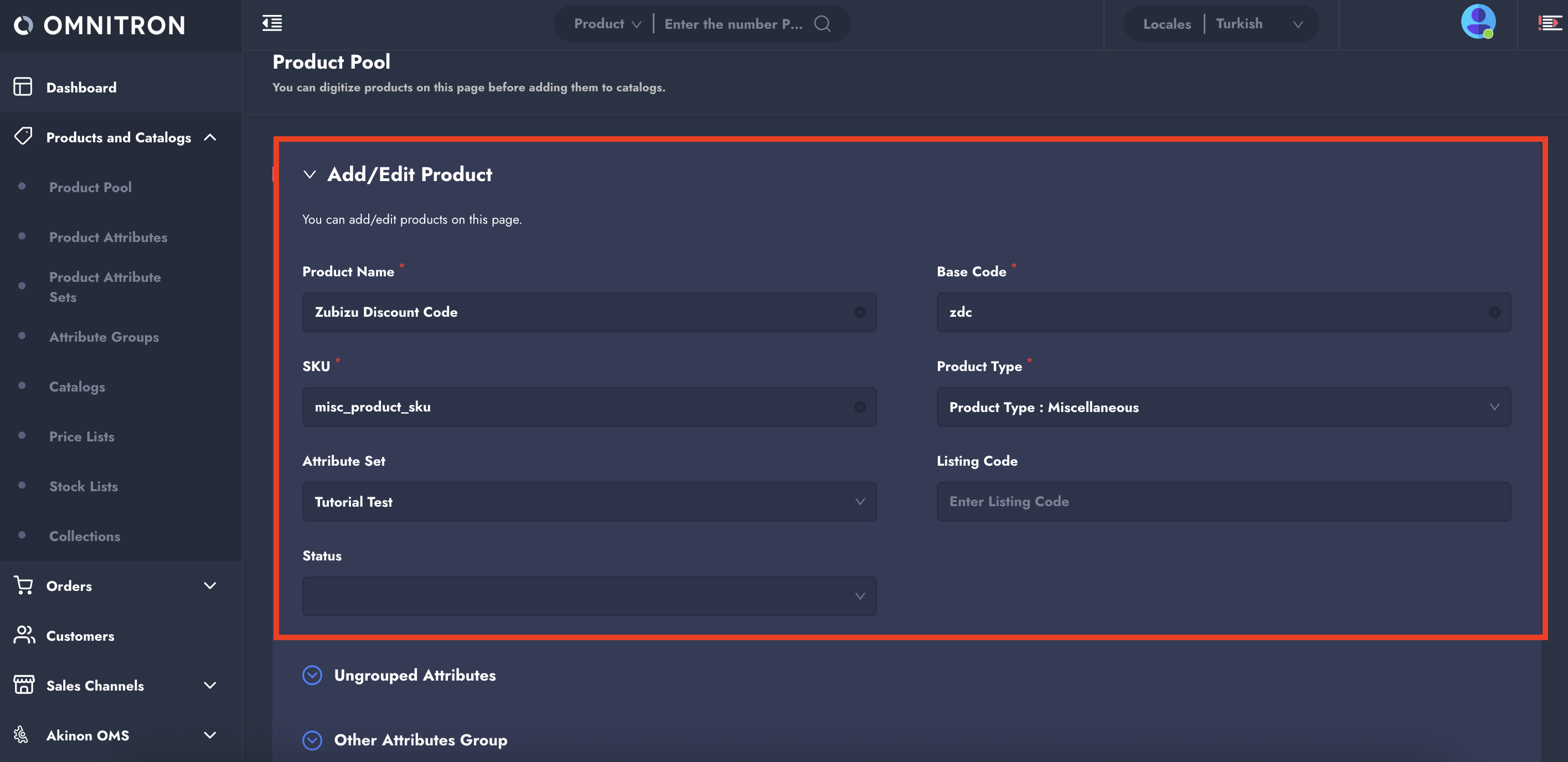
1. Navigate to: **Products & Catalogs → Product Pool**
2. Click on **"+ Add New Product"**.
3. Create a product with the following key characteristics:
* **SKU:** Must exactly match the value defined in the `misc_product_sku` field of the ZUBİZU promotion config.
* **Attribute Set:** You may either define a custom attribute set for this product or reuse an existing one.
Once the product is created, you must assign **price and stock list** manually via Omnitron or through the ERP system:
* **Price:** Must be set to `0` (free item)
* **Stock:** Should be a high value, e.g., `999999`, since one unit will be added to the basket each time a valid ZUBİZU code is used.
#### **Assigning to Catalog and Category**
Although this product is not meant to be visible to customers, it must still be assigned to:
* At least one **catalog**, and
* A valid **category tree**, so it can be exported and synced to the storefront.
{% hint style="warning" %}
The product will **not appear in any listing or search pages**, due to its "not sellable" status. However, it will be accessible via its direct URL:
`{{shop_url}}/misc-product/{sku}`
{% endhint %}
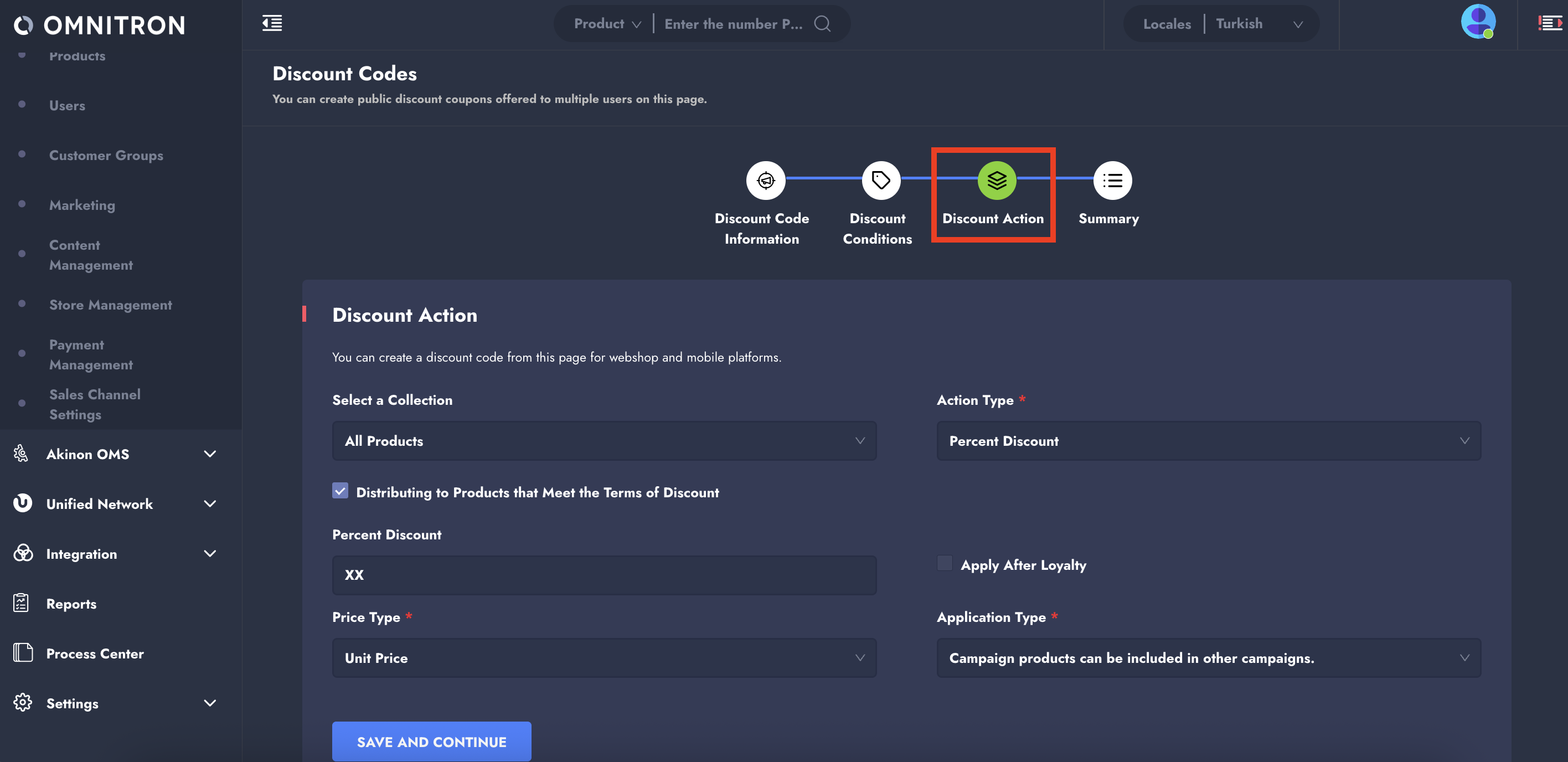
## **Defining a Discount Code for ZUBİZU**
ZUBİZU campaigns are mapped via discount codes in Omnitron. These must match the `ExternalCampaignCode` values provided by ZUBİZU.
#### **Creating the Discount Code**
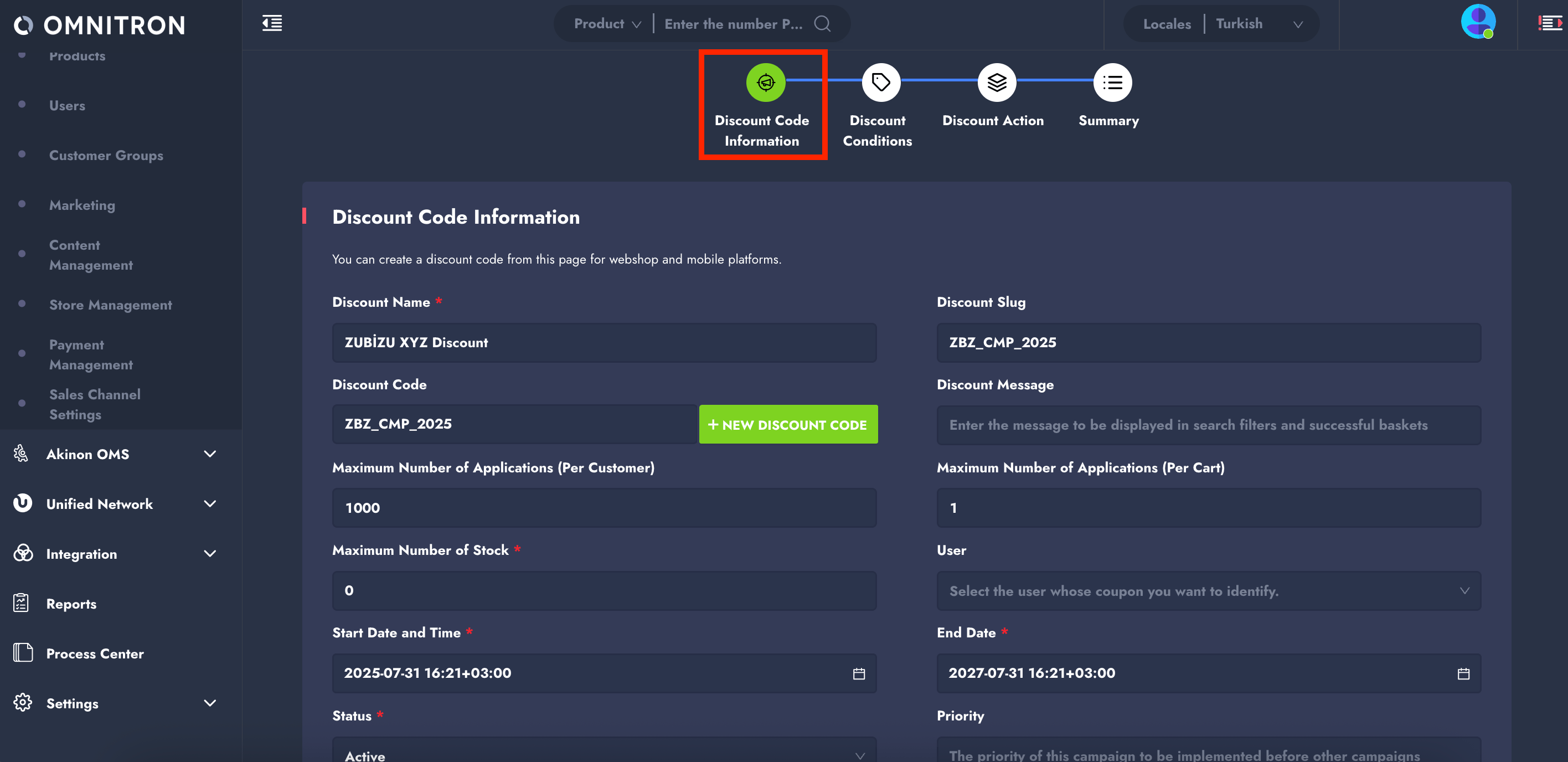
1. Go to: **Sales Channels → Marketing → Discount Codes**
2. Click **“+ New Discount Code”**.
3. In the new discount code creation screen:
* Set both the **Discount Code** and **Slug** to the `ExternalCampaignCode` provided by ZUBİZU (e.g., `ZBZ_CMP_2025`).
* The **Action Type** must be set to `Percent Discount`.
* Configure other campaign parameters based on your business use case.
## **Frontend Integration**
ZUBİZU discount codes must **not** be processed using the standard discount code input flow. Instead, the integration relies on adding a predefined **miscellaneous product** to the basket, along with the ZUBİZU-specific code provided to the customer.
This process involves using the **primary key (PK)** of the miscellaneous product and sending the ZUBİZU code as part of the product attributes in the basket request payload.
#### **Adding the Misc Product with ZUBİZU Code**
To apply a ZUBİZU discount, the frontend should issue a **POST** request to the basket service with the following structure:
**Request URL:** `POST` `{{shop_url}}/baskets/basket/`
**Request Payload Example:**
```json
{
"product": "6",
"quantity": 1,
"attributes": {
"zubizu_type": "code",
"zubizu_code": "5312168442"
}
}
```
* `product`: PK of the miscellaneous product. In this example, it's `6`.
* `zubizu_code`: The discount code provided by ZUBİZU, which is unique per user.
* `zubizu_type`: Always set to `"code"`.
#### **Handling the Response**
Upon sending the POST request, evaluate the response:
* **HTTP 200 (OK):** The code is valid, the miscellaneous product has been added to the basket, and the discount has been successfully applied.
* **HTTP 400 (Bad Request):** The ZUBİZU code is invalid, expired, or previously used. In this case, the frontend should remove the product from the basket by setting its quantity to `0`.
#### **Removing the ZUBİZU Product**
Whether due to an invalid code or the user opting to remove the discount, the miscellaneous product can be removed from the basket using a **PUT** request:
**Request URL:** `PUT` `{{shop_url}}/baskets/basket/`
**Request Payload Example:**
```json
{
"product": "6",
"quantity": 0,
"attributes": {
"zubizu_type": "code",
"zubizu_code": "5312168442"
}
}
```
* This request clears the product from the basket and effectively cancels the applied ZUBİZU promotion.
* The same PUT request should also be triggered if a user changes their mind and decides not to use the ZUBİZU discount.
## **Testing with Helper Services**
ZUBİZU codes have a limited validity and **cannot be reused once validated**. To test the integration smoothly, request ZUBİZU to provide a **persistent test code** that can be queried multiple times.
To verify the **validity of a** ZUBİZU **code** and obtain the `ExternalCampaignCode`, you may use the following API:
#### **Validation Request Example:**
```bash
curl --location 'https://api.zubizu.com/api/Retailer/GetCustomerByCode?Code=' \
--header 'APIKey: ' \
--header 'MerchantId: ' \
--header 'StationId: ' \
--header 'Content-Type: application/json'
```
---
# Agent Instructions
This documentation is published with GitBook. GitBook is the documentation platform designed so that both humans and AI agents can read, navigate, and reason over technical content effectively. Learn more at gitbook.com.
## Querying This Documentation
If you need additional information that is not directly available in this page, you can query the documentation by asking a question.
Perform an HTTP GET request on the following URL with the `ask` and `goal` query parameters:
```
GET https://docs.akinon.com/technical-guides/3rd-party-integration/promotion-integrations/zubizu-promotion-integration.md?ask=&goal=
```
`ask` is the immediate question: it should be specific, self-contained, and written in natural language.
`goal` is what the user is ultimately trying to achieve, the reason they need the answer. Sharing it helps GitBook give you a better, more relevant answer. A goal is most helpful when it describes the outcome the user wants rather than restating the question. For example, with `ask=how do I create an API token`, a goal like `automate deployments from our CI pipeline` lets GitBook tailor the answer to that use case.
The response will contain a direct answer to the question and relevant excerpts and sources from the documentation.
Use this mechanism when the answer is not explicitly present in the current page, you need clarification or additional context, or you want to retrieve related documentation sections.